Advances in AI have opened up the possibilities for greater personalisation in the fashion world. Exploring this intersection between technology and high fashion, we’re …
Advances in AI have opened up the possibilities for greater personalisation in the fashion world. Exploring this intersection between technology and high fashion, we’re …
Posted by Matthew Forsythe Director - Product Management, Android App Safety
We recently announced new developer verification requirements, which serve as an additional layer of defense in our ongoing effort to keep Android users safe. We know that security works best when it accounts for the diverse ways people use our tools. This is why we announced this change early: to gather input and ensure our solutions are balanced. We appreciate the community's engagement and have heard the early feedback – specifically from students and hobbyists who need an accessible path to learn, and from power users who are more comfortable with security risks. We are making changes to address the needs of both groups.
To understand how these updates fit into our broader mission, it is important to first look at the specific threats we are tackling.
Why verification is important
Keeping users safe on Android is our top priority. Combating scams and digital fraud is not new for us — it has been a central focus of our work for years. From Scam Detection in Google Messages to Google Play Protect and real-time alerts for scam calls, we have consistently acted to keep our ecosystem safe.
However, online scams and malware campaigns are becoming more aggressive. At the global scale of Android, this translates to real harm for people around the world – especially in rapidly digitizing regions where many are coming online for the first time. Technical safeguards are critical, but they cannot solve for every scenario where a user is manipulated. Scammers use high-pressure social engineering tactics to trick users into bypassing the very warnings designed to protect them.
For example, a common attack we track in Southeast Asia illustrates this threat clearly. A scammer calls a victim claiming their bank account is compromised and uses fear and urgency to direct them to sideload a "verification app" to secure their funds, often coaching them to ignore standard security warnings. Once installed, this app — actually malware — intercepts the victim's notifications. When the user logs into their real banking app, the malware captures their two-factor authentication codes, giving the scammer everything they need to drain the account.
While we have advanced safeguards and protections to detect and take down bad apps, without verification, bad actors can spin up new harmful apps instantly. It becomes an endless game of whack-a-mole. Verification changes the math by forcing them to use a real identity to distribute malware, making attacks significantly harder and more costly to scale. We have already seen how effective this is on Google Play, and we are now applying those lessons to the broader Android ecosystem to ensure there is a real, accountable identity behind the software you install.
Supporting students and hobbyists
We heard from developers who were concerned about the barrier to entry when building apps intended only for a small group, like family or friends. We are using your input to shape a dedicated account type for students and hobbyists. This will allow you to distribute your creations to a limited number of devices without going through the full verification requirements.
Empowering experienced users
While security is crucial, we’ve also heard from developers and power users who have a higher risk tolerance and want the ability to download unverified apps.
Based on this feedback and our ongoing conversations with the community, we are building a new advanced flow that allows experienced users to accept the risks of installing software that isn't verified. We are designing this flow specifically to resist coercion, ensuring that users aren't tricked into bypassing these safety checks while under pressure from a scammer. It will also include clear warnings to ensure users fully understand the risks involved, but ultimately, it puts the choice in their hands. We are gathering early feedback on the design of this feature now and will share more details in the coming months.
Getting started with early access
Today, we’re excited to start inviting developers to the early access for developer verification in Android Developer Console for developers that distribute exclusively outside of Play, and will share invites to the Play Console experience soon for Play developers. We are looking forward to your questions and feedback on streamlining the experience for all developers.
Watch our video below for a walkthrough of the new Android Developer Console experience and see our guides for more details and FAQs.
We are committed to working with you to keep the ecosystem safe while getting this right.
We’re expanding the capabilities of our Google Voice Starter plan by adding two highly requested features already available in Voice Standard and Voice Premier plans today:
Desk phone and analog telephone adapter (ATA) support: Organizations using Google Voice Starter can now provision and manage compatible desk phones and adapters. This provides more flexibility, allowing users to make and receive calls on traditional desk hardware if they prefer.
On-demand call recording: End users can now easily record important calls for future reference, training, or compliance. An intuitive record button will be available in the Google Voice interface during active calls.
These features make the Google Voice Starter plan a more complete solution for organizations that need core telephony features combined with the flexibility of Google Workspace.
Call recording: This feature will be ON by default for Voice Starter add-on subscriptions. It can be disabled at the organizational unit (OU) or group level. Note there is no admin control for Voice Starter standalone subscriptions (with a personal @gmail.com account).
End users:
Desk phone support: Once enabled by your admin, you can add a new desk phone in your Google Voice settings.
Call recording: If enabled for your account, you will see a “Record” button during your calls.
Rollout pace
Rapid Release and Scheduled Release domains: Gradual rollout (up to 15 days for feature visibility) starting November 12, 2025
Availability
Available for Google Voice Starter, Standard, and Premier
Hi everyone! We've just released Chrome Beta 143 (143.0.7499.24) for Android. It's now available on Google Play.
You can see a partial list of the changes in the Git log. For details on new features, check out the Chromium blog, and for details on web platform updates, check here.
If you find a new issue, please let us know by filing a bug.
The Beta channel has been updated to 143.0.7499.25 for Windows, Mac and Linux.
A partial list of changes is available in the Git log. Interested in switching release channels? Find out how. If you find a new issue, please let us know by filing a bug. The community help forum is also a great place to reach out for help or learn about common issues.
People all over the world already turn to Google Images for visual discovery, whether you're planning a trip, sprucing up your apartment or deciding what to wear to a ho…
We're making it easier than ever to analyze massive datasets by more seamlessly connecting Google Sheets and BigQuery. Now, users will see a new option to import .csv files containing datasets of any size directly to BigQuery while opening large .csv files from Drive or via the Data > Data Connectors menu flow in Sheets. From there, users can analyze the entire dataset using familiar Sheets features such as charts, pivot tables, and formulas via Connected Sheets.
Previously, preparing a large dataset for analysis in Connected Sheets was often a multi-step process that could have involved relying on separate data pipelines, processing tools or multiple upload steps, all before the user could return to Sheets to start their analysis. This new connectivity expedites the analysis workflow by allowing users to directly ingest large datasets and begin analysis seamlessly, all within a single interface. This update will help users move from raw data to insights much faster.
Part of the upload dialog when users choose to import a file to BigQuery via the Google Sheets interface
Users with appropriate permissions will also see a new option to import with Connected Sheets when a file is too large for native upload to Sheets
Getting started
Admins: This feature will only be available to users who have been granted permissions to write to BigQuery tables. Visit the Help Center to learn more about using Connected Sheets in your organization.
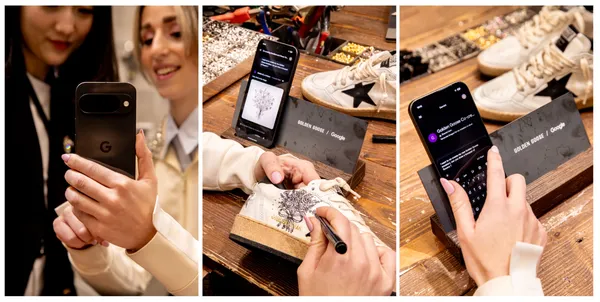 Advances in AI have opened up the possibilities for greater personalisation in the fashion world. Exploring this intersection between technology and high fashion, we’re …


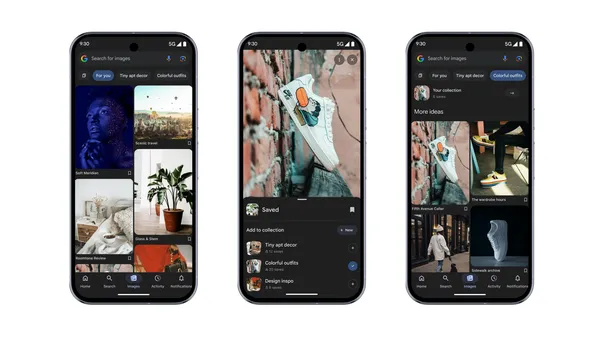 People all over the world already turn to Google Images for visual discovery, whether you're planning a trip, sprucing up your apartment or deciding what to wear to a ho…
 Here’s how Gemini Live can help you have a more natural conversation with new updates.

