We all make mistakes. But big mistakes can cause big headaches! Suppose you're writing a utility to update production data for a launch. Before making changes to production data, you want to perform a dry run to validate the expected changes. In your excitement, you forget to include the--dry_run flag in your command:
$ /scripts/credit_accounts --amount=USD10 # Oops, I forgot to include --dry_run
You realize your mistake too late. Safe flag defaults can prevent a simple mistake from turning into a major outage:
Flag has unsafe default:
cliArgs.addBoolFlag(name="dry_run", default=False, help="If set, print change summary, but do NOT change data.")
Flag has safe default:
cliArgs.addBoolFlag(name="dry_run", default=True, help="If set, print change summary, but do NOT change data.")
Safety depends on context: When defining flags,choose the default that minimizes the cost of potential mistakes. This might involve defaulting to a "dry" run, asking for user confirmation before irreversible actions, requiring a confirmation flag on the command line, or other strategies. If you’re writing documentation that contains commands, always set values to minimize the damage if run blindly:
Flag in documentation has unsafe default:
## How to commit changes
Use this command to commit changes. Use --dry_run to test and compute and report changes.
Similarly, consider requiring that environment-specific flags (e.g., backend addresses and output folders) be explicitly set. In this situation, unspecified environment flags will crash your program, instead of potentially mixing configuration across environments.
Android Studio Panda 2 is now stable and ready for you to use in production. This release brings new agentic capabilities to Android Studio, enabling the agent to create an entire working application from scratch with the AI-powered New Project flow, and allowing the agent to automate the manual work of dependency updates.
Whether you're building your first prototype or maintaining a large, established codebase, these updates bring new efficiency to your workflow by enabling Gemini in Android Studio to help more than ever.
Here’s a deep dive into what’s new:
Create New Projects with AI
Say goodbye to boilerplate starter templates that just get you to the start line. With the AI-powered New Project flow, you can now build a working app prototype with just a single prompt.
The agent reduces the time you spend setting up dependencies, writing boilerplate code, and creating basic navigation, allowing you to focus on the creative aspects of app development. The AI-powered New Project flow allows you to describe exactly what you want to build - you can even upload images for style inspiration. The agent then creates a detailed project plan for your review.
When you're ready, the agent turns your plan into a first draft of your app using Android best practices, including Kotlin, Compose, and the latest stable libraries. Under your direction, it creates an autonomous generation loop: it generates the necessary code, builds the project, analyzes any build errors, and attempts to self-correct the code, looping until your project builds successfully. It then deploys your app to an Android Emulator and walks through each screen, verifying that the implementation works correctly and is true to your original request. Whether you need a simple single-screen layout, a multi-page app with navigation, or even an application integrated with Gemini APIs, the AI-powered New Project flow can handle it.
Getting Started
To use the agent to set up a project, do the following:
Start Android Studio.
Select New Project on the Welcome to Android Studio screen (or File > New > New Project from within a project)
Select Create with AI.
Type your prompt into the text entry field and click Next. For best results we recommend using a paid Gemini API key or third-party remote model.
Create a New Project with AI in Android Studio
5. Name your app and click Finish to start the generation process.
6. Validate the finished app using the project plan and by running your app in the Android Emulator or on an Android device.
We want to hear from you and see the apps you’re able to build using the New Project flow. Share your apps with us by using #AndroidStudio in your social posts. We’ll be amplifying some of your submissions on our social channels.
Unlock more with your Gemini API key
While the agent works out-of-the-box using Android Studio's default no-cost model, providing your own Google AI Studio API key unlocks the full potential of the assistant. By connecting a paid Gemini API key, you get access to the fastest and latest models from Google. It also allows the New Project flow to access Nano Banana, our best model for image generation, in order to ideate on UI design — allowing the agent to create richer, higher fidelity application designs.
In the AI-powered New Project flow, this increased capability means larger context windows for more tailored generation, as well as superior code quality. Furthermore, because the Agent uses Nano Banana behind the scenes for enhanced design generation, your prototype doesn't just work well—it features visually appealing, modern UI layouts and looks professional from the get go.
Version Upgrade Assistant
Keeping your project dependencies up to date is time-consuming and often causes cascading build errors. You fix one issue by updating a dependency, only to introduce a new issue somewhere else.
The Version Upgrade Assistant in Android Studio just made that a problem of the past. You can now let AI do the heavy lifting of managing dependencies and boilerplate so you can focus on creating unique experiences for your users.
To use this feature, simply right-click in your version catalog, select AI, and then Update Dependencies.
Version Upgrade Assistant accessed from Version Catalog
You can also access the Version Upgrade Assistant from the Refactor menu—just choose Update all libraries with AI.
Version Upgrade Assistant accessed from the Refactor menu
The agent runs multiple automated rounds—attempting builds, reading error messages, and adjusting versions—until the build succeeds. Instead of manually fighting through dependency conflicts, you can let the agent handle the iterative process of finding a stable configuration for you. Read the documentation for more information on Version Upgrade Assistant.
Gemini 3.1 Pro is available in Android Studio
We released Gemini 3.1 Pro preview, and it is even better than Gemini 3 Pro for reasoning and intelligence. You can access it in Android Studio by plugging in your Gemini API key. Put the new model to work on your toughest bugs, code completion, and UI logic. Let us know what you think of the new model.
Gemini 3.1 Pro Now Available in Android Studio
Get started
Dive in and accelerate your development. Download Android Studio Panda 2 Feature Drop and start exploring these powerful new agentic features today.
Choosing an internet service provider can feel like a lot. With today’s technology, speeds are reaching thousands of megabits per second, which is amazing—but what actually separates one provider from the rest? It almost always comes down to value—what you get for what you pay, and how well it supports your life online.
The problem is that internet service often comes with fine print that’s a headache to navigate. Hidden fees or unexpected rate hikes can turn your monthly bill into an unpleasant surprise. GFiber is here to change that. Our broadband labels include everything you need to know, with simple, easy-to-read explanations of exactly what you’re paying for. If you’re thinking about switching, here’s a quick guide on how to evaluate products based on performance, price, and long-term value.
Evaluating internet products? Here’s what to look for
Start by figuring out your home’s internet needs and your monthly budget. Think about how many people and devices are jumping on at once—streaming, gaming, video calls. The more the merrier, as long as your product provides symmetrical upload and download speeds with low latency, even during peak usage times for your house.
Next, check out the options in your area that hit your speed and budget goals. Reliable third-party reviewers like HighSpeedInternet.com and CNET are great resources for comparing competitors based on real customer surveys and network tests. At GFiber, we have a guided tool that asks a few basic questions to help you find your perfect product in just a few clicks based on some simple questions.
Once you’ve narrowed it down, dive into the details. This is where those broadband labels really help.
How to read broadband labels like a pro
The FCC requires that every internet service provider (ISP) display an internet “nutrition label” for their products when people are making buying decisions. These labels break down performance, including speeds, any fees, and clear pricing.
GFiber was an early adopter for these labels and one of the first providers to share publicly. We put every detail about our service in there, which is just one more reason you can be confident in the stability of our pricing, staying the same month to month. You can compare broadband labels across all our products right here.
If you’re looking at other ISPs, keep an eye on the fine print. Does that advertised price stay stable month after month, year after year, or is it an "exploding offer" that hikes up after some period of time? Always check the “Additional Charges and Terms” for infrastructure or equipment costs—your price should include the hardware it takes to make your internet work. And look closely at “Discounts & Bundles.” Many sign-up discounts vanish after a year and bundles can require you to buy things you don’t need, meaning your bill can get a lot bigger than you expect.
The GFiber transparent pricing guarantee
We believe you deserve to know exactly what you’re paying for—no exceptions. We offer three straightforward products—Core 1 Gig, Home 3 Gig, and Edge 8 Gig—each with reliable performance and simple pricing. Depending on where you live, there may be a local access fee required by the local municipality (typically under $4.50 a month). If that’s the case, you’ll see it clearly marked on your bill and all of that money goes directly to your city, town or county.
So what are the common shenanigans to watch out for with other providers? Look out for equipment rentals for routers or extenders, activation charges, data cap overages, and those vague “maintenance” fees. Others might offer flashy bundle deals, but look out for price hikes once the promo ends or penalties if you try to leave.
At GFiber, you don’t have to worry about the extra stuff. That means no hidden fees, no contracts, and no data caps. Just internet that works as hard as you do.
What makes GFiber different?
We provide internet you can actually rely on. Our products are designed for your lifestyle—whether you want effortless Core 1 Gig, our everyday essentials Home 3 Gig, or the no-limit experience of Edge 8 Gig, you’ll get the best value per megabit.
With transparent pricing, no hidden fees, and free professional installation, switching is easy. Check out our products and pricing here.
Google Meet Audit event logging for endpoints will now also include the permission type used to grant access to join a meeting.
For some endpoint types, additional information will be logged in addition to the join permission type:
For users who asked to join a meeting, the audit event will show which of the other meeting participants admitted them
For meeting room hardware devices that joined a client-side encrypted meeting, the audit event will show which user logged in to grant the room access through delegated authentication
Posted by Trevor Johns, Developer Relations Engineer
In January we announced Android Studio Otter 3 Feature Drop in stable, including Agent Mode enhancements and many other updates to provide more control and flexibility over using AI to help you build high quality Android apps. To help you get the most out of Gemini in Android Studio and all the new capabilities, we sat down with Google engineers and Google Developer Experts to gather their best practices for working with the latest features—including Agent mode and the New Project Assistant. Here are some useful insights to help you get the best out of your development:
Build apps from scratch with the New Project Assistant
The new Project Assistant—now available in the latest Canary builds—integrates Gemini with the Studio's New Project wizard. By simply providing prompts and (optionally) design mockups, you can generate entire applications from scratch, including scaffolding, architecture, and Jetpack Compose layouts.
Integrated with the Android Emulator, it can deploy your build and "walk through" the app, making sure it’s functioning correctly and that the rendered screens actually match your vision. Additionally, you can use Agent Mode to then continue to work on the app and iterate, leveraging Gemini to refine your app to fit your vision.
Also, while this feature works with the default (no-cost) model, we highly recommend using this feature with an AI Studio API Key to access the latest models — like Gemini 3.1 Pro or 3.0 Flash — which excel at agentic workflows. Additionally, adding your API Key allows the New Project Assistant to use Nano Banana behind the scenes to help with ideating on UI design, improving the visual fidelity of the generated application! - Trevor Johns, Developer Relations Engineer.
Dialog for setting up a new project.
2. Ask the Agent to refine your code by providing it with ‘intentional’ contexts
When using Gemini Agents, the quality of the output is directly tied to the boundaries you set. Don't just ask it to "fix this code"— be very intentional with the context that you provide it and be specific about what you want (and what you don't). Improve the output by providing recent blogs or docs so the model can make accurate suggestions based on these.
Ask the Agent to simplify complex logic, or if it see’s any fundamental problems with it, or even ask it to scan for security risks in areas where you feel uncertain. Being firm with your instructions—even telling the model "please do not invent things" in instances where you are using very new or experimental APIs—helps keep the AI focused on the outputs you are trying to achieve. - Alejandra Stamato, Android Google Developer Expert and Android Engineer at HubSpot.
3. Use documentation with Agent mode to provide context for new libraries
To prevent the model from hallucinating code for niche or brand-new libraries, leverage Android Studio’s Agent tools, tohave access to documentation: Search Android Docs and Fetch Android Docs. You can direct Gemini to search the Android Knowledge Base or specific documentation articles. The model can choose to use this if it thinks it’s missing some information, which is good especially when you use niche API’s, or one’s which aren’t as common.
If you are certain you want the model to consult the documentation and to make sure those tools are triggered, a good trick is to add something like ‘search the official documentation’ or ‘check the docs’ to your prompts. And for documentation on different libraries which aren’t Android specific, install a MCP Server that lets you access documentation like Context7 (or something similar). - Jose Alcérreca, Android Developer Relations Engineer, Google.
4. Use AI to help build Agents.md files for using custom frameworks, libraries and design systems
To make sure Agent uses custom frameworks, libraries and design systems you have two options 1) In settings, Android Studio allows you to specify rules to be followed when Gemini is performing these actions for you. Or 2) Create Agents.md files in your application and specify how things should be done or act as guidance for when AI is performing a task, specific frameworks, design systems, or specific ways of doing things (such as the exact architecture, things to do or what not to do), in a standard bullet point way to give AI clear instructions.
Manage AGENTS.md files as context.
You can also use Agents.md file at the root of the project, and can have them in different modules (or even subdirectories) of your project as well! The more context you have or the more guidance available when you’re working, that will be available for AI to access. If you get stuck creating these Agents.md files you can use AI to help build them, or give you foundations based on the projects you have and then edit them so you don’t have to start from scratch. - Joe Birch, Android Google Developer Expert and Staff Engineer at Buffer.
5. Offload the tedious tasks to Agent and save yourself time
You can get Gemini in Android Studio agent to help you make tasks such as writing and reviewing faster. For example it can help writing commit messages, giving you a good summary which you can then review and save yourself time. Additionally, get it to write tests; under your direction the Agent can look at the other tests in your project and write a good test for you to run following best practices just by looking at them. Another good example of a tedious task is writing a new parser for a certain JSON format. Just give Gemini a few examples and it will get you started very quickly. - Diego Perez, Android Software Engineer, Google
6. Control what you are sharing with AI using simple opt-outs or commands, alongside paid models.
If you want to control what is shared with AI whilst on the no-cost plans, you can opt out some or all your code from model training by adding an AI exclusions file (‘.aiexclude’) to your project. This file uses glob pattern matching similar to a .gitignore file, specifying sensitive directories or files that should be hidden from the AI. You can place .aiexclude files anywhere within the project and its VCS roots to control which files AI features are allowed to access.
An example of an `.aiexclude` file in Android Studio.
Alternatively, in Android Studio settings, you can also opt out of context sharing either on a per project or per user basis (although this method limits the functionality of a number of features because the AI won’t see your code).
Remember, paid plans never use your code for model training. This includes both users using an AI Studio API Key, and businesses who are subscribed to Gemini Code Assist. - Trevor Johns, Developer Relations Engineer.
Hear more from the Android team and Google Developer Experts about Gemini in Android Studio in our recent fireside chat and download Android Studio to get started.
At the Android Avenue, attendees of MWC Barcelona can experience the latest AI features through hands-on demos on the newest devices and prototype glasses.
We are adding two new functions to Google Sheets, =SHEET and =SHEETS. These additions help users manage and reference spreadsheets with multiple tabs more effectively. | Learn more about two new functions in Google Sheets.
New internal and external membership classifications for Google Groups
On Chrome on your computer, you can now save PDFs directly to Drive without leaving the page, and easily get back to them later in the “Saved from Chrome” folder. | Learn more about saving PDFs to your Google Drive.
Get quantitative insights from text responses with Gemini in Google Forms
Last year, we announced proactive Gemini-generated insights in Forms for short answer and paragraph questions helping form creators summarize responses to longer questions and quickly understand sentiment and feedback. | Learn more about quantitative insights from text responses with Gemini in Google Forms.
New cartoon avatars in Google Vids
AI avatars in Google Vids provide a fast, cost-effective way to generate high-quality digital speakers. While photorealistic avatars are ideal for formal business, we are introducing new 2D and 3D cartoon-styled avatars that utilize expressive, stylized features.| Learn more about new cartoon avatars in Google Vids.
AI avatars and AI voiceovers in Google Vids now available in seven new languages
Google Vids is thrilled to announce that AI avatars and voiceovers now support more than just English. Users can now provide input in seven additional languages: French, German, Italian, Korean, Portuguese, Spanish, and Japanese. | Learn more about AI avatars and AI voiceovers in Google Vids, available in seven new languages.
Sending larger attachments in Gmail: New 50MB limits for Enterprise Plus customers
We are introducing a significant enhancement to Gmail’s storage and delivery capabilities for Enterprise Plus customers. To support seamless collaboration and high-fidelity file sharing, we are increasing the file size limits for both sending and receiving emails. | Learn more about the new limits for Enterprise Plus customers in Gmail.
Google Chat now available as a data source in Gemini app
We’re excited to announce that Google Chat is now available as a data source in the Gemini app for Workspace customers, joining Gmail, Google Drive, and other Workspace apps. | Learn more about Google Chat as a data source in Gemini app.
Expanded duration limits in Google Vids
We are increasing the duration limits for Google Vids projects, recordings and imported media clips, giving you more flexibility to create comprehensive video content. | Learn more about expanded duration limits in Google Vids.
Introducing a new video player experience in Google Drive on iOS devices
Last year, we announced a smoother, more modern video player in the Google Drive Android app. This updated look and feel is now available when watching Drive videos on your iOS devices. | Learn more about the video player experience in Google Drive on iOS devices.
Gemini conversation history is coming to the side panel in Google Workspace
Conversation history is coming to the Gemini side panel in Google Workspace apps. This feature will enable users to resume their conversations with Gemini across sessions. | Learn more about Gemini conversation history in the side panel.
Introducing Nano Banana 2 in the Gemini app
Starting today, we’re rolling out Nano Banana 2 (Gemini 3.1 Flash Image), our best image model yet, to Workspace customers in the Gemini app. | Learn more about Nano Banana 2 in the Gemini app.
The announcements above were published on the Workspace Updates blog over the last week. Please refer to the original blog posts for complete details.
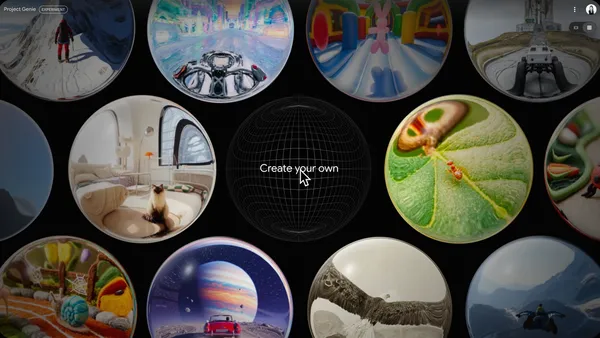 Learn more about Google DeepMind’s Project Genie and how to write prompts to create your own worlds.
 Gemini 3.1 Flash-Lite is our fastest and most cost-efficient Gemini 3 series model yet.


.jpg)
 VRC Non-Skip ads are now generally available globally in Google Ads and Display & Video 360.


 At the Android Avenue, attendees of MWC Barcelona can experience the latest AI features through hands-on demos on the newest devices and prototype glasses.