

Today, the Jetpack Compose August ‘26 release is stable! This release brings version 1.12 across core Compose modules (see the full BOM mapping), introducing rich visual APIs like Mesh Gradients and Wide Color Gamut (WCG) support, structural layout features like named areas in Grid, seamless integration with Android’s Credential Manager, and significant testing and performance improvements.
To update your project to today’s release, upgrade your Compose BOM version to 2026.08.00:
implementation(platform("androidx.compose:compose-bom:2026.08.00"))Breaking Changes
AGP & Compile SDK: Compose 1.12 updates compileSdk to API 37, requiring a minimum AGP 9.2.0. As a reminder, Compose will always target the latest compileSdk. Learn more about this change here.
Modifier.onFirstVisible() is deprecated: Migrate to Modifier.onVisibilityChanged(), which provides more precise visibility threshold tracking.
Graphics
Mesh Gradients
Compose 1.12 introduces MeshGradientPainter to help you create multi-point, organic color gradients.

val rows = 1
val columns = 1

val gradientPainter = remember {
    MeshGradientPainter(rows, columns) {
        // Parameters: row, column, position, color
        setVertex(0, 0, Offset(0f, 0f), Color.Red)     // Top-Left
        setVertex(0, 1, Offset(1f, 0f), Color.Blue)    // Top-Right
        setVertex(1, 0, Offset(0f, 1f), Color.Green)   // Bottom-Left
        setVertex(1, 1, Offset(1f, 1f), Color.Yellow)  // Bottom-Right
    }
}

Box(
    modifier = modifier
        .aspectRatio(16/9f)
        .fillMaxWidth()
        .paint(gradientPainter)
)
For more information and examples, see the documentation.
Wide Color Gamut & HDR Support
Modern displays offer extended color fidelity and higher dynamic range. In Compose 1.12, full pipeline support for Wide Color Gamut (P3) and HDR rendering has been enabled across Compose graphics, paint, and shaders. Colors defined in non-sRGB color spaces (such as Display P3) are preserved through to platform rendering without color clamping. Colors will safely fall back to sRGB if they use an unsupported color space (e.g. CieXyz, CieLab, or Oklab), rely on a color space on an unsupported Android version (e.g Bt2020Hlg on Android 13 and below), or if the app is running on Android 9 (API 28) and below.
Other notable changes:
LayerOutsetswas added toGraphicsLayer&Modifier.graphicsLayer, which you can use to increase the visual bounds of the layer beyond its measured size. ApplyLayerOutsetsto avoid the implicitclipToBoundsbehavior when the layer is promoted to an offscreen buffer.
Styles
At Google I/O, we shared our early vision for the Compose Styles API—a unified, performant way to style components. Since then, we have continued building the underlying architecture to guarantee strict type safety and predictable correctness, and to support building custom design systems.
To ensure we get this foundational layer correct, the API will remain experimental, and you can expect breaking changes.
Runtime Optimizations
Keyed SideEffect Overload
SideEffect now supports key arguments, which lets you fire one-shot side effects whenever specific keys change. This can lead to better performance compared to using a LaunchedEffect or DisposableEffect when you don’t need the coroutine or dispose block. SideEffect is up to 90% faster than LaunchedEffect and around 20% faster than DisposableEffect. Note that SideEffect runs its effect before DisposableEffect and LaunchedEffect, so use caution if migrating existing effects to this API, especially for LaunchedEffects that rely on being dispatched to start after the current frame is completed.
@Composable
fun AnalyticsTracker(userId: String, screenName: String) {
    SideEffect(key1 = userId, key2 = screenName) {
        analytics.logScreenView(userId, screenName)
    }
}
Animation
DeferredTargetAnimation has graduated out of experimental status.
Interactive Two-Stage Transitions
New composables: DeferredAnimatedContent and DeferredAnimatedVisibility allow creating delightful two-stage transitions, e.g. for predictive back gesture tracking.
Manual animation control: During a transition's deferred phase, animated properties (like scale or offset) can now be manually manipulated in real-time (e.g., tracking a swipe gesture).
Seamless handoff: Once the deferred phase ends, the transition engine takes over and performs a seamless handoff, including velocity transfer, to the automatic transition.
Shared element support: A new permitTransformDuringDeferredTransition flag in SharedContentConfig controls whether shared elements visually transform along with their parent containers during the deferred transition phase.
val state = remember { DeferredTransitionState(initialScreen) }
val transition = rememberDeferredTransition(state)

if (predictiveBackInProgress) {
    state.defer(targetScreen)
} else {
    state.animateTo(targetScreen)
}

transition.DeferredAnimatedContent(
    targetState = targetScreen,
    mutableTransformSpec = {
       MutableContentTransform {
           // Manually manipulate properties during the deferred phase
           initialContentTransform { scale = swipeProgress }
       }
    }
) { screen ->
    ScreenContent(screen)
}
Below are two demos of use cases where a gesture-driven animation is handed off to a triggered animation:

Text, Input & Platform Integrations
Editable Text Formatting
New APIs offer rich-text formatting for editable text in BasicTextField. You can now programmatically apply and manipulate inline character and paragraph formatting using SpanStyle and ParagraphStyle via the new addStyle() method inside a TextFieldBuffer scope (such as inside textFieldState.edit { ... } or an InputTransformation). Additionally, TextFieldBuffer provides getSpanStyles() and getParagraphStyles() APIs that return TrackedRange objects, allowing you to read, update, or remove applied styles. To complement formatting creation, TextFieldState now exposes a read-only textStyles property for querying active styles across ranges, while TextFieldBuffer provides originalTextStyles to inspect formatting state prior to an edit. Text formatting and custom annotations are persisted across configuration changes.
val state = rememberTextFieldState("Formatted text in Compose 1.12")

// Apply bold and color styles to a range of text
state.edit {
    addStyle(
        SpanStyle(fontWeight = FontWeight.Bold, color = Color.Blue),
        start = 0,
        end = 9
    )
}

// Query active styles from TextFieldState
val currentStyles = state.textStyles
Text Selection
A new SelectionState API provides programmatic control and observability over text selection within a SelectionContainer. Hoisting a SelectionState object via rememberSelectionState() and passing into SelectionContainer exposes selectedTexts as a reactive list of AnnotatedStrings and provides methods like selectAll(), clear(), select(TextRange), and extendSelectionByWord().
Additionally, use getSelectableTexts() to retrieve all selectable text items in layout order and select text across composables in the SelectionContainer using a global range.
@Composable
fun ProgrammaticSelectionExample() {
    val selectionState = rememberSelectionState()

    Column {
        Button(
            onClick = { selectionState.selectAll() },
            modifier = Modifier.disableSelectionClearOnTap()
        ) {
            Text("Select All")
        }

        SelectionContainer(state = selectionState) {
            Text("Text content to be selected programmatically.")
        }
    }
}
Credential Manager Integration
Compose text fields now natively integrate with Android’s Credential Manager (API 34+) via the Autofill framework (below API 34 is handled by androidx.credentialslibrary). By attaching the new credentialRequest semantics property with CredentialRequestData, text inputs can prompt passkeys, saved credentials, or sign-in requests directly within the user input flow.
@Composable
fun LoginField(textFieldState: TextFieldState) {
    val credentialData = remember {
        CredentialRequestData(
            // Specify Credential Manager request options
        )
    }

    BasicTextField(
        state = textFieldState,
        modifier = Modifier.semantics {
            credentialRequest = credentialData
        }
    )
}
Other notable changes:
- Support for font variation settings in downloadable fonts.
- Enabled auto-scrolling when dragging text selection beyond the viewport in
SelectionContainer. - Added support for automatic interaction sounds (clicks and focus navigation) to Compose components, with a new
SoundEffectOnInteractioncomposable to allow opt-out. Note that as a consequence of this change, semantics click listeners must now be called from the main thread, which may affect a small number of test cases. KeyboardTypenow includesDate,Time,DateTime, andSignedDecimal.BasicSecureTextFieldnow usesTextObfuscationMode.Systemby default, whileRevealLastTypedserves as an absolute override.
Layout Enhancements
Named Areas in Grid Layout
Building complex 2D layouts is now easier with named areas in the @Experimental Grid component. Rather than managing numeric column and row indices across items, you can define semantic regions in your GridConfigurationScope and position composables by area name.
@OptIn(ExperimentalGridApi::class)
@Composable
fun DashboardLayout() {
    Grid(
        config = {
            area("header", row = 0, column = 0, rowSpan = 1, columnSpan = 2)
            area("sidebar", row = 1, column = 0)
            area("content", row = 1, column = 1)
            gap(16.dp)
        }
    ) {
        HeaderSection(modifier = Modifier.gridItem(areaId = "header"))
        NavigationSidebar(modifier = Modifier.gridItem(areaId = "sidebar"))
        MainContentView(modifier = Modifier.gridItem(areaId = "content"))
    }
}
Performance
As with every release, we continue to invest in Compose's performance to ensure that the framework helps you to build beautiful, performant apps. In this release we've focused on improving startup performance and are now seeing Time to Initial Display (the time it takes for an app to produce its first frame) that is comparable to Views in our benchmarks.

Testing & Tooling Upgrades
Test Synchronization
Compose 1.12 introduces new test APIs designed to reduce test execution times and eliminate flakiness during state sampling:
hasPendingWork: Passively checks if the UI has pending work without advancing the clock, which is ideal for manual animation loops.
runWithoutImplicitWait: Temporarily disables implicit synchronization when stepping through manual clock frames (e.g. animation tests).
@Test
fun testAnimationStateFast() {

composeTestRule.mainClock.autoAdvance = false

    while (composeTestRule.hasPendingWork()) {
        composeTestRule.mainClock.advanceTimeByFrame()
        composeTestRule.waitForIdle()

        composeTestRule.runOnUiThread {
            composeTestRule.runWithoutImplicitWait {
                // This is most effective when querying multiple nodes in a single frame.
                // It prevents the redundant synchronization overhead that would
                // otherwise occur on every individual query.
                val box1 = composeTestRule.onNodeWithTag("Box1").fetchSemanticsNode()
                val box2 = composeTestRule.onNodeWithTag("Box2").fetchSemanticsNode()

                assertThat(box1.boundsInRoot.right).isAtMost(box2.boundsInRoot.left)
            }
        }
    }
}
Other notable changes:
- The
captureToImageAPI now allows you to capture a popup or dialog together with its anchor in a single bitmap. - Added
onRootWithViewInteractionto scope Compose semantic searches to specific Android Views. This simplifies testing hybrid UIs, such as RecyclerViews, without requiring unique test tags in production code. @PreviewWrapperannotations can now be applied to custom@MultiPreviewclasses, enabling reusable preview setups (such as custom themes) across multiple components.
Happy Composing!
As always, we value your input, so please share your feedback on these changes or what you'd like to see next on our issue tracker. Happy composing!
 - Lindsey Volta, on behalf of the Campaign Manager 360 API Team
 Google is rolling out new Pixel accessories as part of Made by Google
 The new Pixel 11 lineup offers the best of Gemini Intelligence and brings our biggest camera upgrades in years.
 Pixel 11 Pro Fold is our latest foldable with a thinner and lighter design, a new main camera, and enhanced intelligence tools.
 The Pixel Watch 5 offers our most accurate GPS route tracking yet, helping you retrace where you went on runs, hikes, and bike rides.
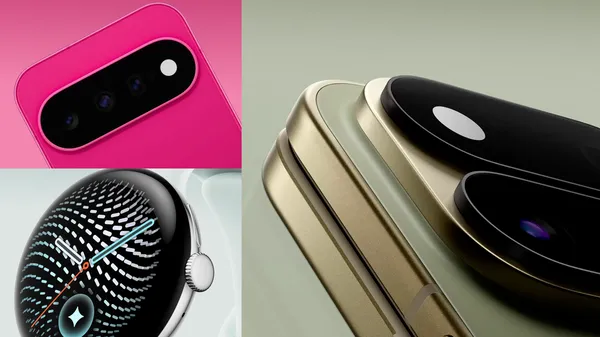 Here’s a first look at our new Pixel devices, including new Pixel 11 phones, Pixel Watch 5, and our first-ever Pixel Tag.
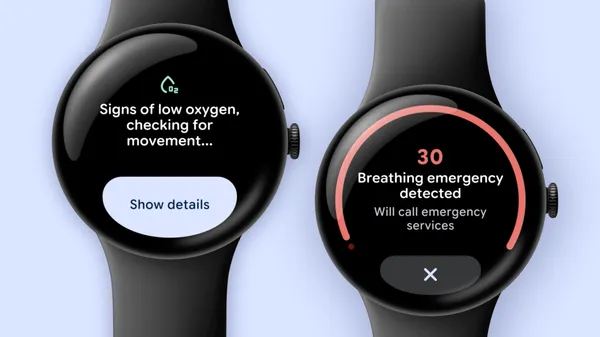 Breathing emergency detection calls emergency services when you stop breathing so you can get potentially life-saving care.
 Google Pixel Tag locates keys, wallets, and luggage via Bluetooth Channel Sounding and Find Hub. Check specs, price, and compatibility.
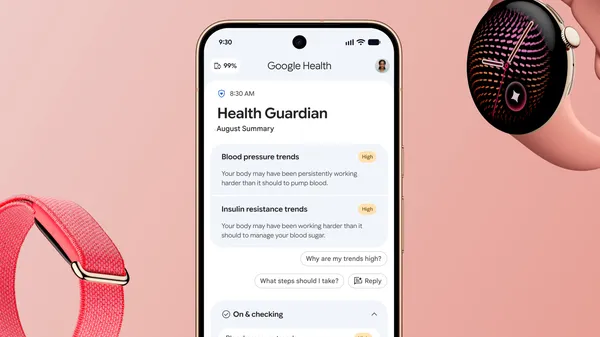 A new level of proactive health and wellness is coming to your wrist.