In 2024, we introduced our site reputation policy to stop a practice where third-party content is published on a trusted website just to exploit that site's good reputation to rank higher in Search. This practice hurts search quality, and creates a bad experience for users.
Author Archives:
October 2026 changes to the Display & Video 360 API and Structured Data Files
Today we’re announcing three unversioned changes to the Display & Video 360 API and Structured Data Files that will take effect in October 2026 and may impact your existing integrations.
These changes will take place on the following dates and have been fully detailed on our Announced Deprecations page:
Starting October 1, 2026:
- You will no longer be able to exclude specific digital content labels using targeting, impacting available
TARGETING_TYPE_DIGITAL_CONTENT_LABEL_EXCLUSIONtargeting options in the Display & Video 360 API and valid values for theDigital Content Labels - Excludecolumn in Line Item Structured Data Files. - You will no longer be able to exclude the majority of sensitive categories using targeting, impacting available
TARGETING_TYPE_SENSITIVE_CATEGORY_EXCLUSIONtargeting options in the Display & Video 360 API and valid values for theBrand Safety Sensitivity SettingandBrand Safety Custom Settingscolumns in Line Item Structured Data Files.
Starting October 12, 2026:
- You will be required to provide a business name and logo when you create or update YouTube responsive ads if default values are not already assigned to the parent advertiser, impacting the upload of Ad Structured Data Files.
If you believe these changes will impact your integration, follow the recommended actions in the change description.
If you have any questions or want to discuss this post, please reach out to us on our “Google Advertising and Measurement Community” Discord server.
 - Trevor Mulchay, Display & Video 360 API Team
Source: Google Ads Developer Blog
Why streamers, gamers, and remote workers are switching to GFiber
.jpg)
Most internet plans advertise download speed, but two other numbers shape your day-to-day experience more than most people realize: upload speed and latency.
Download speed is how fast information reaches you, like when browsing or updating a game. Upload is how fast information leaves, influencing whether you freeze on video or how quickly you share content to the cloud. And latency, or "ping," measures how instantaneous those actions feel.
As of June 2026, Americans get an average of 305 Mbps (megabits per second) download speeds but only 58 Mbps upload. And latency varies even more by connection type: fiber typically runs at 10–20ms, with cable deeper into the double digits and satellite spiking into the hundreds.
GFiber's (formerly Google Fiber) 100% fiber-to-the-home (FTTH) network delivers upload speeds that match downloads, with Lifestyle Products ranging from 1000 up to 8000 Mbps[1], and a typical latency of 14.8ms for instant response.[2]
For streamers, gamers, and remote workers, that combination of strong upload speed plus low latency is what makes their internet reliably fast.
For gamers, the real opponent is lag
Whether you win or lose a game often comes down to your reaction time: partly your own reflexes and partly your connection’s latency.
Industry guidance puts the threshold for competitive gameplay under 20ms. At that level, even a small delay can mean your input registers a beat later than everyone else's. GFiber's typical 14.8ms latency keeps players well inside that window for competitive play, a major reason GFiber has been named PCMag's Best Gaming ISP three years running.[3]
Gaming is a constant two-way conversation: your inputs go out and the game world comes back. This means your connection needs to perform well in both directions. Symmetrical upload speeds across GFiber's Core 1 Gig, Home 3 Gig, and Edge 8 Gig products keeps responsiveness consistent, so even multiple gaming stations can use the connection without a drop in performance.
For streaming, your upload speed is your broadcast
Live streaming sends video out nonstop, making upload speed the name of the game.
Twitch streaming needs roughly 8 to 15 Mbps to run smoothly, and YouTube's guidelines recommend 35 Mbps for a top-quality 4K stream. At those rates, a single broadcast can eat a meaningful chunk of a typical connection's upload capacity. If you’re live gaming or running a content backup in the background, that upload capacity gets used up fast.
With up to eight gigabits of upload with the Edge 8 Gig product, GFiber gives streamers and content creators room to run high-quality broadcasts without eating into bandwidth other functions need.
For remote workers, the new bar for AI-powered work
Remote work today goes beyond staying connected on a Zoom call. Now, it means AI agents and cloud tools that need to keep pace with your workday.
A March 2026 survey of 200 AI-enabled workers found that 64% of organizations say their AI use cases require end-to-end response times under 250ms. For coding tasks, that threshold is ever lower: Google sets the bar at less than 100ms latency for end-to-end completion.
Your home connection is only one piece of how quickly AI responds. The AI model and application themselves also take time to process requests. But a congested connection can eat into an already tight latency budget and degrade AI’s responsiveness. GFiber's low latency network is built for real-time workloads, giving your AI tools a solid foundation to perform at speed.
Symmetrical upload speeds across GFiber's products keep that responsiveness steady even when the rest of the house is using the connection at the same time, whether it’s a kid gaming or a video call running in the next room. That’s what keeps critical work online when your network is handling a full house of activity.
Why GFiber works better for households that rely on speed
GFiber’s advantages stem from its 100% FTTH architecture, where light travels through fiber optic cables directly from our network to the Fiber Jack in your home. Unlike "hybrid fiber" or "fiber-powered" networks that use copper segments for part of their infrastructure, our pure fiber connection is optimized to provide extremely fast internet. We’re also proactively upgrading our network in GFiber cities to 25G PON technology, capable of 20 gigabits-per-second (Gbps) symmetrical speeds.
Reliability starts before your connection is even live. During your free professional installation, a GFiber technician will evaluate your home's layout to route high-speed wired connectivity straight to the rooms that matter most, like home offices or streaming setups.
That focus on service holds up after the initial installation, too. GFiber won Best Customer Experience in CableTV.com's 2026 home internet customer satisfaction survey of over 8,000 respondents.
For anyone whose work or income depends on their internet, that combination of proactive setup and dependable support means you can count on your connection to be there when you need it.
Ready to put your internet to work?
Take a speed test to see where you stand. Then compare products to find the right fit for your household.
—
© 2026 GFiber | 1600 Amphitheatre Pkwy, Mountain View, CA 94043 | Privacy & Terms
[1] Upload/download speed and device streaming claims are based on maximum wired speeds. Actual internet speeds, Wi-Fi speeds, and Wi-Fi coverage are not guaranteed and can vary based on factors such as home or business size and layout, construction materials, hardware and software limitations, latency, packet loss, etc.
[2] Latency comparison based on analysis by GFiber from Ookla® Speedtest Intelligence® data of GFiber multi-server median latency and combined median multi-server latency of all U.S. fixed broadband providers and speed tiers for Q3-Q4 2025. Individual speeds vary.
[3] A trademark of Ziff Davis, LLC. Used under license; Reprinted with permission. © 2026 Ziff Davis, LLC. All Rights Reserved.
[4] Plus local access fee where applicable, 100% of which go back into your community.
Source: Google Fiber Blog
Chrome for Android Update
Hello Everyone! We've just released Chrome 153 (153.0.8010.18) for Android to a small percentage of users. It'll become available on Google Play over the next few days. You can find more details about early Stable releases here.
This release includes stability and performance improvements. You can see a full list of the changes in the Git log. If you find a new issue, please let us know by filing a bug.Harry Souders
Google Chrome
Source: Google Chrome Releases
GFiber rated highest in customer satisfaction for 2026
.jpg)
Customer service is central to what we do here at GFiber (formerly Google Fiber). We’ve always focused on anticipating and fulfilling customer needs, but you don’t have to take our word for it. We recently earned the highest customer satisfaction score in SpeedTestHQ’s 2026 ranking of major home internet providers.
SpeedTestHQ’s “ISP Satisfaction Rankings 2026” ranks major fiber and cable home internet providers based on their customer satisfaction scores and most common customer complaints. GFiber earned the top spot in the rankings, noted as having the “Best Satisfaction” of all internet service providers in 2026.
Based on real customer feedback
Additionally, GFiber achieved the highest J.D. Power score (88), the highest ACSI score (82), and a “Low” complaint rate, according to SpeedTestHQ’s research. SpeedTestHQ reviewed third-party studies from top consumer intelligence reports to inform their rankings, combining analysis from three sources:
J.D. Power’s 2025 US Residential Internet Service Provider Satisfaction Study, which surveys nearly 30,000 customers on overall satisfaction, quality of service, value, trust, and customer support.
American Customer Satisfaction Index's (ACSI) 2025 Subscription Internet Service report, which rates providers on a 100-point scale based on customer interviews.
The FCC Consumer Complaint Database, a public platform that publishes anonymous data about real customer complaints.
Key trends in satisfaction rankings data
Fiber vs. Cable Gap: Fiber providers scored 10 to 30 points higher than cable providers, with an average J.D. Power score of 82 for fiber, compared to 66 for cable.
Common Cable Pitfalls: According to SpeedTestHQ’s survey data, complaints among cable providers included unreliable speeds, data cap overages, price increases, and billing errors.
GFiber Strengths: GFiber was rated as having the “Best Satisfaction” for delivering on speed promises, offering transparent pricing with no contracts or data caps, and providing shorter customer wait times than other providers.
GFiber is committed to delivering excellence
GFiber delivers an essential upgrade over traditional internet providers with a 100% fiber optic network designed to support symmetrical upload and download speeds and meet the bandwidth demands of modern digital life. Check if GFiber is available at your address and stay up to date on where we’re headed next at gfiber.com.
Frequently asked questions
What is SpeedTestHQ?
SpeedTestHQ is an independent internet speed test platform. They measure download, upload, ping, and jitter speeds, publishing guides to help people evaluate their internet providers.
How were the 2026 ISP rankings measured?
SpeedTestHQ ranked US internet providers using credible third-party reports, including J.D. Power, the American Customer Satisfaction Index (ACSI), and the FCC Consumer Complaint Database. GFiber ranked as the top-rated provider in both the J.D. Power and ACSI reports, with a low complaint rate from the FCC.
How did GFiber compare to other internet providers in the report?
GFiber earned the highest scores in the J.D. Power and ACSI reports and maintained a low complaint rate with the FCC, leading SpeedTestHQ to award GFiber the overall verdict of “Best Satisfaction” over other providers.
What do customers say about GFiber?
According to SpeedTestHQ’s “ISP Customer Satisfaction Rankings 2026,” GFiber consistently leads satisfaction surveys thanks to its reliable high-speed network, transparent pricing, and fast customer support.
Source: Google Fiber Blog
Expert Intelligence: a new way for you to engage with trusted content
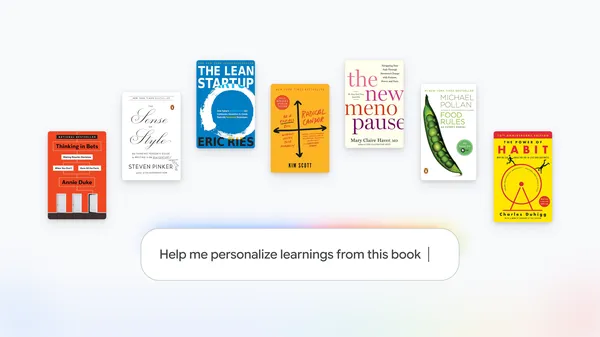 Expert Intelligence lets you add ebooks like those you’ve purchased from Google Play Books directly to a Gemini Notebook.
Source: The Official Google Blog
Improving Google Calendar’s interoperability with third-party video conferencing solutions
We are introducing improvements to Google Calendar that make it easier to join third-party video meetings, including Microsoft Teams, Zoom, and Cisco Webex, when collaborating across different calendar and email clients.
Specifically, users may notice:
- A better join experience for external recipients (for outgoing invitations): When you send a Google Calendar invitation containing a third-party video conferencing link to external recipients who use clients like Microsoft Outlook or Apple Calendar, Google Calendar now automatically includes the conferencing URL in the event's Location field. Because many external clients render links in the Location field as prominent, clickable buttons or chips in event previews, your guests can join calls with a single click without opening the full invite description.
- Structured "Join" button in Google Calendar (for incoming invitations): When you receive a calendar invite from an external system (such as Microsoft Outlook) containing third-party conferencing details in the event description or location, Google Calendar now automatically identifies and extracts the meeting URL, meeting ID, and passcode/PIN into structured video conferencing data. Instead of searching through text descriptions, you will see a prominent "Join video call" button directly on the event across Google Calendar on Web, Android, and iOS.


In hybrid work environments, teams frequently collaborate across different organizations, calendaring platforms, and video conferencing providers. Previously, joining third-party meetings from external invitations required manually copying and pasting URLs or passcodes from text descriptions, while external recipients didn't always see conferencing links prominently in their event previews.
These improvements remove friction from the scheduling and meeting-join experience. Whether you or your external collaborators use Microsoft Outlook, Apple Calendar, or Google Calendar, joining video calls is now seamless and effortless.
Getting started
- Admins: There is no admin control for this feature.
- End users: This feature will be available by default for all incoming and outgoing calendar invitations containing supported third-party conferencing links (Microsoft Teams, Zoom, and Webex). No additional action is needed.
Rollout pace
- Rapid Release and Scheduled Release domains: Extended rollout (potentially longer than 15 days for feature visibility) starting on August 27, 2026
Availability
- Available to all Google Workspace customers, Google Workspace Individual subscribers, and users with personal Google accounts.
Resources
- Google Workspace Learning Center: Add or remove a video conference from your Calendar event
Source: Google Workspace Updates
How WhatsApp Upgraded to Secure, Seamless Sign-In for 1 Billion Users with Passkeys

Posted by Niharika Arora, Senior Developer Relations Engineer, Tracy Agyemang, Product Marketing Manager, Google and Mayank Manuja, Android Engineer, Meta

WhatsApp is the world's largest messaging platform, serving billions of users globally. It is the default communication tool for people across diverse regions, connecting users through private, reliable, and secure messaging.
"What excites me most is the sheer scale of WhatsApp's impact. Even a small improvement to WhatsApp touches billions of users worldwide," says Mayank Manuja, an Android Engineer on the WhatsApp Registration and Access team who led the design and implementation of passkey-based authentication for WhatsApp.
Building for an audience of this magnitude requires navigating a vast range of network conditions, device capabilities, and levels of digital literacy. Recognizing the potential early, WhatsApp committed to adopting passkeys in 2023, becoming one of the first major consumer apps to integrate the technology. By implementing passkeys, WhatsApp aimed to provide a fast, phishing-resistant option that significantly reduces user friction while providing robust protection against account takeovers and credential theft.

A user creating a passkey on WhatsApp for faster, more secure sign-ins.
The Decision to Adopt Passkeys
For WhatsApp, offering multiple access methods is key to making it easier for users to stay connected and regain access when needed. Passkeys offer users a streamlined, one-tap login experience that eliminates phishing risks and functions reliably even in regions where OTP message delivery can be inconsistent.
Underneath, passkeys leverage public-private key cryptography to replace manual entry with biometric or screen lock authentication. This workflow drastically improves sign-in speeds by reducing the process to a single tap via a unified, bottom-sheet interface that keeps users engaged within the app's context. The benefits are twofold: passkeys offer users a streamlined login experience while simultaneously providing robust, native protection against phishing attacks. Crucially, they function reliably even in regions where traditional SMS OTP delivery can be inconsistent.


Having robust and diverse account access methods ensures that users are never locked out of what matters most to them.
Client-Side Integration
From the WhatsApp developer perspective, the Credential Manager API provided a clean, unified interface that abstracted away the complexity of underlying credential providers. Once initial integration flows were mapped out, the API surface became straightforward, with credential creation and retrieval following well-defined request and response patterns. Find the implementation guide in the Android developer documentation.
While the happy path worked from the start, navigating a diverse user base across OEMs, multiple Android versions, and varied device configurations (such as PIN-only versus biometric, or Android 13 versus 14+) surfaced unprecedented edge cases. These included users without a screen lock, unexpected exception types, outdated Play Services, and inconsistent credential provider behavior.
To overcome these hurdles, the WhatsApp and Google teams collaborated deeply and tackled several challenges:
- Optimizing the credential lookup flow: The initial lookup flow exhibited poor latency, particularly for users who had not yet created a passkey. Since the majority of WhatsApp users fall under this bucket in early stages, this added noticeable delay to nearly every sign-in. By instrumenting the call path and identifying bottlenecks together, WhatsApp significantly fastened up the process, achieving performance gains that ultimately benefited the entire Android ecosystem.
- Handling transient states: WhatsApp built a comprehensive error-handling layer to navigate device-specific hurdles such as password manager availability, screen lock not configured, intermittent connectivity issues, incompatible hardware, outdated play services, categorizing exceptions into recoverable and terminal states. This allowed for graceful degradation, if a passkey flow could not complete, the system safely fell back to traditional authentication without leaving the user in a broken state.
- Navigating OS-specific exceptions: When telemetry revealed device-specific hurdles such as GetPublicKeyCredentialDomException (Failed to decrypt credential) on certain Android 13 devices, and CreatePublicKeyCredentialDomException (Unable to get sync account) during passkey creation on Android 14, Google and the WhatsApp team investigated the root causes and implemented platform-level improvements to ensure smoother creation flows. You can find the comprehensive error guide here which lists common error codes and descriptions related to Credential Manager, and provides some information about their causes.
Note: For further guidance, explore the Passkeys best practices blog to learn how to optimize the user experience when adopting passkeys.
Refining the User Experience
Because passkeys were an entirely new concept in early 2023, there were no established patterns for prompting their creation. Through extensive A/B testing, WhatsApp developed a contextual framework targeting users who would benefit most. This strategy continuously evolved: as Android OS flows matured into a streamlined, single-screen experience, WhatsApp simplified its own prompts to avoid redundant or confusing UI.

Server-Side Architecture and Cross-Platform Hurdles
On the backend, WhatsApp's server implements the standard WebAuthn/FIDO2 ceremonies. The backend is written in Erlang and calls the Rust webauthn-rs library through a native interface. This Rust library handles signature verification and credential parsing, allowing the internal code to remain focused on orchestration, storage, and product rules like eligibility, rate-limiting, and credential lifecycle.
The server architecture orchestrates these core ceremonies through four primary entry points, paired into Begin and Finish sequences for both Registration and Authentication:
1. Passkey registration
This sequence handles issuing creation options to the client, verifying the attestation once the client acknowledges successful creation, and securely persisting the credential.

Erlang: Begin Registration
begin_registration(UserId) ->
    Existing = list_credentials(UserId),
    %% reuse the existing user handle, or mint a new one
    {UserHandle, IsNew} = user_handle(Existing),
    %% returns the client creation options and the server-side challenge state
    #{client_safe := CreationOptions, server_only := ChallengeState} =
        webauthn:start_registration(UserId, UserHandle, rp_config()),
    %% excludeCredentials: the user's existing credential IDs, so the device won't re-enroll one
    Options = with_exclude_credentials(CreationOptions, credential_ids(Existing)),
    store_challenge(UserId, ChallengeState),          %% short TTL
    IsNew andalso reserve_user_handle(UserId, UserHandle),
    Options.
- Identify the user: The server first checks for any existing credentials to either reuse an existing user handle or generate a new one.
- Generate options and challenge: It calls the WebAuthn library to generate the creation options for the client and a secure challenge state for the server.
- Prevent duplicates: It explicitly excludes the user's existing credential IDs so that the device does not accidentally re-enroll a passkey that is already registered.
- Store challenge: The server temporarily stores the challenge with a short time-to-live (TTL) and sends the options back to the client device.
Erlang: Finish Registration
finish_registration(UserId, Attestation) ->
    ChallengeState = get_challenge(UserId),          %% must exist and be unexpired
    #{credential_id := CredId, public_key := PubKey} =
        webauthn:finish_registration(Attestation, ChallengeState, rp_config()),
    ok = index_credential(CredId, UserId),            %% map credential_id -> account
    case multi_passkey_enabled(UserId) of
        true  -> add_credential(UserId, CredId, PubKey);      %% append (oldest evicted past the cap)
        false -> replace_credential(UserId, CredId, PubKey)   %% single-passkey mode
    end,
    notify_client(UserId, {passkey_created, CredId}),
ok.- Retrieve challenge: The server retrieves the stored challenge, ensuring it still exists and hasn't expired.
- Verify attestation: It passes the client's response (Attestation) and the challenge to the WebAuthn library to verify the request and extract the new credential ID and public key.
- Index the credential: The new credential ID is mapped directly to the user's account for fast lookup later.
- Save and manage limits: Depending on whether the multi-passkey feature is enabled, the server will either append the new credential to the user's list (evicting the oldest if a cap is reached) or replace the existing one in single-passkey mode.
2. Credential Authentication
Similar to creation, the app server handles the authentication flow by orchestrating the login sequence. This includes verifying the assertion after successful client authentication, and dynamically updating stored credentials whenever WebAuthn signals a refresh is necessary.
Erlang: Begin Authentication
begin_authentication(UserId) ->
    Credentials = list_valid_credentials(UserId),
    #{client_safe := RequestOptions, server_only := ChallengeState} =
        webauthn:start_authentication(Credentials, rp_config()),
    store_challenge(UserId, ChallengeState),          %% short TTL
RequestOptions.- Fetch valid credentials: The server looks up all currently valid credentials associated with the user.
- Generate challenge: It uses those credentials to build request options for the client and generates a new server-side challenge.
- Store and return: Just like in registration, the challenge is saved temporarily, and the request options are passed to the client app.
Erlang: Finish Authentication
finish_authentication(UserId, Assertion) ->
    ChallengeState = get_challenge(UserId),
    Credentials = list_valid_credentials(UserId),
    case webauthn:finish_authentication(Credentials, Assertion, ChallengeState) of
        #{user_verified := true, credential_id := CredId, needs_update := NeedsUpdate} = Result ->
            %% webauthn tells us when the stored credential should be refreshed
            NeedsUpdate andalso refresh_credential(UserId, CredId, Result),
            mark_credential_used(UserId, CredId),
            {ok, CredId};
        _ ->
            {error, not_allowed}
end.- Verify assertion: The server retrieves the stored challenge and valid credentials, then asks the WebAuthn library to verify the client's Assertion.
- Refresh if needed: If the user is successfully verified, the server checks a needs_update flag. The WebAuthn library uses this flag to signal if the stored credential state needs to be refreshed on the server.
- Finalize: The server marks the credential as used and successfully completes the login process.
 The step-by-step passkey login experience on the WhatsApp app.
To know more about server registration, follow the integration guide here.
Advanced Architectural Considerations
Implementing passkeys on the server at scale presented unique challenges, particularly concerning account architecture and device synchronization. Ashish Choudhary from the WhatsApp backend team highlighted the primary hurdles they faced:
- Migrating to multiple passkeys per account: WhatsApp's legacy server logic was deeply intertwined with the assumption of a single credential per user. To support modern multi-device realities, they engineered a bounded list system that intelligently evicts the oldest credential once a limit is reached. To ensure absolute stability, this major structural shift was rolled out gradually through rigorous experimentation.
- Balancing the credential lifecycle: Managing credential validity required a delicate touch. Invalidating credentials too aggressively forces needless re-enrollments, while being too lenient lets stale credentials pile up. WhatsApp solved this by implementing balanced lifecycle states to maintain tight security without frustrating users, complemented by automated background cleanup for inactive passkeys.
Rethinking Cross-Device Synchronization
This robust multi-passkey architecture also allowed WhatsApp to completely rethink cross-platform usability. The standard WebAuthn cross-device flow requires scanning a QR code on one device and authenticating over Bluetooth on another. However, WhatsApp found the Bluetooth dependency unreliable, and users often confused the new QR codes with the existing WhatsApp Web linking process.
Instead of forcing a fragile cross-device transport mechanism, WhatsApp allows users to hold passkeys natively across multiple ecosystems such as Google Password Manager on Android and iCloud Keychain on iOS. When users migrate to a new platform, they simply generate a fresh passkey during their next sign-in. This approach is completely frictionless for the user and operates seamlessly on top of the new multi-passkey server infrastructure.
Looking Ahead
Since launching passkeys, WhatsApp has witnessed robust organic adoption across its vast user base. By transforming the traditional multi-step sign-in process into a single, frictionless biometric gesture, the app has dramatically improved the user experience. Building on this momentum, WhatsApp is now expanding passkey utility beyond initial sign-ins, exploring seamless in-app re-authentication for sensitive account actions like passkey-encrypted backups.
Looking ahead, WhatsApp is actively collaborating with platform partners to pioneer lower-friction credential creation paths, anticipating that barriers to entry will naturally diminish as device biometric capabilities expand.
Recommendation for Developers Building at Scale
For developers preparing to integrate passkeys at scale, the WhatsApp team shares these critical recommendations:
- Invest in an error taxonomy early: Categorize the wide variety of Credential Manager exceptions into recoverable versus terminal states, and define clear, graceful fallback paths for each scenario.
- Understand your eligibility funnel: Instrument device capability checks such as screen lock presence, biometric hardware, and Play Services versions and design flows to proactively exclude ineligible users rather than failing mid-flow.
- Prepare your app for fallback: Use passkeys as an optimal primary authentication method for capable devices, but always retain traditional methods as a reliable, universal fallback.
- Plan for OS version fragmentation: Passkey behavior can differ across operating systems. Test thoroughly on Android 13, 14, and 15+, and account for OEM-specific variations in the credential selection UI.
- Upsell contextually and educate: Present passkey creation naturally during security-relevant actions. Clearly emphasize the value proposition (speed and security) using accessible language to drive user adoption.
- Monitor proactively: The ecosystem evolves with every OS update. Continuously track latency and error patterns to stay ahead of shifting device landscapes.

Get Started with Passkeys and Credential Manager
Get hands on with passkeys and Credential Manager on Android using our integration guide and public sample code.
If you have any questions or issues, you can share with us through the Android Credentials issues tracker.
Source: Android Developers Blog
Partnering with Khan Academy on building AI tools for classrooms
 Interactive visual aids and teacher-controlled practice materials — both built with Gemini — are launching for the new school year.
Source: Learning & Education
Google Flow brings new creative control features to enhance video editing.
 At Google I/O, we launched Gemini Omni Flash in Google Flow, bringing new video editing capabilities to creatives. Today we’re rolling out updates via Gemini Omni 1.1 Fl…