Today, we’re announcing improvements to our Out-of-Domain file-level warnings. First launched in April 2025, these badges alert users to documents and users outside of their Workspace organization, helping to prevent accidental data exfiltration and potential phishing attacks that spoof internal content. We’ve expanded support across devices and sharing types in the following ways:
Files in the Android and iOS apps for Drive, Docs, Sheets, and Slides now include external indicators
Chat Spaces and Google Groups can be configured to allow external users; if they’re given access to a document, that document now shows the external badge
If a service account has access to a document, and that service account is owned by an external Google Cloud organization, it now triggers the external badge in documents
Comment email notifications now include badges for external documents and users
File sharing email notifications now include badges for external documents and users
How Out-of-Domain warnings work
This feature helps users identify potentially risky files and avoid phishing scams when working with files shared from outside your organization.
Notification in comments
Notification in file sharing email
Image of "External" badge displayed in Google Docs
Making decisions in a fast-paced environment often leads to long, messy threads and lost consensus. Polly helps teams solve this by enabling the creation of interactive polls within existing Chat conversations. By keeping the feedback loop inside the "flow of work," Polly helps eliminate the friction of switching between apps, leading to faster responses and clearer team alignment.
Effortless authoring and participation
Creating a poll is as simple as mentioning @Polly in any Google Chat space. Whether you need a quick pulse on a project direction or a simple vote on a meeting time, you can author a poll in seconds. For end users, participation is just as easy: team members can cast their votes with a single click directly within the chat stream.
Real-time results
Results are updated as votes come in, providing immediate visual feedback to the entire space. This transparency ensures that everyone is on the same page and can move forward with confidence as soon as a decision is reached.
Use cases for Polly in Google Chat:
Driving consensus: Rapidly narrow down options for project names, design directions, or strategy shifts.
Meeting logistics: Quickly vote on the best time for a sync or gather topics for an upcoming agenda.
Team preferences: Streamline simple office or team logistics, from lunch orders to preferred collaboration hours.
Admins can easily enable the Polly integration to empower their teams with a more structured way to collaborate without leaving the Google Workspace ecosystem.
Getting started
Admins: Admins can install the Polly Chat app on their users’ behalf. Visit the Help Center to learn more about installing Marketplace apps for your organization. If you’ve already deployed Polly for Google Meet, then the Polly Chat app will automatically be available as well.
End users: End users can search for the Polly add-on in Google Chat under Apps > Find apps. Visit the Google Workspace Marketplace to learn more and install Polly. If you’ve already installed Polly for Google Meet, then the Polly Chat app will automatically be available as well.
We’re updating icons across Google Workspace to introduce a modern visual design that gives every app a more distinct identity. Over the next several weeks, users will see new icons for Gmail, Calendar, Chat, Meet, Drive, Docs, Slides, Sheets, Vids, Keep, Forms, Voice, Sites, and Tasks.
These changes drive consistency and cohesion across our product suite, while ensuring each individual application remains modern and recognizable on your screen. These design updates do not alter any core functionality or administrative controls.
Getting started
Admins: There is no admin control for this update; changes will roll out automatically according to the schedule below. If you need to update internal documentation, visit the Help Center to find the new icon designs.
End users: There is no end user control for this update; changes will roll out automatically according to the schedule below.
In March 2021, we announced the open source release of TestParameterInjector: a simple but powerful parameterized test runner for JUnit4. In September 2022, we followed up with JUnit5 support, bringing our framework to developers who had moved on to the Jupiter API.
We're excited to announce our biggest update yet for our Kotlin users: KotlinTestParameters.
The de facto standard for parameterized testing
When we first introduced TestParameterInjector, we shared a graph showing its rapid adoption within Google. Over the past few years, that trajectory has continued to a point where TestParameterInjector is the de facto parameterized test framework.
Usage of all other alternative frameworks continues to steadily decline, while TestParameterInjector's adoption keeps growing rapidly. It has fundamentally lowered the barrier to writing data-driven unit tests, empowering Googlers and open source developers alike to maximize test coverage with minimal boilerplate. We believe its ubiquity internally is a strong testament to its reliability and utility for the broader developer communities.
The Kotlin challenge
As Kotlin's popularity has surged, developers have naturally been writing more of their TestParameterInjector tests in Kotlin. However, specifying explicit test values in Kotlin historically meant falling back to Java-centric paradigms.
If you wanted to provide specific values to a test, you typically had three options, none of which felt truly idiomatic in Kotlin:
@TestParameter({"123", "456"}): This relies on string arrays, limiting you to a subset of types that the string parsing supports.
@TestParameters: This allows for more complex sets of data, but relies on YAML strings (e.g.,"{age: 17, expectIsAdult: false}"). These strings however are not type-safe, and are completely ignored by IDE refactoring tools.
Provider classes: For complex types that couldn't be easily represented in strings, you have to write Provider classes, adding a bit of boilerplate code and indirection.
Enter KotlinTestParameters
To bring a seamless experience to Kotlin, we are introducing a significant new Kotlin-only feature: KotlinTestParameters.
By leveraging Kotlin's default function arguments, you can now define parameterized tests in a fully type-safe, concise, and refactor-friendly way using the testValues() function (and friends).
Here is what it looks like in practice:
import com.google.testing.junit.testparameterinjector.TestParameterInjector
import com.google.testing.junit.testparameterinjector.TestParameter
import com.google.testing.junit.testparameterinjector.KotlinTestParameters.testValues
import com.google.testing.junit.testparameterinjector.KotlinTestParameters.namedTestValues
import org.junit.Test
import org.junit.runner.RunWith

@RunWith(TestParameterInjector::class)
class MyTest {

  // Testing simple types directly
  @Test
  fun simpleTest(@TestParameter limit: Int = testValues(20, 100)) {
    // This test method is run twice: once for limit=20 and once for limit=100
  }

  // Testing complex types without YAML strings or Provider classes!
  data class TestCase(val age: Int, val expectIsAdult: Boolean)

  @Test
  fun complexTest(
    @TestParameter testCase: TestCase = namedTestValues(
      "teenager" to TestCase(age = 17, expectIsAdult = false),
      "young adult" to TestCase(age = 22, expectIsAdult = true)
    )
  ) {
    // This test method is run twice with fully typed data class instances
  }
}
Why we recommend making the switch
Because testValues() seamlessly integrates with Kotlin's language features, any type is supported. This completely eliminates the need for stringly-typed YAML maps or verbose Provider classes.
We firmly believe that KotlinTestParameters is a massive leap forward in readability and maintainability. Moving forward, this should be the default way of specifying test values for all new Kotlin tests, replacing the older @TestParameters, @TestParameter({"..."}), and Provider class patterns.
Try it out!
You can read more and start using KotlinTestParameters today over on our GitHub repository.
Let us know what you think on GitHub if you have any questions, comments, or feature requests!
Hi everyone! We've just released Chrome Dev 150 (150.0.7847.3) for Android. It's now available on Google Play.
You can see a partial list of the changes in the Git log. For details on new features, check out the Chromium blog, and for details on web platform updates, check here.
If you find a new issue, please let us know by filing a bug.
Google is expanding its smart home ecosystem by launching a full-stack Gemini AI offering that integrates advanced camera intelligence, natural language queries, and daily activity summaries. This initiative provides service providers and hardware manufacturers with turnkey reference designs and APIs to build proactive, branded services without extensive research and development. Ultimately, the program aims to move beyond basic device control toward an AI-native home that can understand context and care for users' needs in real time.


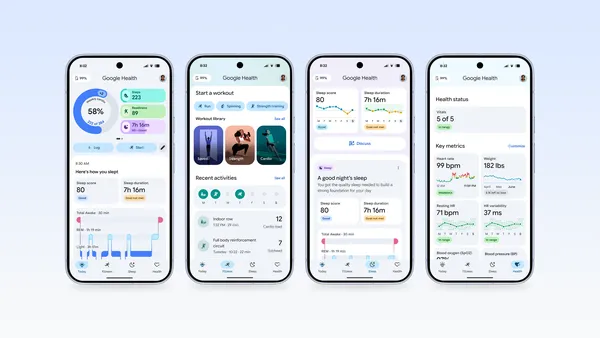 We designed the Google Health App to bring your data into one secure place, no matter what device you use.

 A recap of the 2026 I/O Dialogues, where leaders discuss the future of AI, quantum computing, robotics and creativity.