Google is enhancing Sign in with Google by introducing new OIDC standard claims—specifically auth_time and amr (Authentication Methods Reference) to provide developers with deeper session metadata. These updates allow verified apps to verify the "freshness" of a user's login and the specific authentication methods used (such as MFA or hardware keys), enabling more dynamic, risk-based access controls. By leveraging these federated identity signals, platforms can better prevent account takeover and fraud while implementing granular security policies like step-up authentication for sensitive actions.
Hi, everyone! We've just released Chrome 149 (149.0.7827.159) for Android. It'll become available on Google Play over the next few days.
This release includes stability and performance improvements. You can see a full list of the changes in the Git log. If you find a new issue, please let us know by filing a bug.
Android releases contain the same security fixes as their corresponding Desktop releases (Windows & Mac: 149.0.7827.155/156, Linux: 149.0.7872.155) unless otherwise noted.
by Anurag Sinha, Universal Commerce Protocol (UCP)
At Open Source Summit North America 2026, I shared why agentic commerce needs open rails.
As AI agents become more capable, the shopping journey is shifting from "show me" to "help me." Instead of browsing, comparing, clicking, and checking out step by step, people can increasingly ask an agent to help them decide what to buy and, in some cases, complete the purchase. Industry forecasts suggest agentic shopping could account for roughly 10% to 25% of U.S. e-commerce by 2030 (Bain), which points to a meaningful shift in how digital commerce will work. Watch the full keynote here.
Why shared rules matter
That shift also exposes a challenge. Commerce is still highly fragmented. Different businesses, payment providers, and platforms operate with their own rules, workflows, and business logic. Every new surface adds more integration work. Every bespoke connection creates more complexity. And that fragmentation makes it harder for AI systems to understand and perform commerce actions consistently across businesses. A shared language lowers that barrier for everyone.
We launched the Universal Commerce Protocol, or UCP, with industry leaders to establish an open standard for agentic commerce, built to work across the shopping journey. UCP creates a common language for agents and systems to operate together across consumer surfaces, businesses, and payment providers, so the ecosystem does not need a different bespoke integration for every new agent or platform.
Just as importantly, UCP is designed for the real world. Every business has its own way of selling. Checkout, fulfillment, loyalty, policy logic, shipping, and post-purchase flows can vary widely between a local shop, a marketplace, and a large retailer. UCP is built to support that reality.
A layered architecture for a shared commerce language
UCP uses a layered model to create a reusable shared language for commerce. Services organize domains like shopping and common. Capabilities define core actions such as checkout, catalog, cart, orders, and shared functions like identity linking. Extensions keep those capabilities configurable, so features like fulfillment can be modeled once and reused across multiple flows instead of being hardwired each time. At the transport layer, UCP stays agnostic, supporting bindings like REST, Model Context Protocol, and Agent2Agent.
Together with capability discovery and payment handling, these layers help consumer platforms, agents, and businesses interoperate more consistently over time. They also let different participants advertise what they support, compose new behaviors, and communicate over the transport that works best for them.
Built in the open
A standard for everyone should be shaped by everyone. Because UCP is open, merchants, developers, and community contributors can pressure-test real-world gaps, propose new capabilities and extensions, and help make sure the protocol reflects more than the needs of the largest players. That kind of participation is what keeps an ecosystem moving.
Agentic commerce is still evolving, and UCP is a foundational building block to support what's next in this new era.
If you want the full architecture walkthrough and the complete story from Open Source Summit North America, watch the session here. And if you want to go deeper, you can explore the UCP documentation, join the community conversation, and contribute to the public repository.
The Stable channel has been updated to 149.0.7827.155/.156 for Windows andMac and 149.0.7827.155 for Linux, which will roll out over the coming days/weeks. A full list of changes in this build is available in the Log
Interested in switching release channels? Find out howhere. If you find a new issue, please let us know byfiling a bug. Thecommunity help forum is also a great place to reach out for help or learn about common issues.
The Extended Stable channel has been updated to 148.0.7778.271for Windows and Mac which will roll out over the coming days/weeks.
A full list of changes in this build is available in the log. Interested in switching release channels? Find out how here. If you find a new issue, please let us know by filing a bug. The community help forum is also a great place to reach out for help or learn about common issues.
We’re introducing two new administrator controls for the Gemini app (gemini.google.com) that allow end users to manage their own chat activity. Admins can now configure whether users can use temporary chats and delete their conversation history.
Temporary chats allows users to have conversations that are not saved to their history.
Conversation deletion allows users to delete individual chats or their entire chat history.
These settings give organizations greater flexibility in managing data while empowering users to control their Gemini app experience.
Please note: If your organization uses Google Vault, Vault retention rules will always be honored if they are set up.
Getting started
Admins: These features will be ON by default and can be disabled at the domain, OU, or group level. Visit the Help Center to learn more.
Gemini in Chrome empowers business and education users with AI tools that integrate seamlessly into their daily browsing workflows while maintaining strict data governance. It’s also available to users with personal Google accounts who can access the Gemini app.
Gemini in Chrome allows users to:
Get answers and insights: Summarize articles, clarify complex concepts, or find specific information based on the context of open tabs.
Generate content: Draft emails and social media posts, or create images directly in the browser.
Go live: Engage in two-way voice conversations with Gemini Live to brainstorm ideas or prepare for meetings.
Getting started
Admins: This feature is ON by default unless you’ve already disabled the Gemini app service setting or the Chrome Gemini setting. The feature can be turned on or off at the domain, OU, or group level. Refer to the Help Center or our previous announcement for information on the terms of service and privacy considerations for the feature.
End users: To access Gemini in Chrome, click the Gemini icon at the top of your browser. You must meet the criteria listed here. Learn more about using Gemini in Chrome here.
Available to all Google Workspace plans, Workspace Individual subscribers, and users with personal Google accounts on ChromeOS, MacOS and Windows devices
by Olena Huang, CEL (Common Expression Language) team
We're excited to announce that the official Common Expression Language (CEL) repositories have moved to a dedicated GitHub organization. Visit the new cel-expr repository now!
Why the move?
This move is a key step in strengthening the CEL ecosystem. By centralizing our projects, including the language specification, Go, C++, C, Java, and Python implementations, under the cel-expr organization, we aim to:
Enhance Branding: Create a clear and unified brand identity for CEL.
Improve Discoverability: Make it easier for users and contributors to find all official CEL resources in one place.
Ensure Consistency: Foster consistency across all CEL projects.
Streamline Development: Simplify our development and release processes.
What's Changing?
The following repositories now reside in the cel-expr organization:
google/cel-spec is now cel-expr/cel-spec
google/cel-cpp is now cel-expr/cel-cpp
google/cel-go is now cel-expr/cel-go
google/cel-java is now cel-expr/cel-java
cel-expr/cel-python and cel-expr/cel-c have already been in the cel-expr namespace
All future development, issues, and pull requests for these projects will take place in their new homes within the cel-expr organization. This is a non-breaking change, due to automatic redirects, but you should update your URLs where possible.
What Stays the Same?
We've worked to make this transition as seamless as possible:
Automatic Redirects: GitHub will automatically redirect all web traffic and git operations from the old google/cel-* URLs to the new cel-expr/cel-* locations. Your existing links and git remote configurations pointing to the old URLs should continue to work for cloning and fetching.
Preserved History: The full commit history, issues, and pull requests for each repository have been migrated and are available in the new locations.
Action Required: Update Your Dependencies
While existing links and git remote configurations pointing to the old URLs should continue to work thanks to GitHub's redirects, we recommend updating your dependency management configurations (e.g., go.mod, pom.xml, requirements.txt, etc.) to point directly to the new repository URLs under https://github.com/cel-expr. This ensures you are fetching the latest code and releases from the canonical source.
We're thrilled about this new chapter for CEL, bringing all our core components under one roof. We believe this will foster a stronger CEL community and accelerate the development and adoption of CEL.


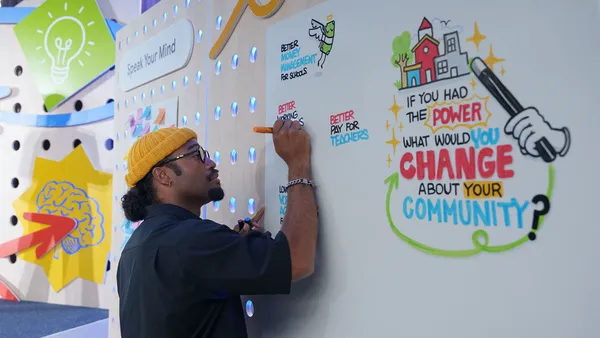 Google.org announces it’s expanding its digital wellbeing fund.
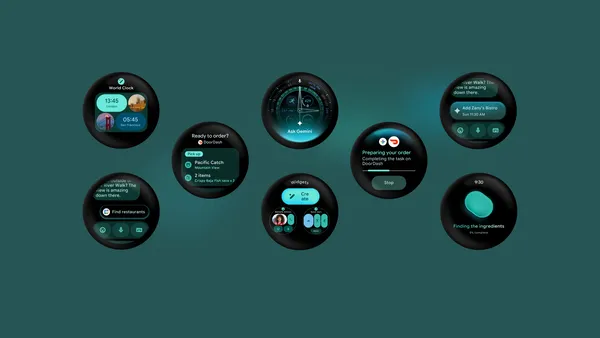 Wear OS 7 brings new glanceable features — and select devices will get Gemini Intelligence later this year.