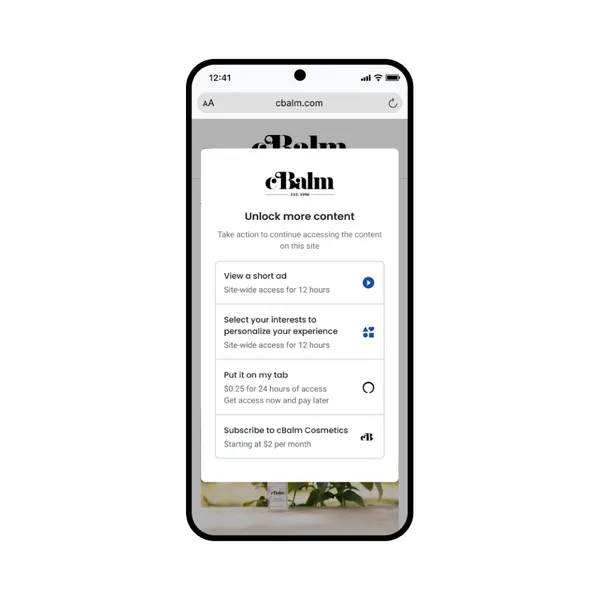
 For years, our publishing partners have asked for more ways to monetize their content beyond traditional ads using Google Ad Manager. That’s why we’re launching Offerwal…
The Google for Startups Gemini kit is here
 Learn more about how startups can use Gemini models and other AI resources from Google.
Source: AI
Simulating a neural operating system with Gemini 2.5 Flash-Lite
A research prototype simulating a neural operating system generates UI in real-time adapting to user interactions with Gemini 2.5 Flash-Lite, using interaction tracing for contextual awareness, streaming the UI for responsiveness, and achieving statefulness with an in-memory UI graph.
Source: Google Developers Blog
5 tips for getting started with Flow
 Here are five tips for making videos with Flow, Google’s new AI filmmaking tool.
Source: The Official Google Blog
Gemini Add-ons will no longer appear under subscriptions in the Admin console for Workspace Business and Enterprise customers
What’s changing
In January 2025, we announced our plan to bring premium AI features directly to our Business and Enterprise offerings, helping our customers and their users boost productivity, creativity, and innovation, transforming how they work. We also stopped charging for Gemini add-ons that you may have purchased previously for your Business and Enterprise offerings after January 31, 2025.
This week, as part of a shift in our offerings, we will begin removing references to the Gemini Enterprise, Gemini Business, AI Meetings & Messages, and AI Security add-ons from the Subscriptions page within the Admin console (Menu > Billing > Subscriptions). This change will apply to customers whose Workspace edition now includes all functionality previously available with these add-ons.
For example, if you had a Workspace Business Standard or Enterprise Standard subscription and a Gemini Business add-on, the add-on is no longer needed since the applicable AI features are now included in your Workspace subscription.
Important note: There will be no disruptions in service or changes in feature availability with this change. This change will have no effect on your bill.
Getting started
- Admins: No action is needed – we will make these updates to the Subscriptions page automatically.
- End users: There is no end user impact or action required.
Rollout pace
- This update will begin taking effect starting June 25, 2025 and may take several weeks to rollout for affected customers.
Availability
- This update impacts Google Workspace customers who previously purchased Gemini add-ons
Resources
Source: Google Workspace Updates
Chrome Stable for iOS Update
Hi everyone! We've just released Chrome Stable 138 (138.0.7204.56) for iOS; it'll become available on App Store in the next few hours.
This release includes stability and performance improvements. You can see a full list of the changes in the Git log. If you find a new issue, please let us know by filing a bug.
Chrome Release Team
Google Chrome
Source: Google Chrome Releases
Updates to the GitHub app for Google Chat
What’s changing
Last year, we made updates to the Google Chat integration with GitHub, a cloud-based platform that enables users to store, share and collaborate with others to write code. Today, we’re excited to announce additional updates and functionality that improve upon the overall experience using the GitHub app for Google Chat.
Starting today, users will have the ability to:
- Choose from additional controls for repository notification subscriptions, allowing users to set notifications according to their needs. For example, users can subscribe only to notifications when a deployment fails, or set notifications for Pull Requests assigned only to a particular individual.
- Create scheduled reminders, providing a new way for teams to stay on top of open pull requests.
- Set personal reminders to help keep track of pull requests that require review.

Users can set up scheduled reminders to stay on top of open pull requests

Granular notification filters enable users to subscribe to notifications based on their preferences.
Getting started
- Admins: Admins can install the Github app on their users’ behalf. Visit the Help Center to learn more about installing Marketplace apps for your organization.
- End users: End users need a GitHub account to use this app, and can also search for the app in the + New Chat menu to get updates via a DM with the bot. Visit the Help Center to learn how to set up the GitHub app in Chat. Visit the Google Workspace Marketplace to learn more and access Github for Google Chat.
Rollout pace
- Rapid Release and Scheduled Release domains: Extended rollout (potentially longer than 15 days for feature visibility) starting on June 25, 2025
Availability
- Available to all Google Workspace customers, Workspace Individual Subscribers, and users with personal Google accounts
Resources
Source: Google Workspace Updates
See summaries of even more file types directly in Google Chat
What’s changing
Earlier this year, we introduced the ability for users to easily summarize Google Docs, Slides, and Sheets files shared within a Google Chat conversation. Today, we’re excited to expand this feature to PDF, Office (Word, Excel, PowerPoint), CSV, txt, and zip files shared as Drive links in Chat.
Simply click the new “Summarize this file” button that appears within the respective file preview card in the conversation, and Gemini will summarize the file so you can get a quick overview without having to leave Chat.

Who’s impacted
End users
Why you’d use it
By providing quick, on-demand summaries of files shared in Chat, Gemini helps you save time and get the gist of shared files instantly, eliminating the need to open each document.
Additional details
This feature is only available on web at this time.
Getting started
- Admins: To access summaries in home, users need to have smart features and personalization turned on. Admins can turn on default personalization setting for their users in the Admin console.
- End users:
- You can turn this feature ON/OFF by turning Smart features & controls in Google products ON/OFF.
- To see summaries of files shared in Chat on web, click the “Summarize this file” button.
- Note: a user must have access to the file that they aim to summarize.
- Visit the Help Center to learn more about summarizing a file in Chat.
Rollout pace
- Rapid Release and Scheduled Release domains: Gradual rollout (up to 15 days for feature visibility) starting on June 25, 2025
Availability
Available for Google Workspace:
- Business Standard and Plus
- Enterprise Standard and Plus
- Frontline Plus
- Customers with the Gemini Education or Gemini Education Premium add-on
- Gemini Business*
- Gemini Enterprise*
- AI Meetings and Messages*
Resources
Source: Google Workspace Updates
Chrome Beta for Android Update
Hi everyone! We've just released Chrome Beta 139 (139.0.7258.3) for Android. It's now available on Google Play.
You can see a partial list of the changes in the Git log. For details on new features, check out the Chromium blog, and for details on web platform updates, check here.
If you find a new issue, please let us know by filing a bug.
Chrome Release Team
Google Chrome
Source: Google Chrome Releases
Generate data with Gemini in Google Sheets
What’s changing
Currently, you can utilize Gemini in Google Sheets to generate charts and valuable insights, and today we’re excited to bring AI directly into the cells of your spreadsheet with the power of AI function.
From a cell, you can now input a specific prompt describing what you would like to do and an optional data range, and Gemini can do the following:
- Use relevant information from your spreadsheet to generate text that is tailored to your specific data.
- Summarize information by analyzing the content of your spreadsheet and highlighting the most important parts, so you can quickly understand your data.
- Categorize your data into meaningful groups, so you can easily detect patterns, such as user sentiment.


- Text generation:
- =AI(“Write a formal ad copy for the product. Cater copy to the objective and target audience”, A2:C2)
- =AI("Create an email to the reviewer addressing specific items in their reviews.", A2:G2)
- Summarization:
- =AI("For the customer, write a one sentence summary of their feedback.", A2:D2)
- =AI("You are the owner of a pet sitting business. Write a 2 sentence summary for the customer about their pet’s last stay. Be a little funny.", F2)
- Categorization:
- =AI("Categorize the customer inquiry as a compliment, exchange request, or return request.",C2)
- =AI("Perform sentiment analysis on the emails sent by the customers to the barbershop.", C2)
- =AI("Write a review of the hot sauce "&A2&" using only the ingredients "&D2&" and the popularity "&E2&".", A2:D2)
- =AI("Find the major themes in the customer feedback of "&B2&" using the rating "&C2&" and comments: "&D2&".")
Who’s impacted
End users
Why you’d use it
Now you can create hundreds of rows of data quickly to do things like categorize user feedback requests or write personalized emails, all without being an expert in data or spreadsheets. Regardless of your data needs, with instant access to Gemini from any cell in your Sheet, the Al function helps you get work done faster.
Additional details
- We currently support text-based responses for text generation, summarization, categorization, and sentiment analysis queries. While the input information is optional, we recommend using it for optimal results.
- After generating, if an explicitly referenced cell or the prompt is updated, the cell shows an out-of-sync state, and keeps the previous output for reference.
- To refresh a cell, you can select one or multiple cells and press “refresh and insert.”
- You can select multiple cells with AI functions and generate outputs; however, only the first 200 selected cells with AI functions will be generated. You can wait for the generation to complete and select more cells to generate outputs.
Getting started
- Admins: To access Gemini in the side panel of Workspace apps, users need to have smart features and personalization turned on. Admins can turn on default personalization setting for their users in the Admin console.
- End users: You can access Gemini for Sheets in the side panel by clicking on “Ask Gemini” (spark button) in the top right corner of Sheets. Visit the Help Center to learn more about using the AI function in Google Sheets and collaborating with Gemini in Sheets.
Rollout pace
- Rapid Release domains: Extended rollout (potentially longer than 15 days for feature visibility) starting on June 25, 2025
- Scheduled Release domains: Gradual rollout (up to 15 days for feature visibility) starting on July 29, 2025
Availability
Available for Google Workspace:
- Business Standard and Plus
- Enterprise Standard and Plus
- Customers with the Gemini Education or Gemini Education Premium add-on
- Google AI Pro and Ultra
- Gemini Business*
- Gemini Enterprise*