“Digital access is no longer optional—it is essential to quality of life, economic opportunity, and civic participation” said John Carli, the Mayor of Vacaville, California, and a past Trailblazer awardee. “Being named a Visionary Digital Inclusion Trailblazer reflects Vacaville’s commitment to ensuring every resident, regardless of circumstance, has the tools and access needed to thrive in a digital-first world. We are proud to be leading by example and building a more connected, inclusive community.”
As the leading voice for digital equity, the Trailblazer awards program showcases how digital inclusion can be achieved—and, even better, replicated. The program also serves as an open-source knowledge base for others to learn from. The winning applications are archived in the NDIA digital library. Each year there are new examples of civic innovation to share and learn from. They can come from small government non-profit initiatives with five-person staffs to or large statehouses, and so many other organizations in-between. NDIA takes all ideas and plans into consideration, and gives these awards based on projects’ innovation and impact on community digital access, regardless of size.
“Striving for the NDIA Trailblazer indicators has helped focus and uplift our digital inclusion efforts while providing a wealth of insights from other communities to learn from,” said Patrick McGuire, the Technology Equity Manager of South Bend, Indiana, and the leader of a Trailblazer-winning government initiative. Trailblazer indicators are the standards— like funding full time staff at a community organization and enacting public policies that promote digital inclusion—that applicants are judged by to earn their scores.
When a community comes together to solve these tough problems, we move closer to a more connected world. GFiber proudly supports the NDIA Trailblazer program, and we look forward to honoring the newest Trailblazers this year. The 2026 Trailblazers application is open and all state, local, and regional government bodies or government sponsored programs are eligible. NDIA will be accepting submissions until October 13.
Read about GFiber’s community impact and more at www.gfiber.com/blog.
Posted by Jess George, Head of Government & Community Affairs, East Region
 New capabilities across our measurement suite can help you make better, faster decisions that drive business growth.
 A new weekend explores how artists, digital innovation and AI are reshaping the world we live in.


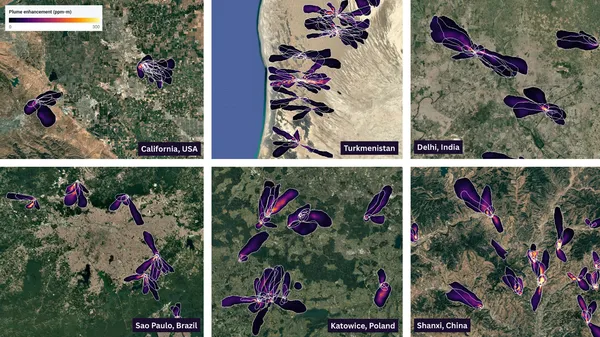 Google and NASA JPL developed an AI model to map and quantify global methane emissions from space using EMIT.