Get ready for the next generation of gameplay powered by Play Games Services

Posted by Chris Wilk – Group Product Manager, Games on Google Play

To captivate players and grow your game, you need tools that enhance discovery and retention. Play Games Services (PGS) is your key to unlocking a suite of services that connect you with over 2 billion monthly active players. PGS empowers you to drive engagement through features like achievements and increase retention with promotions tailored to each gameplay progress. These tools are designed to help you deliver relevant and compelling content that keeps players coming back.

We are continuously evolving gaming on Play, and this year, we're introducing more PGS-powered experiences to give you deeper player insights and greater visibility in the Play Store. To access these latest advancements and ensure continued functionality, you must migrate from PGS v1 to PGS v2 by May 2026. Let’s take a closer look at what’s new:

Drive discovery and engagement by rewarding gameplay progress

We’re fundamentally transforming how achievements work in the Play Store, making them a key driver for a great gaming experience. Now deeply embedded across the store, achievements are easily discoverable via search filters and game detail pages, and further drive engagement when offered with Play Points.

At a minimum, you should have at least 15 achievements spread across the lifetime of the game, in the format of incremental achievements to show progress. Games that enable players to earn at least 5 achievements in the first 2 hours of gameplay are most successful in driving deeper engagement*.

The most engaging titles offer 40 or more achievements with diverse types of goals including leveling up characters, game progression, hidden surprises, or even failed attempts. To help you get the most out of achievements, we’ve made it easier to create achievements with bulk configuration in Play Console.

For eligible titles*, Play activates quests to reward players for completing achievements - for example with Play Points. Supercell activated quests for Hay Day, leading to an average 177% uplift in installs*. You can tailor your quests to achieve specific campaign objectives, whether it's attracting high-value players or driving spend through repeated engagement, all while making it easy to jump back into your game.

Achievement-based quests allowing users to grow their farm and earn Play Points in the mobile game Hay Day on Google Play
Hay Day boosted new installs with achievement-based quests

Increase retention with tailored promotions

Promotional content is a vital tool for you to highlight new events, major content updates, and exciting offers within your game. It turns Play into a direct marketing channel to re-engage with your players. We've enhanced audience targeting capabilities so you can tailor your content to reach and convert the most relevant players.

By integrating PGS, you can use the Play Grouping API to create custom segments based on gameplay context*. Using this feature, Kabam launched promotional content to custom audiences for Marvel Contest of Champions, resulting in a 4x increase in lapsed user engagement*.

Marvel Contest of Champions increased retention with targeted promotional content on Google Play
Marvel Contest of Champions increased retention with targeted promotional content

Start implementing PGS features today

PGS is designed to make the sign-in experience more seamless for players, automatically syncing their progress and identity across Android devices. With a single tap, they can pick up where they left off or start a new game from any screen. Whether you use your own sign-in solution, services from third parties, or a combination of both, we've made it easier to integrate Play Games Services with the Recall API.

To ensure a consistent sign-in experience for all players, we’re phasing out PGS v1.

All games currently using PGS v1 must migrate to PGS v2 by May 2026. After this date, you will no longer be able to publish or update games that use the v1 SDK.

Below you'll find the timeline to plan your migration:


Migration guide

May 2025 As announced at I/O, new apps using PGS v1 can no longer be published. While existing apps can release updates with v1 and the APIs are still functional, you’ll need to migrate by May 2026, and APIs will be fully shut down in 2028.
May 2026 APIs are still functional for users, but are no longer included in the SDK. New app versions compiled with the most recent SDK would fail in the build process if your code still uses the removed APIs. If your app still relies on any of these APIs, you should migrate to PGS v2 as soon as possible.
Q3 2028 APIs are no longer functional and will fail when a request is sent by an app.

Looking ahead, more opportunities powered by PGS

Coming soon, players will be able to generate unique, AI-powered avatars within their profiles – creating fun, diverse representations of their gaming selves. With PGS integration, developers can allow players to carry over their avatar within the game. This enables players to showcase their gaming identity across the entire gameplay experience, creating an even stronger motivation to re-engage with your game.
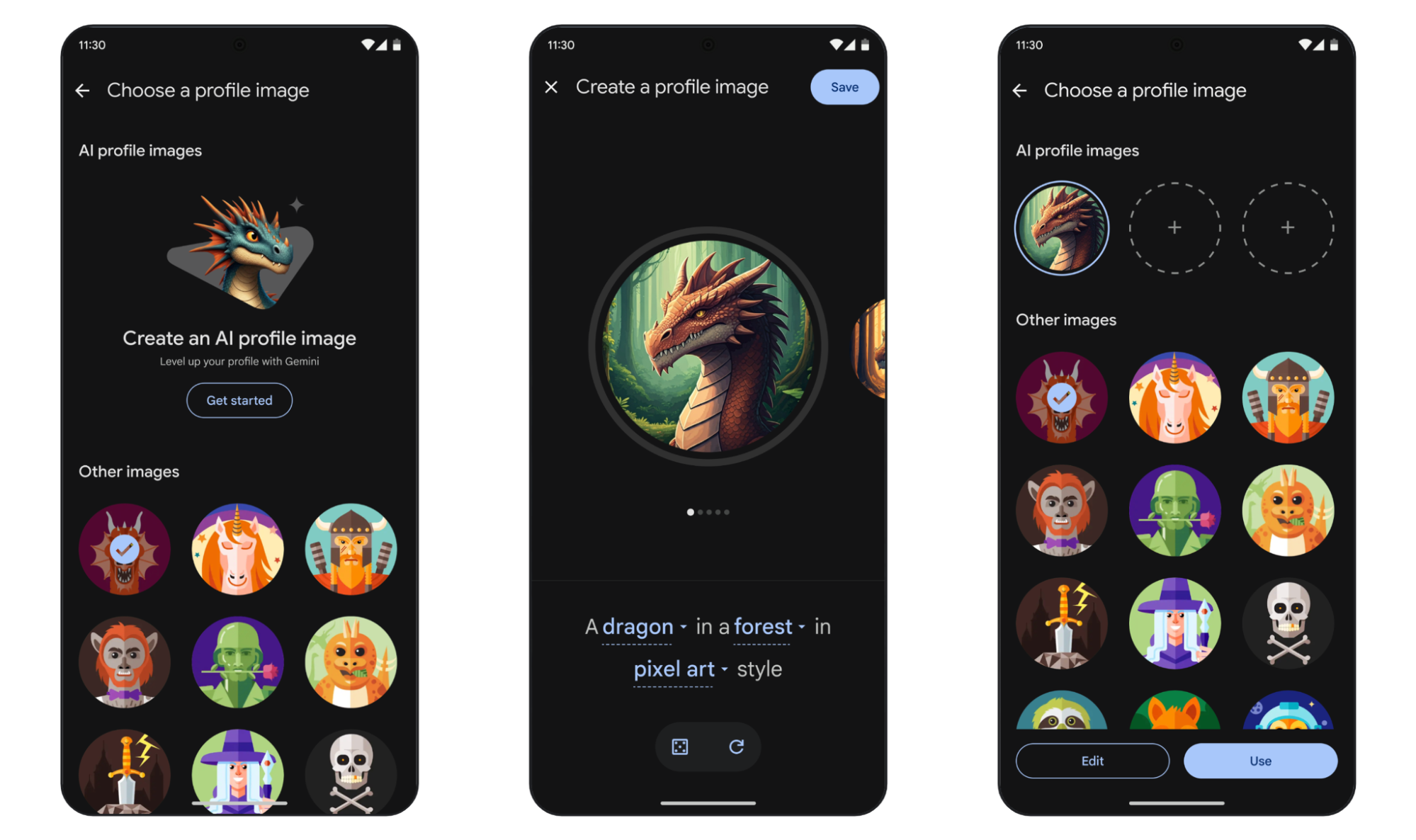
Gen AI avatar profiles create player-centric experiences on Google Play
Gen AI avatar profiles create more player-centric experiences

PGS is the foundational tool for maximizing your business growth on Play, enabling you to tailor your content for each player and access the latest gameplay innovations on the platform. Stay tuned for more PGS features coming this year to provide an even richer player experience.


* To be eligible, the title must participate in Play Points, integrate Play Games Services v2, and have achievements configured in Play Console.
* Data source from partner. Average incremental installs over a 14-day period.
* Data source from partner.
* The Play Grouping API provides strong measures to protect privacy for end users, including user-visible notification when the API is first used, and opt-out options through My Activity.


Google Play logo

FINRA Compliance for Google Workspace: Google Drive and Calendar Updates

What’s changing 

Today, we announced Google Workspace support for FINRA compliance, continuing our commitment to meet the unique needs of heavily regulated industry. This includes the preservation of records in a non-rewritable, non-erasable (WORM) format, including support for SEC Rule 17a-4, SEC Rule 18a-6, and CFTC §1.31. 

We’re pleased to announce FINRA-compliant solutions for Google Drive and Calendar (complementing our existing FINRA-compliant features for Gmail, Chat, and Meet) that address the critical supervisory, documentation, and surveillance requirements that underpin financial regulations: 

For Google Drive, super admins can now use Google Workspace’s Data Export tool and AODocs to create a FINRA-compliant archive of their Google Drive data in a Google Cloud Storage (GCS) bucket. This data can be from specific organizational units (OUs), groups, or users, and filtered by Drive labels.

When you’re using the Data Export tool, select “FINRA” as your export type

For Calendar, super admins and admins with third-party archiving privileges can enable third-party archiving on an OU or group level and specify the email address to which Calendar archives should be sent. The following events will be captured: 
  • On the monitored user’s calendar: all events and their updates, including events modified by another user with the appropriate access to the monitored user's calendar 
  • On other calendars that the monitored user can make changes to: all actions performed by the monitored user 
When these actions are performed, an email is sent to the journaling address specified by the admin with the event data, user who performed the action, and time stamp. providing access via SMTP for a third-party service provider to archive and produce the records on demand.
Third-party archiving can be enabled in the Admin console by going to Apps > Google Workspace > Settings for Calendar > Third-party Archiving Settings

Who’s impacted 

Admins 

Why it’s important 

These updates are critical for Google Workspace customers operating in the financial services industry on a global scale. For Calendar, archival journaling functionality supports compliance news by ensuring electronic communications are captured and preserved, meeting essential record-keeping standards. For Drive, admins can manage and securely store critical documents at scale. These solutions add to our existing FINRA-compliant features for Gmail, Chat, and Meet (when certain settings are enabled and disabled), providing global communication solutions and cutting edge productivity tools that meet the regulatory needs of customers in the financial services sector. 

Additionally, we are proud to announce partnerships with several industry-leading Digital Communications Governance and Archiving (DCGA) vendors: AODocs, Mimecast, Smarsh, and Global Relay. These partners provide vital connectors for our customers, ensuring the compliant flow of Google Workspace data into their trusted archiving solutions. For more information on these partnerships and FINRA compliance for Google Workspace, visit the Workspace blog.

Getting started 


Rollout pace 


Availability 


Resources

A new kind of internet experience is taking shape at GFiber Labs

At GFiber, we’re determined to stay ahead of what’s next, especially when it has the potential to make our customers’ experience better. This year, we rolled out new lifestyle-based internet products to customers across the vast majority of our cities. And last week, we successfully demoed a new capability with Nokia that pushes the boundaries of possibility for the customer experience: network slicing.


So what is network slicing? 

TLDR: it gives us the ability to carve up a customer’s home network into different “lanes,” each optimized for a specific use. 

In our GFiber Labs demo, we used gaming as the test scenario. We ran two gaming consoles next to each other and injected congestion into the network with the lab’s traffic generator. Predictably, things fell apart: lag, stuttering, pixelation.* Then we carved out a dedicated lane (a “slice”) in the network that reserved bandwidth just for  gaming traffic. The result: the driving game demo went from jittery and glitchy to smooth and responsive. 

This was a foundational test. And it worked.

In the long-term, this could truly change how home internet works, especially when it’s driven by the customer. Today’s one-size-fits-all connections treat all traffic the same. But we know not everyone uses the internet the same way: gamers care about latency, remote workers need video stability, home businesses rely on solid uptime and security, and, we can see a future where applications (AI, VR, etc.) may require next-level performance. Network slicing could be how we level up network performance.  

Network slicing opens the door to something new: the ability for customers to tailor their connection to the categories of Internet use that matter most in their home. It’s not about prioritizing traffic behind the scenes, it’s about giving you more control, more flexibility, and more ways to get the performance you need, when you need it. And with GFiber, it will always be in service of giving customers more control, without compromising our commitment to an open, unrestricted internet.

There’s also potential for something called “transactional slices.” These would spin up automatically, just for a few seconds, to keep things like financial logins secure. For example, connecting you directly to a service like your bank without routing traffic across the broader internet. You wouldn’t even notice it happening, but it could add meaningful peace of mind.

Network slicing is the next logical step in how we think about GFiber service — especially our lifestyle products like Core, Home, and Edge, built to meet the needs of customers’ unique internet lifestyles. Those products are designed to better match the way people live and work. Network slicing takes that a step further: adding real-time customization and control at the network level.

While we’re very excited about the possibilities here, there are few things that have to happen before we roll out network slicing across our network. Automation is a key piece of the puzzle. We’ll be diving deeper with Nokia later this year to explore how we can bring some of these ideas to life. This kind of innovation is exactly what GFiber Labs was built for and we’re excited about potentially leveling up the GFiber customer experience — again.

Stay tuned.

Posted by Nick Saporito, Head of Product


*Want to see how GFiber delivers a seamless gaming experience? Check out real-world stories and pro tips in our gaming FAQ.

Google Vids is now available for all Google Workspace for Education customers

What’s changing

Last year, we empowered educators and students to easily create and collaborate with video by introducing Google Vids to Education Plus customers. Today, we’re excited to expand Vids to all Google Workspace for Education customers.* 

Vids can help deepen learning opportunities, up-level instruction, and inspire the next generation of storytellers in a variety of scenarios, for example: 
  • Educators can support diverse learning styles and help students retain information with instructional videos and deep dives on complex concepts. 
  • Students can work on video projects and review recorded lessons. 
  • Education leaders can easily incorporate video in their school newsletters and create internal training videos for staff. Vids is also integrated with Google Workspace for Education tools like Google Classroom, empowering educators to easily assign video projects or post video explainers right to their students. 
*Google Workspace for Education customers will receive access to GoogleVids, without AI features. 

Who’s impacted 

End users 

Why you’d use it 

Similar to other productivity tools like Docs, Sheets, and Slides, Vids includes an easy-to-use interface and the ability to collaborate in real-time and share videos securely from your browser. You can easily get started with a variety of templates organized by use cases to create a new video. From there, you can add motion with animations, transitions, and photo effects, and customize your video using the Vids royalty free education-friendly stock content library or your own media directly from Google Drive or Google Photos. 

Getting started 

  • Admins: 
    • Google Vids is a Workspace Core Service for Workspace for Education customers. 
    • Vids will be ON by default and can be disabled at the organizational level. However, if Google Docs are turned OFF in your domain, Vids access will be unavailable. 
    • Visit the Help Center to learn more about turning Vids on or off for users. 
  • End users: 
    • To start, open Google Vids and choose an option to create a new video. You can create a new video or make a copy of an existing video for editing. 
    • You can use Vids on your computer with the two most recent versions of these browsers: 
    • Dive into Google Vids with our free, self-paced online training course, designed specifically for educators and available now in the Google for Education Learning Center. You can also leverage this one pager to get a quick summary of what you can do with Vids. 
    • Visit the Help Center to learn more about getting started with Google Vids. 

Rollout pace 

Availability 

Available for Google Workspace: 
  • Education Fundamentals, Standard and Plus 
  • Customers with a Gemini Education or Education Premium add-on 

Resources