A roboticist’s journey with JAX: Finding efficiency in optimal control and simulation

Max's journey introduces LQRax, a JAX-native LQR solver, which exemplifies the growing JAX robotics ecosystem that includes tools like Brax, MJX, and JaxSim, highlighting the benefits of JAX for computational efficiency in optimal control and simulation, and for seamlessly integrating model-based and learning-based approaches.

Introducing Video Overviews and upgrades to the Studio panel in NotebookLM

What’s changing 

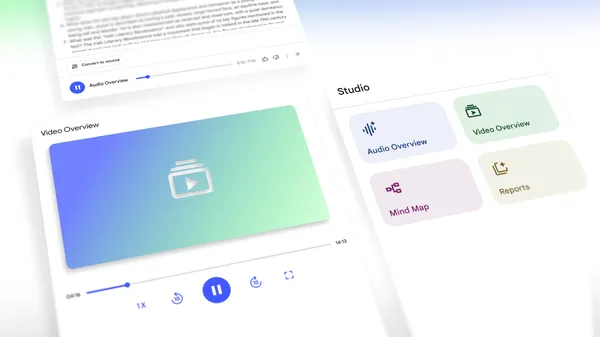
Since introducing Audio Overviews last year, NotebookLM users have created podcast-like, detailed summaries of key topics from their uploaded sources. To build upon this functionality and provide users with a more educational and visual experience, we’re excited to introduce Video Overviews.

Users can now turn documents, slides, charts and more into engaging explainer videos that are narrated by an AI voice. Video Overviews are expertly-crafted visual walkthroughs of the content you provide, pulling in images, diagrams, quotes, and numbers from your source material. Similar to Audio Overviews, you’ll also have the option to customize your Video Overview by specifying topics to focus on, indicating your learning goals, describing the target audience, and much more. At this time, Video Overviews are only available to users over the age of 18. 

We’re also introducing upgrades to the Studio panel where you would create things such as audio overviews and notes in NotebookLM, which includes multiple audio overviews and content sharing. Specifically, users can now:
  • Generate multiple Audio Overviews in a single notebook. This means you can now create versions in different languages from the same source material, or generate a set of Audio Overviews that each focus on different subsections of your sources.
  • Generate shareable links for content like Audio Overviews and Video Overviews, which cannot be shared outside of your domain. 


Additional details

  • Video Overviews are now rolling out to all users in English, with support for more languages coming soon. 
  • Only users with access to your Notebook can view content you share via a shareable link.

Getting started 

  • Admins: There is no admin control for this feature. 
  • End users: Visit the Help Center to learn more about Video Overviews and NotebookLM.

Rollout pace 

  • This has already started to roll out targeting 100% the week of August 4, 2025. 

Availability 

Resources 

Long Term Support Channel Update for ChromeOS

A new LTC version 138.0.7204.163 (Platform Version: 16295.54.0), is being rolled out for most ChromeOS devices. 

If you have devices in the LTC channel, they will be updated to this version. The LTS channel remains on LTS-132 until October 14th, 2025. 

Release notes for LTC-138 can be found here 
Want to know more about Long-term Support? Click here


Giuliana Pritchard 
Google Chrome OS

Chrome for Android Update

 Hi, everyone! We've just released Chrome 138 (138.0.7204.179) for Android. It'll become available on Google Play over the next few days. 

This release includes stability and performance improvements. You can see a full list of the changes in the Git log. If you find a new issue, please let us know by filing a bug.


Android releases contain the same security fixes as their corresponding Desktop (Windows & Mac: 138.0.7204.183/184, Linux: 138.0.7204.183) unless otherwise noted.


Krishna Govind
Google Chrome

Stable Channel Update for Desktop

The Stable channel has been updated to 138.0.7204.183/.184 for Windows, Mac and 138.0.7204.183 for Linux which will roll out over the coming days/weeks. A full list of changes in this build is available in the Log.

Security Fixes and Rewards

Note: Access to bug details and links may be kept restricted until a majority of users are updated with a fix. We will also retain restrictions if the bug exists in a third party library that other projects similarly depend on, but haven’t yet fixed

This update includes 4 security fixes. Below, we highlight fixes that were contributed by external researchers. Please see the Chrome Security Page for more information.

[$8000][426054987] High CVE-2025-8292: Use after free in Media Stream. Reported by Anonymous on 2025-06-19


We would also like to thank all security researchers that worked with us during the development cycle to prevent security bugs from ever reaching the stable channel.

As usual, our ongoing internal security work was responsible for a wide range of fixes:

[434760450] Various fixes from internal audits, fuzzing and other initiatives


Many of our security bugs are detected using AddressSanitizer, MemorySanitizer, UndefinedBehaviorSanitizer, Control Flow Integrity, libFuzzer, or AFL.


Interested in switching release channels? Find out how here. If you find a new issue, please let us know by filing a bug. The community help forum is also a great place to reach out for help or learn about common issues.

Srinivas Sista
Google Chrome

Audit log changes for select Google Meet hardware settings

What’s changing 

Recently, we’ve made updates to the Google Meet Hardware audit logs experience. As we continue to make adjustments and remove references to outdated products (ie Chromebox), we are moving audit logs for certain settings from Event > Chromebox for meetings device setting change to Event >: 
  • Change Application Setting 
  • Create Application Setting 
  • Delete Application Setting  
The Application Setting events

Specifically, these settings are:

Device Settings:  

  • Release channel
  • Display power saving
  • Home screen
  • Call phones

Alerts:  

  • Alert recipients
Example log details for Event > Change Application Setting

Additional details 

Starting August 7, 2025, audit logs will begin to be found under (Change/Create/Delete) Application setting. While we make these updates, there will be a brief period of time where events for these settings will be logged under Chromebox for meetings device setting change and Change application setting (or Create/Delete). Starting August 28, 2025, these audit logs will no longer appear under Chromebox for meetings device setting change.

Getting started 

  • Admins: You’ll notice these changes automatically. 
  • End users: There is no end user impact or action required.

Rollout pace 

Availability 

  • This change impacts all Google Workspace customers with Meet hardware devices

Resources