At Google and YouTube we're committed to creating a safer online experience for kids and teens. We know that while the internet is an incredible tool for learning, playing, and entertainment, it can also pose risks, especially for young people.
Over the years, we have invested heavily in building safety features and controls in our products that help keep New Zealand families safe online. We’ve built on this work by providing additional ways for parents to help their children build healthy habits and access enriching educational content and entertainment in safe and age-appropriate environments.
Putting Parents in Control across Google products
We’re working closely with experts and educators, such as YouTube’s Youth and Families Advisory Committee, to foster safer and age-appropriate environments for young people. We build safety features into our products to protect young people, without having to change any settings. For example, to make online searches safer and prevent accidental exposure to inappropriate content, SafeSearch is on by default for all signed-in users under 18 and filters explicit imagery in search results.
We also empower parents to secure and manage their kids' online experience - while helping them build healthy digital habits - by providing them with a range of tools.
Here are some of the most impactful features that are helping parents across Aotearoa:
Parental Controls for a Safe Experience: Family Link is an app we created to help you set up a supervised account for your child, allowing you to approve what apps and games they can download on their device, keep an eye on screen time - including setting School Time - and help set digital ground rules for your family. It also provides a way to manage the content your child can see, manage privacy settings and find the right balance for your family. You can set up Family Link here.
Safe and Enriching Apps Approved by Teachers: We help parents find quality content through a dedicated Kids Tab on Google Play that’s filled with teacher approved apps.
Manage Website Access in Chrome: You can manage your child’s access to specific websites when they are using the Chrome browser on their Android or Chrome OS device. You can choose to limit your child only to websites that you are comfortable with, or block specific sites that you don’t want them to visit. You can do this through the Family Link app by tapping on Manage Settings > Google Chrome and choosing the setting that’s right for your family.

YouTube’s Ongoing Commitment to Kids and Teens
Last year, we announced a new teen supervised experience, shaped by a nuanced understanding of how the online behaviour of young people changes as they grow older. This builds on the other experiences we have for younger people, such as YouTube Kids and supervised experiences for pre-teens, designed to be safer spaces for young explorers, while empowering parents with intuitive tools to tailor the experience for their family's unique needs.
We aim to create great experiences for young people, which is why their privacy, safety, wellbeing and mental health is at the core of our service and policy development. All our work in this area is underpinned by a set of five principles when building services and features for kids and teens.
Additional Safeguards for Younger Users: We're building a digital environment where curiosity can flourish without constant worry. This means defaulting uploads to private, making default digital wellbeing protections like our Take a Break and Bedtime reminders more prominent, blocking personalised ad targeting and restricting sensitive ad content and categories, and limiting repeated recommendations of videos related to certain sensitive categories for teens. These aren't just technical account-level settings; they're our commitment to helping your child build healthy digital habits and feel secure exploring their interests.
A Library of Free, High-Quality Content: We take pride in the healthy and diverse creator ecosystem in New Zealand, with local creators producing high-quality content that reach young people all around the world. Kids content creators like TV personality Suzy Cato on TreehutTV entertain and educate through their catchy songs and fun videos, while education creators like Subash Chandar K have supported many young people in their home learning, and channels like Kea Kids News leverage YouTube to deliver high quality news content for the younger audience.
Leveraging Insights of Cross-Industry Experts: Beyond our close collaboration with the Youth and Families Advisory Council, we collaborate with third-party experts to create a parents’ guide for quality online time and a set of quality principles for kids and family content. We’re committed to positively shaping young users' online experiences by promoting healthy, enriching content that supports media literacy, digital citizenship, and learning while actively limiting low-quality content, for example, through the YouTube Digital Wellbeing Initiative. We're also collaborating with organisations like the World Health Organization (WHO) and Common Sense Networks to develop public, industry-wide educational resources related to teens and online wellbeing.
We're not just building platforms; we're building a future where young people can explore the online world with confidence, creativity, and a sense of wonder. This is an ongoing journey, and we're committed to continuously listening, learning, and improving to make Google and YouTube the best they can be for young people everywhere.


 Gmail’s protections are strong and effective. Claims that we issued a warning to Gmail users about a major Gmail security issue are false.
 Gmail’s protections are strong and effective. Claims that we issued a warning to Gmail users about a major Gmail security issue are false.
 To kick off the second episode in Season 8 of the Made by Google podcast, host Rachid Finge asks Pixel Product Manager Stephanie Scott to describe the Pixel 10 phones in…
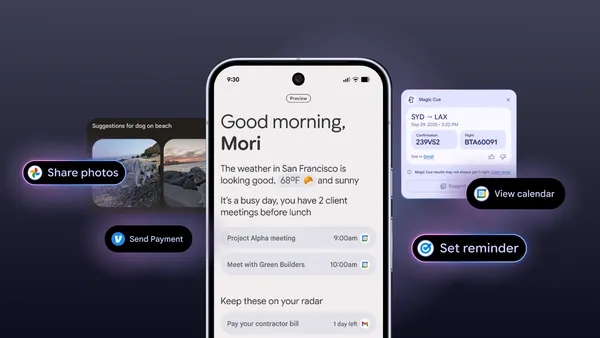 4 ways Pixel's new Magic Cue feature uses on-device AI to suggest information and actions right when you need them.