Unleashing autonomous AI agents: Why Kubernetes needs a new standard for agent execution

Unleashing autonomous AI agents: Why Kubernetes needs a new standard for agent execution

The arrival of autonomous AI Agents capable of reasoning, planning, and executing actions by generating their own code and interacting with the runtime environment marks a paradigm shift in how applications are built and operated. However, these new capabilities also introduce a fundamental security gap: how to safely allow agents to run untrusted, unverified generated code, perform actions and get access to data in runtime environments, especially pertaining to mission-critical infrastructure and environments that may have proprietary data.

We are excited to announce a major initiative within the Kubernetes community to address this exact challenge: we are launching Agent Sandbox as a formal subproject of Kubernetes SIG Apps, hosted under kubernetes-sigs/agent-sandbox.

This is more than just a tool; it is designed to standardize and evolve Kubernetes into the most secure and scalable platform for the agentic workloads.

The Latency Crisis for Interactive AI

Agent behavior often involves quick, iterative tool calls — checking a file, running a calculation, or querying an API. For security reasons, each of these calls requires its own isolated sandbox.

The challenge is that these sandboxes must be created from scratch, extremely quickly, to ensure isolated environments between executions. Because security and isolation are non-negotiable, the "spin-up" time becomes the critical bottleneck. If the secure execution environment takes too long to spin up, the entire agent application stalls, killing the interactive experience.

The Bottleneck of Massive Throughput

Enterprise platforms require infrastructure that can handle overwhelming scale. Users engaged in complex AI agent workloads demand support for up to tens of thousands of parallel sandboxes, processing thousands of queries per second. To meet this challenge, we are extending Kubernetes' proven capabilities of managing high-capacity, low latency applications, models and infrastructure to fit a growing class of single-instance workloads, like AI agent runtimes or dev environments, that require a lightweight, VM-like abstraction. A standardized, controller-based Sandbox API provides Kubernetes-native solution for these use cases, avoiding the workarounds required today, paving the way for the next generation of cloud-native AI applications.

The Agent Sandbox: A new Agent Standard for Kubernetes

To solve these problems, we are introducing a new, declarative resource focused strictly on the Sandbox primitive, designed from the ground up to be backend-agnostic.
The goal is to provide a persistent, isolated instance for single-container, stateful, singleton workloads, managed entirely through familiar Kubernetes constructs. The core APIs include:

  • Sandbox : The core resource defining the agent sandbox workload for running an isolated instance of the agent's environment
  • SandboxTemplate : Defines the secure blueprint of a sandbox archetype, including resource limits, base image, and initial security policies
  • SandboxClaim : A transactional resource allowing users or higher-level frameworks (like ADK or LangChain) to request an execution environment, abstracting away the complex provisioning logic.


In addition to the Sandbox primitive we are also launching with additional features that make the experience as a whole better for the user:

  • WarmPools — In order to support fast instance startup time, which is an important part of the usability of agenting sandboxes, we introduced the Warm Pool extension. The Sandbox Warm Pool Orchestrator utilizes a dedicated CRD to maintain a pool of pre-warmed pods, allowing the Sandbox Controller to claim a ready instance upon creation and reduce cold startup latency to less than one second.
  • Shutdown Time — Since agentic behaviour can be unpredictable, this feature supports clean termination and cleanup of sandboxes, it automates the deletion by providing an absolute time for the sandbox to terminate.
  • Python API/SDK — For better usability and a developer-friendly interface to programmatically interact with these CRDs, we provide an example SDK that abstracts away Kubernetes complexities with simple Pythonic functions.

The standard is designed to seamlessly support multiple isolation backends like gVisor and Kata Containers allowing developers to choose the technology that best fits their security and performance trade-offs.

The new Agent Sandbox features and implementations are available now in the github repo kubernetes-sigs/agent-sandbox and on our website agent-sandbox.sigs.k8s.io. We invite all developers, partners, and experts to join this critical community effort to define the secure scalable future of autonomous AI on Kubernetes.

We will be presenting a technical deep dive and officially launching the project at Kubecon Atlanta, November 2025. We hope to see you there!

Mark it up! Highlight and comment in Scholar PDF Reader

Scholar PDF Reader helps you read through your ever growing pile of papers quickly and thoroughly. Starting today, it also lets you mark key passages or jot down thoughts and questions as you read.

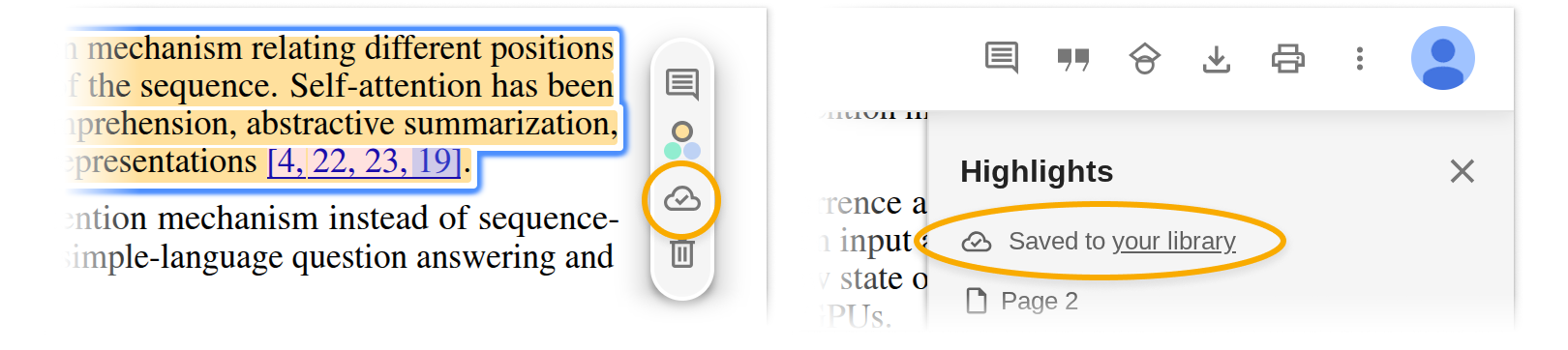
Select the text you want to emphasize, and a popup will appear, allowing you to choose a highlight color or add a comment.

Highlights and comments are saved automatically to your personal Google Scholar Library. The cloud icon confirms your notes are saved online. Access them from any device when logged into your Google account.

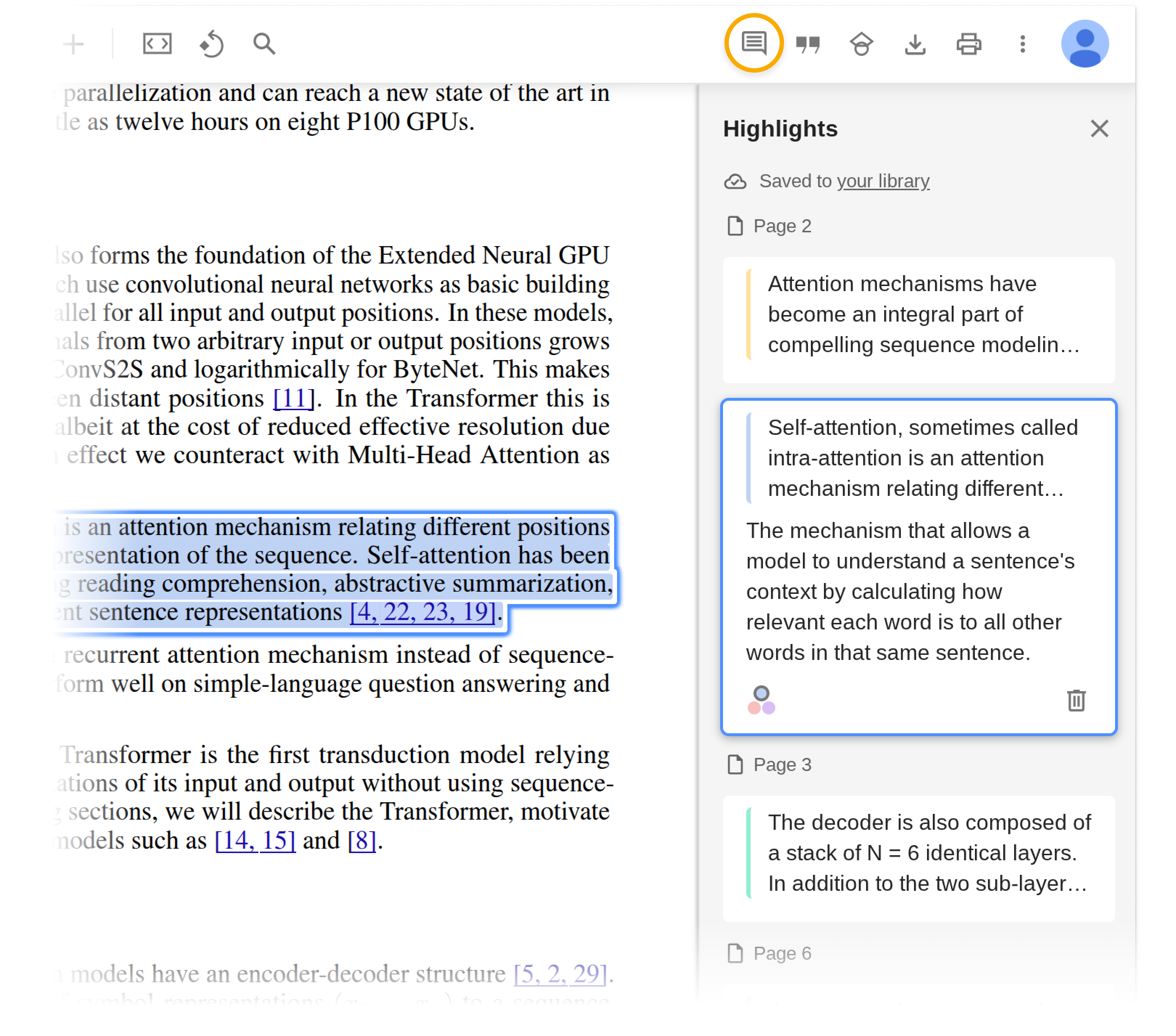
Click the highlight icon in the toolbar to view all your highlights and comments in the PDF.

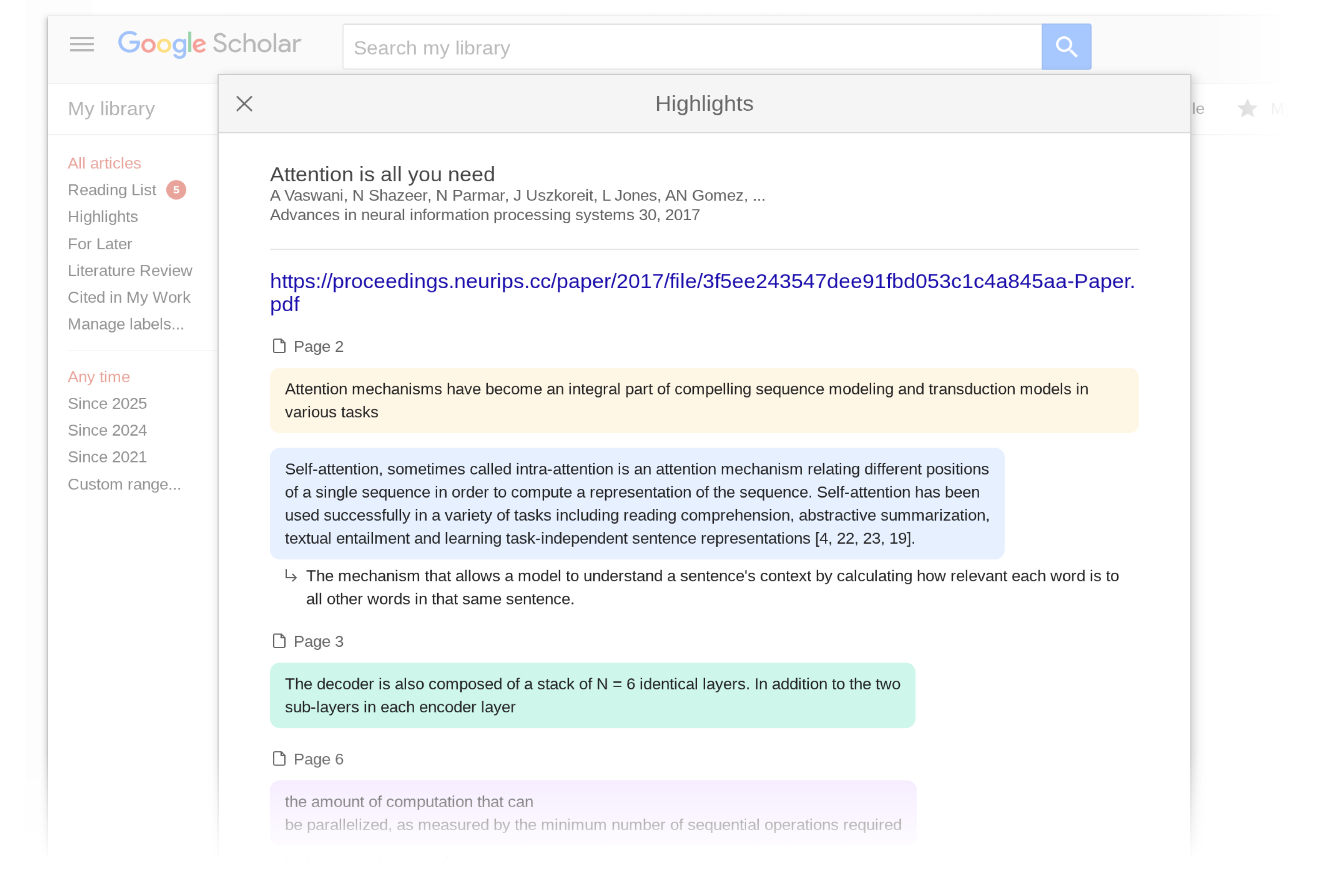
You can also view all your highlights and comments in your Scholar Library.

If you don’t yet have the Reader, you can install it from its Chrome web store page. In addition to highlights, Scholar PDF Reader has many other features to help with your paper reading – AI Outline for quick overview, one-click preview of cited articles, linked figure and table mentions, citing and related articles, and light/dark modes.

Happy reading!

Posted by: Danni Chen, Hanshen Wang, Alex Verstak

Raising the bar on battery performance: excessive partial wake locks metric is now out of beta

Posted by Karan Jhavar - Product Manager, Android Frameworks, Dan Brown - Product Manager, Google Play, and Eric Brenner - Software Engineer, Google Play


A great user experience is built on a foundation of strong technical performance. We are committed to helping you create stable, responsive, and efficient apps that users love. Excessive battery drain is top of mind for your users, and together, we are taking significant steps to help you build more power-efficient apps.

Earlier this year, we introduced a new beta metric in Android vitals, excessive partial wake locks, to help you identify and address sources of battery drain. This initial beta metric was co-developed in close collaboration with Samsung, combining their deep, real-world insights into user experience with battery consumption with Android's platform data.

We want to thank you for providing invaluable feedback during the beta period. Powered by your input and our continued collaboration with Samsung, we have further refined the algorithm to be even more accurate and representative. We are excited to announce that this refined metric is now generally available as a new core vitals metric to all developers in Android vitals.

We have defined a bad behavior threshold for excessive wake locks. Starting March 1, 2026, if your title does not meet this quality threshold, we may exclude the title from prominent discovery surfaces such as recommendations. In some cases, we may display a warning on your store listing to indicate to users that your app may cause excessive battery drain.

GOOGLE PLAY'S CORE TECHNICAL QUALITY METRICS

To maximize visibility on Google Play, keep your app below the bad behavior thresholds for these metrics.

User-perceived crash rate The percentage of daily active users who experienced at least one crash that is likely to have been noticeable
User-perceived ANR rate The percentage of daily active users who experienced at least one ANR that is likely to have been noticeable
Excessive battery usage The percentage of watch face sessions where battery usage exceeds 4.44% per hour
New: Excessive partial wake locks The percentage of user sessions where cumulative, non-exempt wake lock usage exceeds 2 hours

Excessive partial wake locks newly join the technical quality bars that Play expects all titles to maintain for a great user experience

This is the first in a series of new metrics designed to provide deeper insight into your app's resource utilization, enabling you to improve the experience for your users across the entire Android ecosystem.

1. Aligning our definition of excessive wake locks with user expectations

Apps can hold wake locks to prevent the user's device from entering sleep mode, letting the apps perform background work while the screen is off.

We consider a user session excessive if it holds more than 2 cumulative hours of non-exempt wake locks in a 24 hour period. These excessive sessions are a heavy contributor to battery drain. A wake lock is exempted if it is a system held wake lock that offers clear user benefits that cannot be further optimized, such as audio playback or user-initiated data transfer.

The bad behaviour threshold is crossed when 5% of an app’s user sessions over the last 28 days are excessive. If your app exceeds this threshold, you will be alerted directly on your Android vitals overview page. You can read more information about our definition on the Android Developer pages.


Android vitals will alert you to excessive wake lock issues and provide a table of wake lock tags to P90/ P99 duration to help you identify the source by wake lock name.


To help you understand your app’s partial wake lock usage, we are enhancing the excessive partial wake locks page in Android vitals with a new wake lock names table. This table breaks down wake lock sessions by their specific tag names and durations, allowing you to easily identify long wake locks in your local development environment, like Android Studio, for easier debugging. You should investigate any wake locks with P90 or P99 durations above 60 minutes.

2.  Excessive wake locks and their impact on Google Play visibility

If your title exceeds the bad behavior threshold for excessive wake locks, it may be ineligible for some discovery surfaces where users find new apps and games.

In some cases, we may also show a warning on your store listing to inform users that your app may cause their device's battery to drain faster.


Users may see a warning on your store listing if your app exceeds the bad behavior threshold. Note: The exact text and design are subject to change.

We know making technical changes to your app’s code and how it works can be time consuming, so we are making the metric available for you to diagnose and fix potential issues now, with time before the Store visibility changes begin, starting from March 1, 2026.

3. What to do next

We encourage you to take the following steps to ensure your app delivers a great experience for users:

  1. Visit Android vitals: Review your app's performance on the new excessive partial wake locks metric. The metric is now visible to all developers whose apps have wake lock sessions.

  2. Discover excessive partial wake locks: Use the new wake lock names table to identify excessive partial wake locks. 

  3. Consult the documentation: For detailed guidance on best practices and fixing common issues, please check out our technical blog post, technical video and updated developer documentation on wake locks.

Thank you for your continued partnership in building high-quality, performant experiences that users can rely on every day.


Launching Structured Data Files v9.2

Today we’re announcing the general availability of Structured Data Files v9.2. All users can now use v9.2 when downloading and uploading SDFs in the Display & Video 360 UI and API.

SDF v9.2 makes the following updates to files supporting Line Items and Ad Groups:

  • Adds additional audience targeting columns and product filtering options for YouTube and Demand Gen Line Items and Ad Groups.
  • Surfaces related videos for YouTube Line Items, and fixed bidding optimization and primary status for all Line Items.
  • Adds support for Video Sequence Line Items for a closed list of Display & Video 360 clients.

Full details on the changes between v9.1 and v9.2 can be found in the Structured Data Files release notes.

If you are still using a deprecated SDF version, such as v7.1, v8, or v8.1, follow the instructions in the v9 migration guide to migrate to v9 before migrating to v9.2.

If you need help with these new features, please contact us using our Display & Video 360 API Technical support contact form.