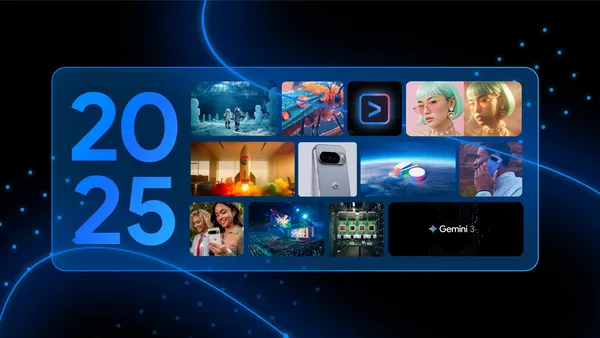
 Look back on Google AI news in 2025 across Gemini, Search, Pixel and more products.
60 of our biggest AI announcements in 2025
Look back on Google AI news in 2025 across Gemini, Search, Pixel and more products.
Look back on Google AI news in 2025 across Gemini, Search, Pixel and more products.
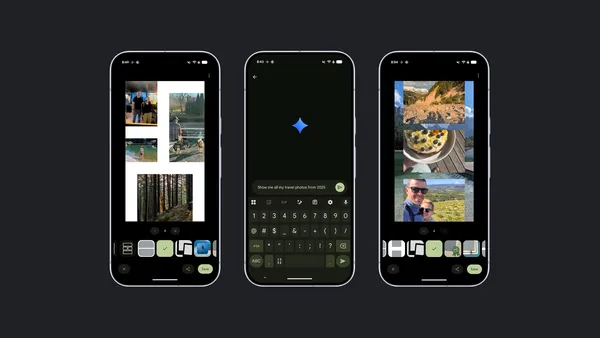 Learn how to use Google Photos to post, share or just look back on your 2025 in photos and videos.
 Today, Alphabet announced a definitive agreement to acquire Intersect, which provides data center and energy infrastructure solutions. The acquisition will enable more d…
Learn how to use Google Photos to post, share or just look back on your 2025 in photos and videos.
Today, Alphabet announced a definitive agreement to acquire Intersect, which provides data center and energy infrastructure solutions. The acquisition will enable more d…
Today, Alphabet announced a definitive agreement to acquire Intersect, which provides data center and energy infrastructure solutions. The acquisition will enable more d…
Learn how to use Google Photos to post, share or just look back on your 2025 in photos and videos.
Today, Alphabet announced a definitive agreement to acquire Intersect, which provides data center and energy infrastructure solutions. The acquisition will enable more d…
Hi everyone! We've just released Chrome Dev 145 (145.0.7587.4) for Android. It's now available on Google Play.
You can see a partial list of the changes in the Git log. For details on new features, check out the Chromium blog, and for details on web platform updates, check here.
If you find a new issue, please let us know by filing a bug.
Chrome Release Team
Google Chrome
We’re expanding image generation powered by Nano Banana in the Gemini app to Google Workspace users of all ages.
This update brings a highly requested and powerful creative tool to younger users, helping them visualize ideas and bring their work to life. For example, a student working on a presentation can now ask Gemini to "create an image of a cell's mitochondria for my biology project" or "generate a picture of a public square in ancient Rome."
Expanding access to this feature provides a more consistent creative experience for all Workspace users.
Users under 18 years old can improve upon their generated images with follow-ups, but cannot edit them directly or use uploaded images for image generation. To prepare to bring image generation to younger users, we conducted rigorous testing specific to users under 18. We’ve trained Gemini to recognize areas that are inappropriate to youth, and implemented safety features and guardrails, including content filters, to help prevent unsafe content, such as illegal or age-gated substances, from appearing in its responses to these users. As a reminder, these filters aren't perfect, so please grant access as appropriate for different age levels. Teachers and staff should continue to help students use Gemini responsibly.

media3-inspector - Extract metadata and frames outside of playback
media3-ui-compose-material3 - Build a basic Material3 Compose Media UI in just a few steps
media3-cast - Automatically handle transitions between Cast and local playbacks
media3-decoder-av1 - Consistent AV1 playback with the rewritten extension decoder based on the dav1d library
We also added caching and memory management improvements to PreloadManager, and provided several new ExoPlayer, Transformer and MediaSession simplifications.
This release also gives you the first experimental access to CompositionPlayer to preview media edits.
Read on to find out more, and as always please check out the full release notes for a comprehensive overview of changes in this release.
The new media3-inspector module combines all utilities to inspect media without playback in one place:
MetadataRetriever to read duration, format and static metadata from a MediaItem.
FrameExtractor to get frames or thumbnails from an item.
MediaExtractorCompat as a direct replacement for the Android platform MediaExtractor class, to get detailed information about samples in the file.
suspend fun extractThumbnail(mediaItem: MediaItem) {
  FrameExtractor.Builder(context, mediaItem).build().use {
    val thumbnail = frameExtractor.getThumbnail().await()
  }
}
We are also still working on even more Compose components, like a prebuilt seek bar, a complete out-of-the-box replacement for PlayerView, as well as subtitle and ad integration.
@Composable
fun SimplePlayerUI(player: Player, modifier: Modifier = Modifier) {
  Column(modifier) {
    ContentFrame(player)  // Video surface and shutter logic
    Row (Modifier.align(Alignment.CenterHorizontally)) {
      SeekBackButton(player)   // Simple controls
      PlayPauseButton(player)
      SeekForwardButton(player)
    }
  }
}
Simple Compose player UI with out-of-the-box elements
When you set up your MediaSession, simply build a CastPlayer around your ExoPlayer and add a MediaRouteButton to your UI and you're done!
// MediaSession setup with CastPlayer
val exoPlayer = ExoPlayer.Builder(context).build()
val castPlayer = CastPlayer.Builder(context).setLocalPlayer(exoPlayer).build()
val session = MediaSession.Builder(context, player)
// MediaRouteButton in UI
@Composable fun UIWithMediaRouteButton() {
  MediaRouteButton()
}
New CastPlayer integration in Media3 session demo app
As with all extension decoder modules, please note that it requires building from source to bundle the relevant native code correctly. Bundling a decoder provides consistency and format support across all devices, but because it runs the decoding in your process, it's best suited for content you can trust.
Caching support – When defining how far to preload, you can now choose PreloadStatus.specifiedRangeCached(0, 5000) as a target state for preloaded items. This will add the specified range to your cache on disk instead of loading the data to memory. With this, you can provide a much larger range of items for preloading as the ones further away from the current item no longer need to occupy memory. Note that this requires setting a Cache in DefaultPreloadManager.Builder.
Automatic memory management – We also updated our LoadControl interface to better handle the preload case so you are now able to set an explicit upper memory limit for all preloaded items in memory. It's 144 MB by default, and you can configure the limit in DefaultLoadControl.Builder. The DefaultPreloadManager will automatically stop preloading once the limit is reached, and automatically releases memory of lower priority items if required.
Mute and unmute – We already had a setVolume method, but have now added the convenience mute and unmute methods to easily restore the previous volume without keeping track of it yourself.
Stuck player detection – In some rare cases the player can get stuck in a buffering or playing state without making any progress, for example, due to codec issues or misconfigurations. Your users will be annoyed, but you never see these issues in your analytics! To make this more obvious, the player now reports a StuckPlayerException when it detects a stuck state.
Wakelock by default – The wake lock management was previously opt-in, resulting in hard to find edge cases where playback progress can be delayed a lot when running in the background. Now this feature is opt-out, so you don't have to worry about it and can also remove all manual wake lock handling around playback.
Simplified setting for CC button logic – Changing TrackSelectionParameters to say "turn subtitles on/off" was surprisingly hard to get right, so we added a simple boolean selectTextByDefault option for this use case.
Media3 1.9.0 has new functionality to make this a lot simpler – you can now define your media button preferences with a standard player command, requiring no custom command handling at all.
session.setMediaButtonPreferences(listOf(
    CommandButton.Builder(CommandButton.ICON_FAST_FORWARD) // choose an icon
      .setDisplayName(R.string.skip_forward)
      .setPlayerCommand(Player.COMMAND_SEEK_FORWARD) // choose an action
      .build()
))
Media button preferences with fast forward button
CompositionPlayer is a new component in the Media3 editing APIs designed for real-time preview of media edits. Built upon the familiar Media3 Player interface, CompositionPlayer allows users to see their changes in action before committing to the export process. It uses the same Composition object that you would pass to Transformer for exporting, streamlining the editing workflow by unifying the data model for preview and export.
We encourage you to start using CompositionPlayer and share your feedback, and keep an eye out for forthcoming posts and updates to the documentation for more details.
val speedProvider = object : SpeedProvider {
    override fun getSpeed(presentationTimeUs: Long): Float {
        return speed
    }

    override fun getNextSpeedChangeTimeUs(timeUs: Long): Long {
        return C.TIME_UNSET
    }
}

EditedMediaItem speedEffectItem = EditedMediaItem.Builder(mediaItem)
    .setSpeed(speedProvider)
    .build()
This new approach replaces the previous method of using Effects#createExperimentalSpeedChangingEffects(), which we've deprecated and will remove in a future release.
This is done via a new EditedMediaItemSequence.Builder constructor that accepts a set of track types (e.g., C.TRACK_TYPE_AUDIO, C.TRACK_TYPE_VIDEO).
To simplify creation, we've added new static convenience methods:
EditedMediaItemSequence.withAudioFrom(List<EditedMediaItem>)
EditedMediaItemSequence.withVideoFrom(List<EditedMediaItem>)
EditedMediaItemSequence.withAudioAndVideoFrom(List<EditedMediaItem>)
We encourage you to migrate to the new constructor or the convenience methods for clearer and more reliable sequence definitions.
Example of creating a video-only sequence:
EditedMediaItemSequence videoOnlySequence =
    EditedMediaItemSequence.Builder(setOf(C.TRACK_TYPE_VIDEO))
        .addItem(editedMediaItem)
        .build()
---
 Posted by Kristina Simakova, Engineering Manager

