In April, we announced notebooks in Gemini as a dedicated, focused space for individual users to organize their projects and conversations. Now, students of all ages, educators, and professionals can access notebooks to keep conversations about a topic organized in one place. For example:
Students can upload all of their materials for a specific course into a single notebook to turn Gemini into a personalized, course-aware study partner that can generate custom practice quizzes and simplify complex topics.
Educators can upload their curriculum standards, assignment rubrics, and lesson templates to rapidly generate aligned coursework, differentiated learning materials, and targeted student feedback.
Professionals can upload product information, project details, research reports, and strategy notes for a specific topic into a notebook to synthesize key insights and draft deliverables.
This tool also combines two of Google’s most powerful AI tools, the Gemini app and Gemini Notebook, to unlock new ways of working and studying. For example, if you’re a student, try adding class notes to a notebook and using Gemini Notebook to create a Cinematic Video Overview. The next day, open the notebook in the Gemini app and ask it to create a study guide based on that same material.
Getting started
Admins: Access to Notebooks in Gemini is on by default, and is controlled using the Gemini App and Gemini Notebook access settings. As an administrator of your organization's Google Accounts, you can control who can use Notebooks in Gemini. Notebooks in Gemini are available to users who are in a group or OU with both Gemini Notebook and Gemini set to On. Visit the Help Center to learn more about turning Gemini and Gemini Notebook on or off for users.
End users: Open the left side panel in the Gemini app and click “New notebook” to start adding your sources and focus area. You can add up to 10 sources to your notebook. Visit the Help Center to learn more.
Available to all Google Workspace customers and Workspace Individual subscribers outside of the European Economic Area (EEA), as well as users with personal Google accounts globally
The Extended Stable channel has been updated to 152.0.7977.134for Windows and Mac which will roll out over the coming days/weeks.
A full list of changes in this build is available in the log. Interested in switching release channels? Find out how here. If you find a new issue, please let us know by filing a bug. The community help forum is also a great place to reach out for help or learn about common issues.
The Stable channel has been updated to 153.0.8010.52/.53 for Windows andMac and 153.0.8010.52 to Linux which will roll out over the coming days/weeks. A full list of changes in this build is available in the Log
Security Fixes and Rewards
Note: Access to bug details and links may be kept restricted until a majority of users are updated with a fix. We will also retain restrictions if the bug exists in a third party library that other projects similarly depend on, but haven’t yet fixed.
This update includes 16 security fixes. Please see the Chrome Security Page for more information.
[TBD][500417361] Critical CVE-2026-93374: Use after free in Dawn. Reported by Florian Schweitzer on 2026-04-08
[N/A][548085797] Critical CVE-2026-93372: Buffer overflow in WebGL. Reported by Google on 2026-08-17
[$3,000][550839154] High CVE-2026-93375: Incorrect reference resolution in Tracing. Reported by M. Fauzan Wijaya (Gh05t666nero) on 2026-08-22
[TBD][541707261] High CVE-2026-93382: Use after free in PDFium. Reported by WinD39 - Huynh Dinh Vu on 2026-08-02
[N/A][553130676] High CVE-2026-93387: Improper state validation in Skia. Reported by Google on 2026-08-26
[N/A][553132214] High CVE-2026-93373: Use after free in Extensions. Reported by Google on 2026-08-26
[TBD][556853443] High CVE-2026-93381: Buffer overflow in PDFium. Reported by SeungMyung Lee (@sm1ee), Siung kim (@ksw9722) on 2026-09-03
[TBD][560039872] High CVE-2026-93379: Incorrect authorization in ORB. Reported by OGINOME Tomohito on 2026-09-11
[N/A][560121552] High CVE-2026-93377: Type confusion in V8. Reported by Google on 2026-09-11
[N/A][498411599] Medium CVE-2026-93380: Race condition in FileSystem. Reported by Google on 2026-04-01
[N/A][511832293] Medium CVE-2026-93384: Server-side request forgery in Omnibox. Reported by Google on 2026-05-10
[N/A][515493668] Medium CVE-2026-93383: Information leak in Permissions. Reported by Google on 2026-05-22
[N/A][520521197] Medium CVE-2026-93376: Out of bounds read in DataTransfer. Reported by Google on 2026-06-05
[N/A][540051167] Medium CVE-2026-93378: Missing authorization in Storage. Reported by Google on 2026-07-28
[N/A][553136980] Medium CVE-2026-93385: Information leak in Paint. Reported by Google on 2026-08-26
[N/A][513996595] Low CVE-2026-93386: UI misrepresentation in WebAppInstalls. Reported by Google on 2026-05-17
We would also like to thank all security researchers that worked with us during the development cycle to prevent security bugs from ever reaching the stable channel.
Interested in switching release channels? Find out how here. If you find a new issue, please let us know by filing a bug. The community help forum is also a great place to reach out for help or learn about common issues.
Posted by Maunik Shah, Staff Software Engineer, Alec Garcia, Software Engineer, and Joseph Yong, Technical Program Manager
At Android, we are constantly working to provide developers and enterprise partners with the data they need to keep devices protected. Today, we're thrilled to announce the stable release of the AndroidX Security Stateversion 1.1.0 and Security State Provider version 1.0.0 libraries which provides a centralized mechanism designed to bring further transparency to the comprehensive security posture and pending updates across the Android ecosystem.
Whether you develop security-critical, consumer-facing apps (such as banking, fintech, or healthcare) or Mobile Device Management (MDM) solutions, these libraries enable you to programmatically verify the security state of the device per component. Rather than relying on a coarse, monolithic Security Patch Level (SPL), you can evaluate true component-level protection and whether remediations are actively pending via the androidx.security.state library. For OEMs and Over-The-Air (OTA) client developers, the companion androidx.security.state.provider library allows you to expose update availability via standardized mechanisms.
Understanding Security Patch Levels (SPL)
As Android has evolved to deliver rapid, independent component updates through modular systems like Google Play system updates, relying on a single SPL build property is no longer the best way to determine a device's true security posture. To provide component level visibility, the Security State libraries provide APIs for three distinct patch levels:
Device SPL (DSPL): The security patch level currently installed and running on the device for specific system components, queried from device properties and configs without network calls.
Published SPL (PSPL): The latest patch level officially published in the Android Security Bulletin for those components.
Available SPL (ASPL): The patch level ready to be downloaded and installed on the specific device, queried asynchronously via inter-process communication (IPC) with on-device update clients.
The Security State libraries track these patch levels across the following components:
System: The core Android operating system, updated via standard/OEM system OTA updates.
System modules: Modular OS subsystems updated seamlessly in the background via Google Play system updates (Project Mainline).
Kernel: The foundational layer connecting the device's hardware and software, evaluated via Long-Term Support (LTS) release versions (such as 5.15.159 or 6.1.91) rather than monthly calendar dates.
By surfacing these three distinct patch levels at the component level, developers and enterprises can now understand exactly how secure a device is, identify missing patches, and take proactive remediation steps. One way of doing so can be seen in the example below.
Rather than taking an all-or-nothing approach to device access, developers and enterprises can combine DSPL, PSPL, and ASPL to make smart, contextual security decisions. For example, a banking or enterprise app can compare a device's current security patch (DSPL) against pending updates (ASPL) before initiating sensitive workflows like high-value payments or credential enrollment. If an update is waiting to be installed, developers and enterprises can require the user to update their device first. For even finer control, developers and enterprises can query whether specific high-risk vulnerabilities (CVEs) have been patched on the device, such as verifying that critical NFC or Bluetooth fixes are in place before authorizing tap-to-pay or proximity data sharing.
High-level flow
For app developers and enterprise management
Client applications can use the androidx.security.state library to make informed, context-aware decisions:
Synchronous Posture Checks (DSPL): Apps can immediately inspect the installed patch levels of the system, system modules, and kernel on app launch and compare with PSPL to verify whether the device meets an organization's required security baseline before unlocking sensitive corporate resources or biometric access.
Pending Update Prompting (ASPL): Instead of immediately blocking an employee whose device is slightly behind on patches, enterprise apps can query ASPL to check if a pending system update or Google Play system update is staged and ready to install. If so, apps can display tailored in-app guidance directing the user to System Settings to complete the installation.
Vulnerability-Level Auditing (CVEs): For high-assurance use cases, the library provides ability to download device-specific vulnerability reports from Open Source Vulnerabilities (OSV) to programmatically audit whether specific, critical CVEs have been resolved on the device.
For OEMs & update clients: Standardizing update availability
The companion androidx.security.state.provider library establishes a standardized, Android IPC mechanism for update clients to report update availability directly on the device. Historically, even if proprietary OTA clients surfaced update availability, this information was siloed and not queryable by third-party applications. Going forward, apps can access ASPL details through a single, unified API, regardless of whether the update is delivered via an OEM’s dedicated OTA client or Google Play, as long as it is provided by the update client.
Google Play system updates already expose ASPL across GMS Android devices.
Google Over-The-Air (GOTA) has also been onboarded and we are working with OEMs worldwide to onboard their OTA clients to this standardized framework.
Incorporating bulletin-level data
Beyond a single SPL string, the Security State libraries provide clarity on what that patch level actually means for the device. By integrating with the Open Source Vulnerabilities (OSV) database to obtain Android Security Bulletin data, the libraries can look deeper than ever before. Instead of just asking if a specific threat, such as a CVE entry, is blocked, this data also allows the libraries to provide the “effective” and granular security state of the device.
Here are two ways this approach benefits enterprises and Android OEMs:
Sometimes, a monthly security update does not contain any new threats for a specific component. In this case, the libraries automatically increments the security level for that component to reflect its "effective" security state. This ensures that a device is accurately credited for being fully protected against all known security threats.
A new feature introduced in Android 17 allows OEMs to declare specific security fixes that have been applied above the SPL via a Supplemental Patches XML file. This feature allows OEMs who backport specific security fixes to immediately prove device compliance without having to wait for a full monolithic SPL bump, ensuring continuous patching efforts are properly credited. The Security State libraries surface this granular information to apps and services, ensuring that continuous patching efforts are recognized the moment they are implemented.
Get started
The Security State Libraries are built to empower the entire Android ecosystem.
App Developers & MDMs: To start protecting your users and evaluating real-time patch posture, explore the official Understand device security state guide.
Release Notes: Check out the official AndroidX Release Notes for Security-State and Security-State-Provider libraries for complete changelogs and API signatures.
We value your feedback! Please try out the libraries and let us know your thoughts or report any issues on the public Android Issue Tracker.
by Mary Radomile, Stephanie Taylor & amanda casari, OSPO
For over twenty years, Google Summer of Code (GSoC) has welcomed new developers into open source by pairing them with experienced mentors on real projects. This spirit is especially vibrant in India, which is home to more than 55% of all global GSoC participants over the last decade.
This July, our team traveled across Bengaluru and Delhi to host a series of developer events and debut our first-ever GSoC Alumni CAMP, bringing together members of India’s vibrant GSoC alumni community. We engaged directly with current and former GSoC Contributors, Mentors, and project maintainers, experiencing firsthand the passion and energy of the Indian developer ecosystem.
Community stories: Learning to think and lead as an engineer
In both Bengaluru and Delhi, a highlight of the trip was hearing directly how open source and GSoC have fundamentally changed how developers think and work.
For many attendees, having a dedicated open source mentor through GSoC took the fear out of tackling new and intimidating codebases. One former participant told us they almost walked away from a distributed storage project because it felt too overwhelming: "Storage systems felt impossible. But great mentors taught me how to think, not just how to code." Another echoed that shift in perspective: "Why am I spending so much time thinking rather than coding? Then I realized that building products is actually about thinking more than coding. GSoC taught me to think like an engineer."
That shift in mindset turns first-time contributors into long-term open source community leaders. We met one developer who submitted their very first pull request in 2023, started mentoring in 2024, and is now a lead maintainer for a major open source Android app. We also saw how new contributors to global projects can spark entire local ecosystems—like the Indian compiler community, which started with a few GSoC alumni and has rapidly grown into a 3,500+ member network with dozens of meetups across the country.
The Google Summer of Code Alumni CAMP — Bengaluru
Open source mentorship in the age of AI
Across our sessions and unconference discussions, one recurring conversation resonated above all others: the evolving role of mentorship in an AI-assisted world. The human element of open source is more critical than ever. As one attendee noted:
AI can generate the slides, but the context takes nine years.
We heard over and over from participants—open source maintainer time and attention remains a limited resource. CAMP participants presented multiple examples of where AI is proving effective for generating starter templates, writing tests, or fixing syntax. Even with this, what open source projects fundamentally need hasn't changed: maintainer time, clear architectural vision, and thoughtful code reviews.
Beyond code quality, the industry agrees that dedicated mentorship is the vital bridge between temporary contributions and long-term project stewardship. Without structured guidance, newcomers often struggle with unwritten project norms, complex codebase histories, or public review feedback, leading to contributor burnout and abandoned pull requests. Programs like GSoC transform casual interest into a sustainable maintainer pipeline by fostering psychological safety, belonging, and accountable relationships. By investing directly in maintainer time and human connection, GSoC ensures that open source projects remain secure and resilient for generations to come.
What’s next?
If our trip across Bengaluru and Delhi taught us anything, it’s that the strength of open source has always come from the communities we build together, not the volume of code any one person can ship.
As developer tools evolve, our main focus for GSoC is preserving the mentorship experience that makes the program special. Manually sifting through low-quality, automated submissions wastes maintainer time and drains the energy of volunteers who signed up to mentor new peers and colleagues. We're ready to tackle these challenges directly by optimizing our program to assist and protect our community of open source maintainers, so they can focus on leading their open source projects and helping new engineers grow. You can stay updated on GSoC’s program rules and timelines at g.co/gsoc.
To everyone who joined us in Bengaluru and Delhi—thank you for your energy, your endless inspiration, and your dedication to open source!
To expand the capabilities of Workspace Studio and help teams build powerful, custom automations, we are introducing four new features for flows in Workspace Studio: custom starters, custom steps, third-party (3P) integrations, and webhooks. These new capabilities empower users to seamlessly connect custom Google Apps Script functions, integrate third-party services, and trigger external webhooks directly within flows in Workspace Studio.
All of these features are backed by granular enterprise security controls that allow admins to safely enable and adopt agentic capabilities across their organizations.
Custom starters: Build and publish custom, real-time triggers to run flows based on events in other applications.
Custom starter that triggers a Studio Flow from an external application
Custom steps: Build and run custom logic (e.g. using Apps Script) and tailor flows to advanced business needs.
Create custom steps using Apps Script
Third-party integrations (Beta): Connect third-party applications and services to pass data effortlessly between Workspace and external tools to automate your business flows. The following integrations are available:
Asana
Confluence
Hubspot
Jira
Mailchimp
Quickbooks
Salesforce
Slack
Step to add a Jira comment in Studio Flows
Webhooks: Send HTTP requests to external endpoints and trigger actions in them. On supported editions, admins can set an URL allowlist for webhook access.
Webhook step in Studio Flows
Getting started
Admins:
These features are OFF by default. Admins can enable them in the Workspace Admin Console under Apps > Google Workspace > Workspace Studio:
Custom steps settings
Integration settings
Webhook settings
Admins can change the human approval requirements in the Workspace Admin Console under Apps > Google Workspace > Workspace Studio > Approvals. Custom steps and Integration have their own approval settings, while Webhooks respect the approval settings for Sensitive Steps.
We’re introducing Expert Intelligence, a cross Google initiative that helps users engage with trusted sources through Google AI products, starting with Gemini Notebook. Featuring more than 100,000 books from major publishers, employees and students can now incorporate insights from leading authors, publications, and domain experts directly into Gemini Notebook.
Users will be able to add compatible ebooks they’ve purchased from Google Play Books directly to a Gemini Notebook, making it simple for them to ask questions about a book and receive responses grounded directly in its text. Readers can also use Gemini Notebooks to help you understand books in new ways, for example, by generating Infographics, Audio Overviews, Quizzes, or more. We’re also providing a book on us for users 18 years or older in the U.S. while supplies last.
Even better, employees and students can combine an author’s expertise with a variety of other sources, including their own information. For example:
A student can upload their class syllabus and lecture notes alongside a purchased book to generate an Audio Overview and practice quizzes to prepare for final exams.
A manager can ask Gemini Notebook to help brainstorm strategies on how to best give employees feedback and navigate tough conversations by consulting a book on management best practices.
Note: To interact with an ebook in a shared notebook—such as asking questions or creating artifacts—recipients must also have purchased an eligible Play Book ebook.
Getting started
Admins: In order for end users to access this feature, they must be in an OU with Gemini Notebook, Google Play, and Google Books set to On. Visit the Help Center to learn more about turning Gemini Notebook and Google Play and Google Books on or off for users.
Tip: For students who need access only to specific books, admins can purchase books using Buy for Groups and allocate to the students without needing to provide Google Play access (available to organizations with Google Workspace for Education Plus or a Teaching & Learning add-on).
End users: There is no end user setting for this feature. To see if a book is eligible for Expert Intelligence, visit Google Play Books. If the ebook is eligible, you’ll see Gemini Notebook listed when you click the “Tools” badge on a book’s detail page, or you can browse eligible books. Visit the Help Center to learn more about adding Play Books ebooks as a source in Gemini Notebook.
Available to all Google Workspace customers, Workspace Individual subscribers, and users with personal Google accounts who have Gemini Notebook, Google Play, and Google Books enabled

 Google and the UN system have launched the UN System Data Commons, a new open platform making global statistics accessible and easy to search.


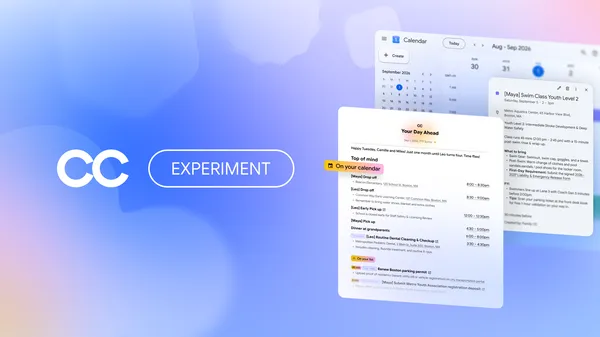 Google Labs is expanding CC to groups, starting with families and households, so they can spend less time on logistics.


