Gemini CLI now features Plan Mode, a read-only environment that allows the AI to analyze complex codebases and map out architectural changes without the risk of accidental execution. By leveraging the new ask_user tool and expanded Model Context Protocol (MCP) support, developers can collaboratively refine strategies and pull in external data before committing to implementation.
Stonepeak to become majority shareholder in new venture combining GFiber and Astound Broadband; Alphabet to retain minority stake
MOUNTAIN VIEW, CA, and NEW YORK, NY — March 11, 2026 — GFiber (formerly Google Fiber) and Stonepeak today announced that they have entered an agreement to combine GFiber with Astound Broadband, creating a leading independent fiber provider. The new company will be majority owned by Stonepeak, an investment firm specializing in infrastructure and real assets. Alphabet will remain a significant minority shareholder, reflecting its confidence in GFiber’s growth opportunity and leadership.
The combined business will be led by the existing GFiber executive team, utilizing their expertise in high-speed fiber innovation to manage the combined network footprint. The combination of GFiber’s high-growth metropolitan networks with Astound’s established infrastructure, team and capabilities creates a highly complementary, national network platform.
This agreement advances GFiber’s mission of redefining internet connectivity and represents a major step toward its goal of operational and financial independence. GFiber will have the external capital and strategic focus needed to accelerate its next phase of growth, expanding its customer-first approach and pioneering fiber technology across the country.
“Building on GFiber’s success as a leading independent US fiber internet provider, this is an exciting next phase of their growth,” said Ruth Porat, President & Chief Investment Officer, Alphabet and Google. “GFiber will now have the opportunity to provide better internet access to more communities across the country as they combine with Stonepeak’s Astound business, while continuing to provide their award winning customer experience.”
"GFiber has always been about pushing the boundaries of what’s possible for internet speed and service,” said Dinni Jain, GFiber CEO. “This partnership with Astound and Stonepeak is the next step in our decade-long mission to redefine what customers can expect from their internet provider. It’s a strategic opportunity to scale our customer-focused approach to connect more households to a truly different type of internet service."
“We are excited to be working with GFiber and Alphabet on this transaction,” said Andrew Thomas, Senior Managing Director at Stonepeak. “This partnership will be transformational for the businesses, with GFiber and Astound’s complementary networks and extraordinary teams enabling the combined company to better serve millions of customers and the demand for a next generation network and ubiquitous connectivity. Stonepeak has a strong track record of building world-class digital infrastructure and we look forward to supporting the company with Alphabet as a co-investor.”
The transaction is subject to customary closing conditions and regulatory approvals and is expected to close in Q4 of this year.
Posted by Maru Ahues Bouza, PM Director, Games on Google Play
Last September, we shared our vision for the future of Google Play Games grounded in a core belief: the best way to drive your game’s success is to deliver a world-class player experience. We launched the Google Play Games Level Up program to recognize and reward great gaming experiences, while providing you with a powerful toolkit and new promotional opportunities to grow your games.
The momentum since our announcement has been incredibly positive, with more than 600 million gamers now using Play Games Services every month. Developers are also finding success, with one-third of all game installs on the Play Store now coming from editorially-driven organic discovery. In fact, in 2025, Level Up features have driven over 2.5 billion incremental acquisitions for featured games, in addition to an average uplift of 25% in installs during the featuring windows.
Today, we're inviting you to start testing Play Games Sidekick to keep your players in the action, sharing new Play Console updates to optimize your reach, and helping you prepare for our upcoming program milestones.
Boost retention and immersion with Play Games Sidekick
Play Games Sidekick is a helpful in-game overlay that gives players instant access to relevant gaming information—like rewards, offers, achievements, and quest progress— keeping them immersed while driving higher engagement for developers. It serves as a seamless bridge to the highly visible "You" tab, connecting your game to 160 million monthly active users already engaging there and doubles as an active gaming companion that enhances the player experience with helpful, AI-generated Game Tips.
Deep Rock Galactic: Survivor keeps players in the action with Play Games Sidekick
Today, Sidekick officially debuts in over 90 games, with the experience expanding to all Level Up titles later this year. But you don’t need to wait for the broader rollout to get your game ready. You can nowenable Sidekick through Play Console to preview and test how your players will interact with features like Achievements, Streaks, Play Points Coupons, and Game Tips. Upon completing your testing, be sure to push Sidekick for production to ensure your game meets the Level Up user experience guidelines.
Enable Play Games Sidekick in Play Console to begin testing
Optimize reach and operations with new Play Console updates
We are also rolling out two new Play Console updates to help you optimize your reach and streamline operations:
Pre-reg device breakdowns: To aid launch decisions, you can now analyze the device distribution of your pre-registered audience by key device attributes including Android version, RAM and SoC. This enables you to optimize game performance, minimum specs, and marketing spend for the players already waiting for your game.
Identify launch-day risks and optimize performance for your players
with new pre-registration device breakdowns
Real-time feedback: WithLevel Up+, our tier for high-performing games, qualifying titles can unlockpromotional content featuring and tools like deep-links and audience targeting. While submissions must meet Play’squality guidelines, you no longer have to wait 24 hours to learn about issues. You can now get immediate feedback on quality whenever possible.
Your 2026 checklist: Securing your Level Up benefits
Today, all games on Google Play qualify for Google Play Games Level Up. However, in order to maintain access to Level Up benefits like Play Points offers, expanded APK size limits, Play Store collections and campaigns consideration, or access to high-visibility surfaces like You tab and Sidekick, you’ll need to ensure your game meets user experience guidelines by their upcoming milestones:
By July 2026:
Integrate Play Games Sidekick to offer a quick and easy entry point to access rewards, offers, and achievements through an in-game overlay.
Implement achievements with Play Games Services, to support authentication with the modern Gamer Profile, and to keep players engaged across the lifespan of your game.
By November 2026:
Implement cloud save to enable progress sync across devices.
Last week, we announced that we’re working on an expanded Level Up program that builds on our successful foundation to further improve gaming experiences. The update will introduce new requirements that will unlock additional benefits like lower service fees. Engaging with the program now ensures your work is strategically aligned with these future updates. We’ll share more details in the coming months.
In the meantime, the path to your first program milestone begins today. By prioritizing these user experience guidelines now, you’re investing in the long-term value of your game and ensuring it’s built to thrive for every player. Head over to Play Console to start testing Sidekick and take the next step in your Level Up journey.
Posted by Aurash Mahbod, VP and GM, Games on Google Play
Google Play is proud to be the home of over 200,000 games—many of which defined the mobile-first era. But as cross-platform becomes the standard for players, we are evolving our ecosystem to match the scale of your ambitions. In recent years, we focused on elevating Android gaming quality while significantly deepening our support for native PC titles.
We know that maximizing your game’s reach across different platforms is complex. The Level Up programserves as your strategic roadmap, helping you prioritize optimizations that drive great experiences on Android. Building on this foundation, we’re doubling down on our investment to make Play the most accessible home for everycategory of play. We’re adding new tools for paid games and making the PC game discovery to purchase seamless. Keep reading to learn more about how we’re creating a bigger stage for your games.
Scale your discovery across mobile and PC platforms
Building a bigger stage starts with making your games easier to find—and easier to buy—no matter which device your players prefer. We’re expanding your reach by bringing cross-platform discovery directly to the mobile storefront.
With the new PC section in the Games tab, your PC titles gain high visibility placement among our most active mobile players.
The PC badge ensures your cross-platform investment is recognized. This creates more opportunities to acquire players on mobile and transition them seamlessly to your high-fidelity PC experience.
PC in the Games tab and PC badging expands your game’s reach
With ‘buy once play anywhere’ pricing, we’re making it easier to sell your games across different devices. If you choose to opt-in your mobile game for Google Play Games on PC, you can now offer a single price that covers both mobile and PC versions. We’re rolling out this feature in EAP with select games including Brotato: Premium.
For PC-only games, players can now complete the full purchase journey on Google Play Games on PC with the same trusted security and privacy standards they expect from Google Play.
'Buy once play anywhere’ pricing to sell your games across devices
Lower the purchase barrier with Game Trials
To help you convert high-intent buyers with less friction, we’re introducing Game Trials, a feature that enables players to experience your game for a limited time before making a purchase on mobile. Accessible directly from your game’s store listing, Game Trials provides a fast-track for players to start exploring your world with a single tap. Game trials are now in testing with select titles and we’ll roll it out to more titles soon.
To ensure this is low maintenance for you, Game Trials is added directly into your Android App Bundle. This enables you to offer a high quality trial without the burden of a separate codebase or a demo version of your app.
Play ensures trials are secure and seamless. Game Trials are once per user and protects your game while the trial is active. When it ends, players can purchase your game and keep their progress.
We’re also working on tools that will give you more control—such as specifying a custom time limit or an in-game event to conclude the trial.
Game Trial for DREDGE to help convert high-intent buyers
Diversify your revenue with a dedicated player community on Play Pass
Play Pass is another way to diversify revenue and grow your player audience. It has been a strong launchpad for indie hits such as Isle of Arrows, Slay the Spire, and Dead Cells. With Play Pass, you can reach highly dedicated players seeking a more curated gaming experience, free of ads and in-app purchases. To help you deepen engagement, paid titles on Play Pass can now opt in to Google Play Games on PC— making it easy for players to find and play your games on a larger screen. Later this year, you can nominate your game through a streamlined opt-in process directly in Play Console.
Drive long term sales with Wishlists and Discounts
Wishlists and Discounts are one of the most effective ways to capture player intent and drive long term sales. To support players at every stage of their purchase journey, we’re integrating them directly into Play. Players can save titles to their wishlist and manage them from library settings. To keep your game top-of-mind, players will receive automated notifications for your latest discounts — starting with mobile and expanding soon to PC games.
Wishlist and discount notifications drives long term sales, rolling out today
How leading studios are finding a new path to success on Play
We’re thrilled to welcome Sledding Game, 9 Kings, Potion Craft, Moonlight Peaks, and Low Budget Repairs to Play [1]. It marks an exciting expansion of our catalog and a step forward in our mission to build a bigger gaming ecosystem for all developers. This growth is fueled by our developer community, whose feedback continues to shape our roadmap and help us better support your success.
Sledding Game, 9 Kings, Potion Craft, Moonlight Peaks, and Low Budget Repairs is coming to Play.
That mission brings us to GDC and the Independent Games Festival (IGF) Awards[2], where the next generation of games awaits! This year, we’re inviting you to come along for the ride as we go backstage to chat with the finalists and winners, sharing the moments of triumph and the creative stories behind their development. Not joining us at GDC? You can take the next step in your journey to launch your game on Google Play today.
1. Sledding Game, 9 Kings, Potion Craft, and Moonlight Peaks are coming to Google Play in 2026. Low Budget Repairs is scheduled for release in 2027. [Back]
2.Independent Games Festival (IGF) Awards is hosted by Game Developers Conference (GDC) and requires a valid GDC pass for entry. [Back]
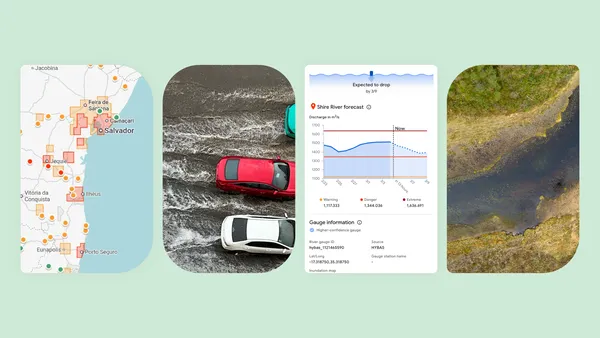 Groundsource is a new AI-powered methodology from Google Research that transforms millions of public records into actionable data.
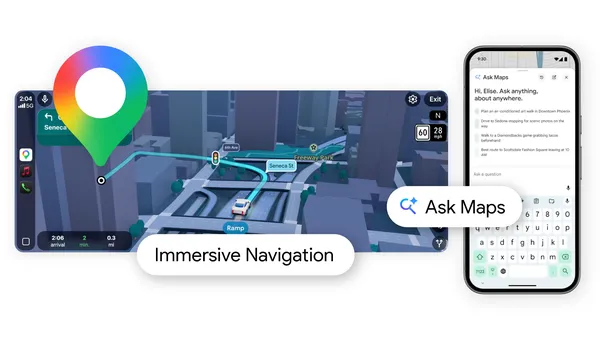 Google Maps has two new AI features: Ask Maps and Immersive Navigation.
 Google’s newest London building, Platform 37, is named to honor Google DeepMind’s AlphaGo.
 The Growing Up in the Digital Age Summit was hosted by Dublin’s Google Safety Engineering Center (GSEC).
 Updates to Google Play include a new You tab, plus new features in the Apps tab and in Google Play Games.


.png)
.gif)
%20(1).gif)


.gif)
