GFiber provides high-speed fiber internet that actually makes sense. While other providers may hide their true costs in the fine print, we keep it simple. With GFiber, you get speedy, straightforward service with no annual contracts, no hidden fees, and no data caps. The price you see is the price you pay, month after month.
Simple pricing with no annual contracts
We believe in a "no-catch" bill. All residential products are month-to-month, which means no annual contracts or exit fees. Your monthly rate for your chosen product stays consistent.[1]
Learn more about how GFiber delivers more value than the other guys: https://fiber.google.com/blog/2026/03/does-gfiber-deliver-more-value-than.html
Wi-Fi equipment and professional installation is included
Every GFiber product comes with the hardware you need to get your home online, including free repairs if you ever need them. You’ll never see a monthly internet equipment rental fee, and there’s no additional charge for the Fiber Jack or installation in your home. All included equipment is designed to cover up to 5,000 square feet with Wi-Fi.[2]
Equipment included is the latest generations:
Core 1 Gig: Features advanced Wi-Fi 6E equipment (router and mesh extender).
Home 3 Gig and Edge 8 Gig: Feature state-of-the-art Wi-Fi 7 routers with a 10-Gig and multiple 2.5-Gig Ethernet ports and up to two mesh extenders.
Unlimited data and symmetrical speeds
All our products include truly unlimited data with no overage charges or speed throttling, unlike other providers who reduce your speeds when you reach certain data thresholds. The symmetrical upload and download speeds in GFiber products mean you’ll look and sound great on video calls (and you won’t get stuck with freeze face), be able to send big files fast, and enjoy instant response gaming.
Curious about how we measure speed? Read more: https://fiber.google.com/blog/2026/02/is-gfiber-internet-worth-it.html
Nationwide award-winning customer satisfaction, year after year
We’re obsessed with making your internet experience great, and it shows. In 2025, GFiber (formerly Google Fiber) ranked #1 in Customer Satisfaction for Residential Wired Internet Service in the South Region three years in a row and #1 as the most trusted provider. [3] Additionally, GFiber has been recognized as the 4x Readers’ Choice Winner: Best Overall Internet Service Provider of 2025.[4]
99.9% reliability
GFiber maintains 99.9% network uptime[5] because we know that internet is only as good as its connectivity. This reliability is backed by our Uptime Guarantee for Edge 8 Gig and 2 Gig business customers: if your internet connection falls below 99.9% uptime in a given month, you’ll receive a 25% credit on your monthly bill.[6]
So, what's the catch with GFiber?
There isn't one. No contracts. No equipment fees. No data caps. No price hikes after the first year (or ever). No bundles needed for the best price. Just high speeds and steady, transparent pricing, backed by award-winning customer support.
[1] Consistent Pricing: Does not include local access fees, which goes back into your community.
[2] Equipment: Actual internet, Wi-Fi speeds, and Wi-Fi coverage are not guaranteed and can vary based on factors such as home or business size and layout, construction materials, hardware and software limitations, latency, packet loss, etc. Customers canceling service will have to pay a replacement fee (including any applicable taxes) if they fail to return equipment within 60 days after cancellation.
[3] J.D. Power: GFiber (formerly Google Fiber) received the highest score in the South region of the J.D. Power 2023-2025 U.S. Residential Internet Service Provider Satisfaction Studies, which measures customers’ satisfaction of service with their current internet provider. Visit jdpower.com/awards for more details.
[4] A trademark of Ziff Davis, LLC. Used under license; Reprinted with permission. © 2025 Ziff Davis, LLC. All Rights Reserved.
[5] Conditions Apply. See Uptime Guarantee for Details
[6] [99.9% Uptime] Conditions Apply. See Uptime Guarantee for details.


%20(1).jpg)
%20(1).jpg)

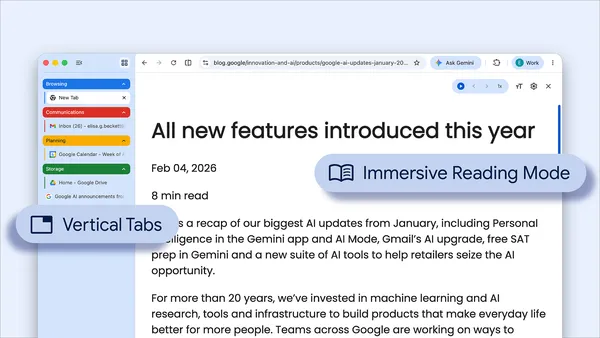 These new features are designed to streamline your browser and help you maximize productivity in Chrome.
 - Josh Radcliff, Data Manager API Team

 Google doesn’t train Gemini using personal emails. Here’s how Google keeps private data secure in Gmail amid new AI model upgrades.
 Android XR adds spatial conversion for 2D apps, the ability to pin apps to your walls and more ways to watch, create, and explore.