Author Archives:

Long Term Support Channel Update for ChromeOS

A new LTS-144  version 144.0.7559.256(Platform Version: 16503.88.0), is being rolled out for most ChromeOS devices. 


This version includes selected security fixes including:


519258799

High

CVE-2026-12034

Insufficient validation of untrusted input

499449324

High

CVE-2026-7922

Use after free in ServiceWorker

523677844

Critical

CVE-2026-13033

Out of bounds read in Blink>InterestGroups

506653647

High

CVE-2026-9970

Use after free in WebGL

511765713

High

CVE-2026-10969

Insufficient validation of untrusted input in Extensions

513609324

High

CVE-2026-10003

Use after free in Views

501575979

High

CVE-2026-9933

Use after free in Input

513208588

High

CVE-2026-9993

Use after free in Views

504710769

High

CVE-2026-9961

Use after free in SurfaceCapture

513256572

High

CVE-2026-9995

Use after free in WebXR

519728275

Critical

CVE-2026-12439

Use after free in Digital Credentials

487357841

High

CVE-2026-10905

Use after free in Network on Android)

502978647

High

CVE-2026-8557

Use after free in Accessibility

498783665

High

CVE-2026-9903

Insufficient validation of untrusted input in Site Isolation

493957495

Medium

CVE-2026-7339

Heap buffer overflow in WebRTC

504629701

High

CVE-2026-8559

Integer overflow in Internationalization

499891888

High

CVE-2026-6920

Out of bounds read in GPU

499565267

High

CVE-2026-8524

Out of bounds write in WebAudio

513754619

High

CVE-2026-10007

Use after free in SVG

516942828

Critical

CVE-2026-12008

Use after free

519731619

Critical

CVE-2026-12440

Use after free in DigitalCredentials

497880137

High

CVE-2026-6360

Use after free in FileSystem

520157118

Critical

CVE-2026-12441

Use after free in File Input

500104917

High

CVE-2026-7348

Use after free in Codecs

Release notes for LTS-144 can be found here 

Want to know more about Long-term Support? Click here

Andy Wu
Google Chrome OS


Stable Channel Update for Desktop

The Stable channel has been updated to 149.0.7827.200/201 for Windows and Mac and 149.0.7827.200 for Linux, which will roll out over the coming days/weeks. A full list of changes in this build is available in the Log

Security Fixes and Rewards

Note: Access to bug details and links may be kept restricted until a majority of users are updated with a fix. We will also retain restrictions if the bug exists in a third party library that other projects similarly depend on, but haven’t yet fixed.

This update includes 3 security fixes. Please see the Chrome Security Pagefor more information.


[N/A][513138301] High CVE-2026-13281: Integer overflow in Mojo. Reported by Google on 2026-05-14

[N/A][517522620] High CVE-2026-13282: Use after free in Payments. Reported by Google on 2026-05-28

[N/A][522561151] High CVE-2026-13283: Use after free in AdFilter. Reported by Google on 2026-06-11


We would also like to thank all security researchers that worked with us during the development cycle to prevent security bugs from ever reaching the stable channel.


Many of our security bugs are detected using AddressSanitizer, MemorySanitizer, UndefinedBehaviorSanitizer, Control Flow Integrity, libFuzzer, or AFL.


Interested in switching release channels? Find out how here. If you find a new issue, please let us know by filing a bug. The community help forum is also a great place to reach out for help or learn about common issues.


Daniel Yip

Google Chrome
Read Along in Google Classroom is now available to all education users to support foundational literacy

Read Along in Google Classroom, an AI-powered literacy tool that provides in-the-moment support to students as they read aloud, is now available to all Google Workspace for Education users at no cost. We believe this will open access to literacy tools for millions of students, and help educators and education leaders achieve better learning outcomes and progress on foundational literacy.

Read Along is designed to build students' speaking, listening, and decoding skills. It offers flexible learning modes, allowing students to practice aloud with real-time feedback, listen to stories, or enjoy books independently. To help emerging students transition from simply "learning to read" to "reading to learn," Read Along includes questions directly in the material to continuously strengthen comprehension as well as decoding support through word-breakdown.

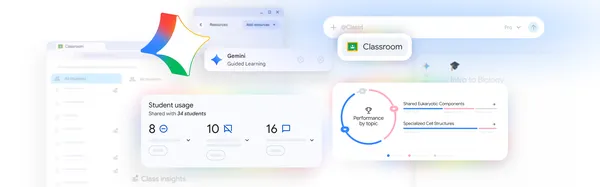
Educators can use Read Along in Google Classroom to provide personalized reading practice for every student. The insights dashboard showing individual student and class-wide progress can help inform instruction and make it easier to create tailored reading activities based on student needs.

With this update, all Google Workspace for Education users will have access to:

  • A tailored reading experience in Google Classroom: Educators can easily create interactive reading activities right within Classroom, giving students in-the-moment support while getting actionable insights related to their reading skills.
  • Real-time reading support: Learners get help with pronunciation as they read aloud and get word breakdown support.
  • Class and student insights to inform instruction: View information on accuracy, speed, comprehension, phonics skills, and progress for individual students and the entire class.
  • An extensive content library: Choose from over hundreds of books across eight languages: English, Spanish, Portuguese, Urdu, Arabic, Thai, Indonesian, and Malay. This includes content such as Heggerty decodables, ReadWorks articles for higher-grade learners, and localized publisher titles like Turma da Mônica in Brazil. 
  • Multilingual support: For students learning English, the reading buddy can provide real-time support in both English and their native language so they can practice their vocabulary. Native language support is available in Spanish, Portuguese, Urdu, Arabic, Indonesian, and Malay.
  • Story creation with Gemini: With help from Gemini, educators can create differentiated reading activities tailored to phonics skills needing practice, specific topics, and reading levels.
  • Existing content: Add existing class content to better tailor real-time student support and insights with Read Along.
Advanced analytics, like viewing student’s progress over time or across assignments and the ability to extract data via BigQuery, are only available with Education Plus and Teaching & Learning add-on.

Getting started

Rollout pace

Availability

  • Education: Education Fundamentals, Standard, and Plus
  • Education Add-ons: Google AI Pro for Education; Teaching and Learning; Endpoint Education
  • Other Editions: Nonprofits

Resources