 Now you can get more intelligent speech-to-text transcription with Gemini 3.5 Transcribe.
Intelligent transcription with Gemini 3.5 Transcribe
Now you can get more intelligent speech-to-text transcription with Gemini 3.5 Transcribe.
Now you can get more intelligent speech-to-text transcription with Gemini 3.5 Transcribe.
 We’re rolling out a major productivity upgrade to Gemini Live so you can use your voice to delegate your to-dos without missing a beat.

Maintaining a healthy Android ecosystem is a shared commitment where every app and game has a role to play. To help you deliver the premium experiences users expect, Google Play is introducing two new quality requirements: one focused on reducing app memory footprint, and another on providing a secure, seamless device migration experience.
First, to help developers navigate industry-wide hardware constraints and Android's broader memory limits, Google Play is establishing new performance thresholds.
Second, as part of our broader commitment to elevate app quality, we are introducing a new onboarding standard to simplify and secure login during device upgrades.
The mobile industry is navigating significant hardware supply constraints that are altering device memory availability that over time can negatively impact the user experience. Android is addressing this challenge head-on with broader memory limits that aim to protect the overall user experience from apps using excess memory and causing system-wide slowdowns.
Building on this, today Google Play is establishing performance thresholds to help developers ensure their apps continue to deliver the premium experience users expect. This includes new thresholds across dynamic memory usage, bitmap usage, and code optimization to prevent unexpected on-device performance throttling and app terminations.
Review the thresholds and technical details to better understand applicability differences specific to apps and games, RAM buckets, and process states.
To enable you to proactively discover, investigate, and optimize your app or game to meet the new bad behavior thresholds, we’ve already begun rolling out new tools in Play Console to get you started.
.gif)
.png)
Later this year, you can expect additional diagnostic tools, including metrics on how long your app spends in each state and deeper insights into the Android Memory Limiter, a feature that prevents individual apps from using too much device memory. Through our ongoing investment in these enhancements, our goal is to help you continuously optimize your footprint and elevate the experience you provide your users.
Starting in February 2027, apps and games must meet their respective bad behavior thresholds for Memory usage (Anonymous RSS + Swap), Bitmap memory usage and DEX code optimization. Similar to existing Android vitals metrics, exceeding thresholds is a strong indicator of degraded app experiences and on-device Android app terminations.
Apps and games that do not meet these thresholds may see reduced app visibility and publishing capabilities on Google Play. Additional details will be provided later this year.
Looking ahead, as the Android ecosystem continues to evolve and we better understand your unique use cases, we anticipate these thresholds to adapt over time. Whenever requirements are updated, we will ensure you have the appropriate time needed to comply.
When users switch to a new device, moving their apps over should be secure and effortless. To provide a better onboarding experience, we’re introducing a requirement for app developers to make log-ins faster and safer during device transfers.
The Zero-Tap Sign-In standard will require any app supporting user sign-in, optional or mandatory, to automatically restore a user's sign-in state when they move from one Android device to another with the Android Restore Credentials API. This API ensures that when a user opens your app on their new Android device for the very first time, they are instantly recognized and securely signed in without additional taps.
Starting in April 2027, Google Play will require apps to meet the Zero Tap Sign-In requirement to maintain full publishing capabilities and optimal visibility in the Play Store.
While games are currently exempt from the Zero-Tap Sign-In requirement, developers should expect dedicated guidance and tailored solutions for complex gaming authentication use cases coming in 2027. For games who support single-account sign-in, we strongly encourage usage of the Restore Credentials API to support zero-tap sign-in. Please visit our help center for more information.
Start preparing for the upcoming enforcement deadlines by reviewing the details of each requirement:
Meeting these quality requirements on Google Play is a crucial step toward building a faster, more reliable experience for our users. We appreciate your partnership and everything you do to keep the Android community thriving.
The Beta channel has been updated to 153.0.8010.12 for Windows, Mac and Linux.
A partial list of changes is available in the Git log. Interested in switching release channels? Find out how. If you find a new issue, please let us know by filing a bug. The community help forum is also a great place to reach out for help or learn about common issues.
Chrome Release Team
Google Chrome
Hi, everyone! We've just released Chrome 152 (152.0.7977.64) for Android. It'll become available on Google Play over the next few days.
This release includes stability and performance improvements. You can see a full list of the changes in the Git log. If you find a new issue, please let us know by filing a bug.
 Spanning North America and Europe, the energy-focused, AI-driven startups were selected for the Google for Startups Accelerator.
Hi everyone! We've just released Chrome Beta 153 (153.0.8010.16) for iOS; it'll become available on App Store in the next few days.
You can see a partial list of the changes in the Git log. If you find a new issue, please let us know by filing a bug.
Chrome Release Team
Google Chrome
Hi everyone! We've just released Chrome Beta 153 (153.0.8010.11) for Android. It's now available on Google Play.
You can see a partial list of the changes in the Git log. For details on new features, check out the Chromium blog, and for details on web platform updates, check here.
If you find a new issue, please let us know by filing a bug.
Chrome Release Team
Google Chrome
The Beta channel is being updated to OS version 16765.31.0 (Browser version 152.0.7977.63) for most ChromeOS devices.
If you find new issues, please let us know one of the following ways:
Visit our ChromeOS communities
General: Chromebook Help Community
Beta Specific: ChromeOS Beta Help Community
Interested in switching channels? Find out how.
Luis Menezes
Google ChromeOS
Answering a research question often requires reading through several papers and figuring out how each of them might be useful. You need to track down what each paper says about your question, what methods the authors used to arrive at the relevant results, and what caveats to keep in mind to understand the boundaries.
Today, we are introducing Scholar Quick Read, to help you answer your research queries faster. Search results in Scholar Labs and Scholar search that discuss your question in depth now include a “Quick read” link.
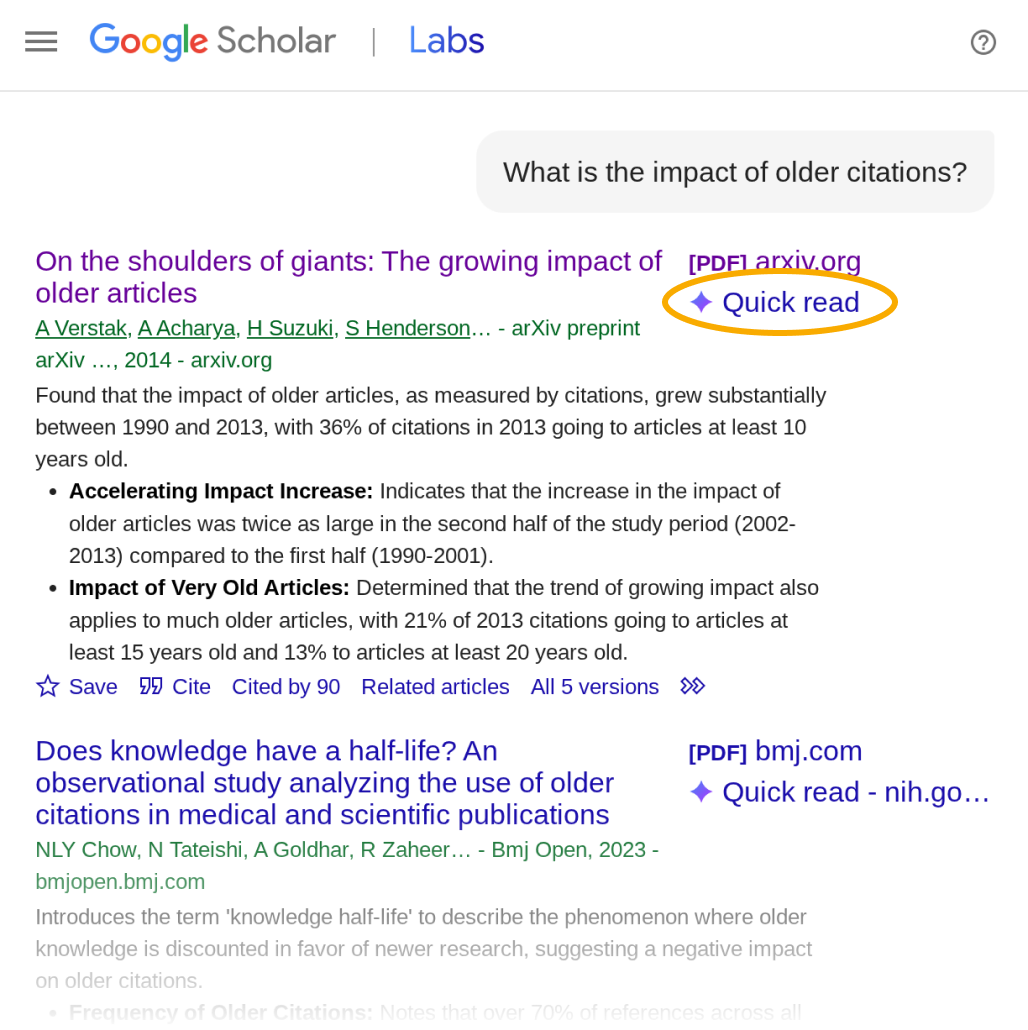
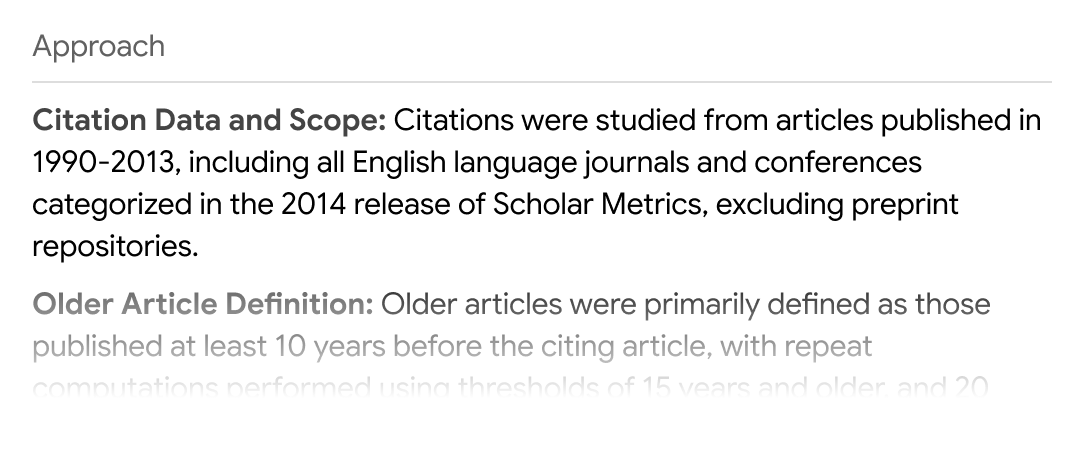
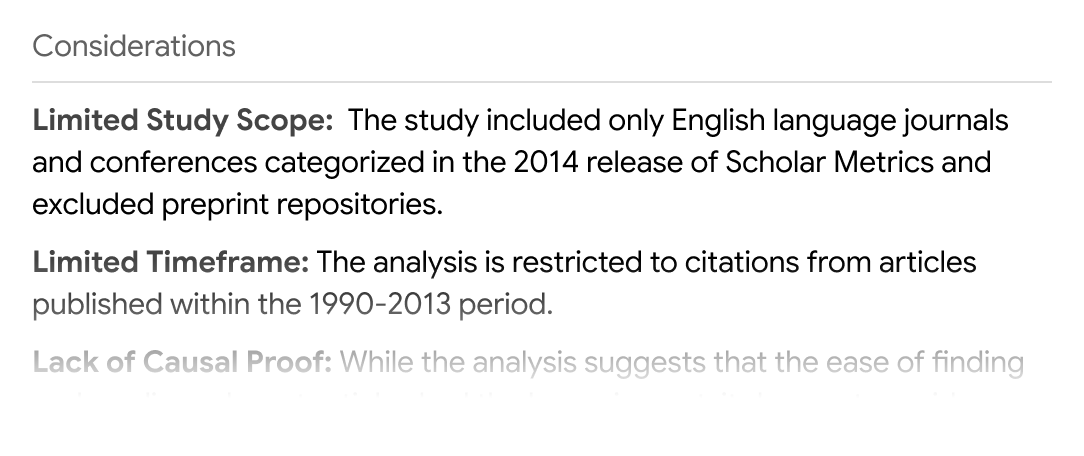
Click “Quick read” to read a short presentation of the paper focused specifically on your query. You’ll see an overview and three sections: Answers, Approach, and Considerations.
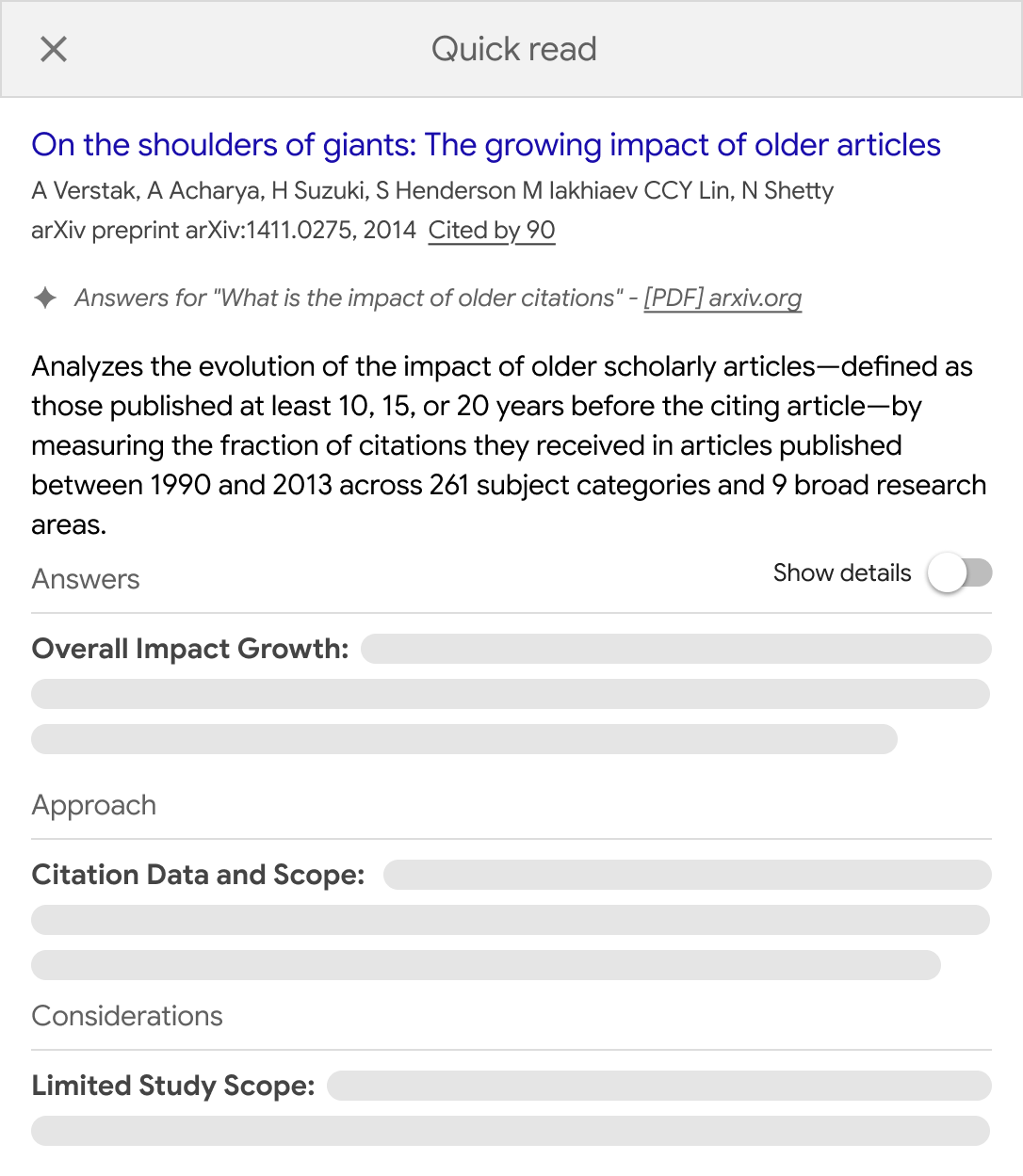
The Answers section presents an overview of what the paper says about your query as well as the supporting details for each of the points. Click “Show details” to view the details.
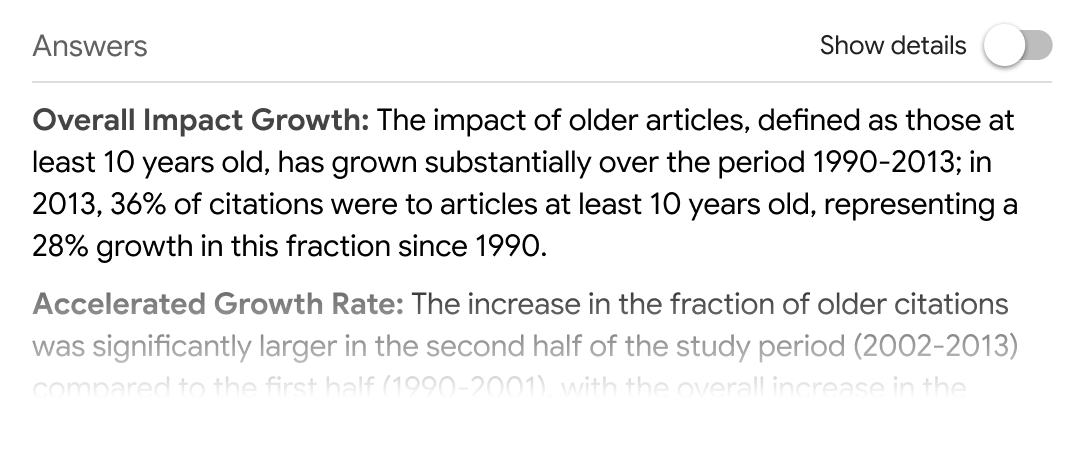
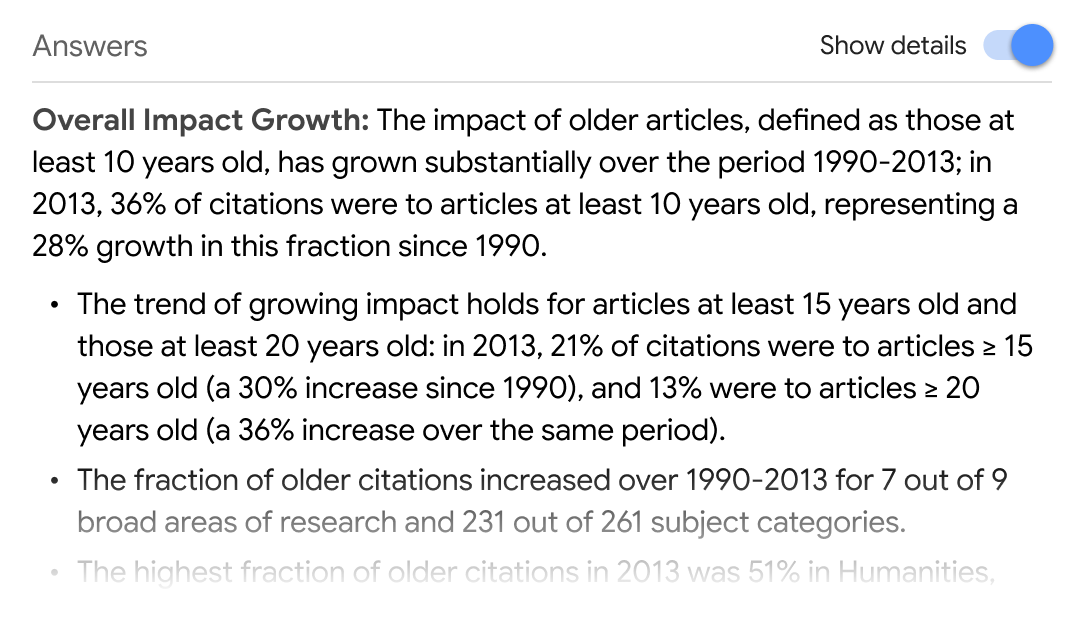
The Approach section describes the methods and techniques from the paper that are relevant to your question.
Finally, the Considerations section lists some caveats to keep in mind as you analyze the results.
Quick Read links appear only for papers that you have access to. We have worked with many of our scholarly publishing partners to enable them for your subscribed articles. We thank all our colleagues for joining us in this shared endeavor.
Quick Read is available for logged in users and is currently limited to English articles.
Here is hoping Quick Read helps find answers to your research questions in the ocean of knowledge.