The Stable channel has been updated to 151.0.7922.108/.109 for Windows and Mac and 151.0.7922.108 for Linux, which will roll out over the coming days/weeks. A full list of changes in this build is available in the Log
Security Fixes and Rewards
Note: Access to bug details and links may be kept restricted until a majority of users are updated with a fix. We will also retain restrictions if the bug exists in a third party library that other projects similarly depend on, but haven’t yet fixed.
This update includes 41 security fixes. Please see the Chrome Security Page for more information.
[TBD][499602793] Critical CVE-2026-19137: Use after free in WebGL. Reported by anonymous on 2026-04-05
[N/A][524824288] Critical CVE-2026-19149: Use after free in Aura. Reported by Google on 2026-06-17
[N/A][532941869] Critical CVE-2026-19154: Use after free in Skia. Reported by Google on 2026-07-09
[N/A][534903095] Critical CVE-2026-19157: Out of bounds write in ANGLE. Reported by Google on 2026-07-14
[TBD][537729021] Critical CVE-2026-19170: Use after free in WebGL. Reported by Muhammad Alifa Ramdhan, Pan ZhenPeng, Billy Jheng Bing Jhong of STAR Labs SG Pte. Ltd. on 2026-07-22
[N/A][537838324] Critical CVE-2026-19172: Use after free in Views. Reported by Google on 2026-07-22
[$5000][537390933] High CVE-2026-19169: Insufficient validation of untrusted input in Contextual Tasks. Reported by Sven Dysthe (@svn-dys) on 2026-07-21
[$500][536945254] High CVE-2026-19168: Inappropriate implementation in V8. Reported by XBOW and triaged by Andrés Luksenberg on 2026-07-20
[N/A][500097298] High CVE-2026-19138: Heap buffer overflow in CrashReporting. Reported by Google on 2026-04-06
[N/A][511731805] High CVE-2026-19139: Race in CredentialProvider. Reported by Google on 2026-05-10
[N/A][513044017] High CVE-2026-19140: Use after free in GPU. Reported by Google on 2026-05-14
[N/A][513602949] High CVE-2026-19141: Use after free in Resources. Reported by Google on 2026-05-15
[N/A][515428251] High CVE-2026-19142: Use after free in Views. Reported by Google on 2026-05-21
[N/A][517772612] High CVE-2026-19143: Insufficient validation of untrusted input in WebAPKs. Reported by Google on 2026-05-29
[N/A][520167277] High CVE-2026-19144: Use after free in HTML. Reported by Google on 2026-06-05
[N/A][521878431] High CVE-2026-19145: Use after free in Translate. Reported by Google on 2026-06-09
[N/A][523713150] High CVE-2026-19146: Uninitialized Use in GPU. Reported by Google on 2026-06-14
[N/A][524439798] High CVE-2026-19147: Use after free in Aura. Reported by Google on 2026-06-16
[N/A][524460000] High CVE-2026-19148: Out of bounds write in GPU. Reported by Google on 2026-06-16
[N/A][526380803] High CVE-2026-19150: Inappropriate implementation in V8. Reported by Google on 2026-06-22
[N/A][530663440] High CVE-2026-19151: Use after free in V8. Reported by Google on 2026-07-02
[N/A][531165110] High CVE-2026-19152: Inappropriate implementation in Navigation. Reported by Google on 2026-07-04
[N/A][532939327] High CVE-2026-19153: Insufficient validation of untrusted input in Workers. Reported by Google on 2026-07-09
[N/A][533053621] High CVE-2026-19155: Use after free in Payments. Reported by Google on 2026-07-09
[TBD][533331920] High CVE-2026-19156: Heap buffer overflow in Base. Reported by Viktoria Zlatinova on 2026-07-10
[N/A][535749174] High CVE-2026-19158: Use after free in Views. Reported by Google on 2026-07-17
[N/A][536067175] High CVE-2026-19159: Use after free in Views. Reported by Google on 2026-07-17
[N/A][536068737] High CVE-2026-19160: Uninitialized Use in Skia. Reported by Google on 2026-07-17
[N/A][536165038] High CVE-2026-19161: Uninitialized Use in Skia. Reported by Google on 2026-07-18
[TBD][536271629] High CVE-2026-19162: Out of bounds write in V8. Reported by OpenAI Codex Security (amyb) on 2026-07-19
[N/A][536449742] High CVE-2026-19163: Use after free in Media. Reported by Google on 2026-07-19
[N/A][536470854] High CVE-2026-19164: Insufficient validation of untrusted input in Codecs. Reported by Google on 2026-07-19
[TBD][536512612] High CVE-2026-19165: Use after free in Extensions. Reported by @bean5oup on 2026-07-19
[TBD][536584251] High CVE-2026-19166: Use after free in Web Authentication. Reported by heesun on 2026-07-20
[N/A][536666274] High CVE-2026-19167: Integer overflow in GPU. Reported by Google on 2026-07-20
[N/A][537832446] High CVE-2026-19171: Use after free in Media. Reported by Google on 2026-07-22
[TBD][538332338] High CVE-2026-19173: Out of bounds write in Skia. Reported by Vu Van Tien (@n0_Be3r) on 2026-07-24
[TBD][538378084] High CVE-2026-19174: Integer overflow in V8. Reported by Seunghyun Lee (@0x10n) of QED Audit (qedaudit.io) on 2026-07-24
[N/A][540138836] High CVE-2026-19175: Use after free in Payments. Reported by Google on 2026-07-29
[TBD][540157141] High CVE-2026-19176: Use after free in Skia. Reported by WinD39 - Huynh Dinh Vu on 2026-07-29
[TBD][540289900] High CVE-2026-19177: Insufficient validation of untrusted input in UI. Reported by Fabian Wahle (Hap Security) on 2026-07-29
We would also like to thank all security researchers that worked with us during the development cycle to prevent security bugs from ever reaching the stable channel.
Interested in switching release channels? Find out how here. If you find a new issue, please let us know by filing a bug. The community help forum is also a great place to reach out for help or learn about common issues.
Srinivas Sista
Google Chrome
 Learn how Gemini provides personalized recommendations and creates custom travel itineraries when you ask it to plan a trip.

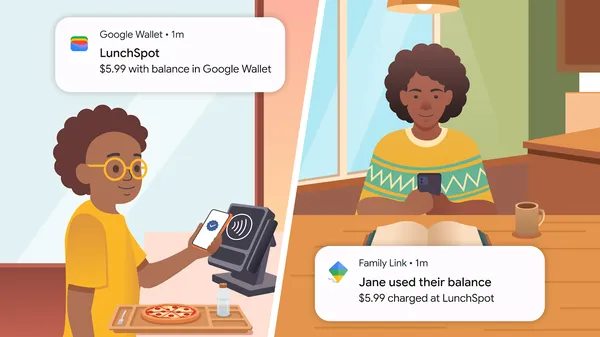 U.S. parents can set up a secure digital balance on Google Wallet for their kids to tap and pay using Android and Wear OS devices.
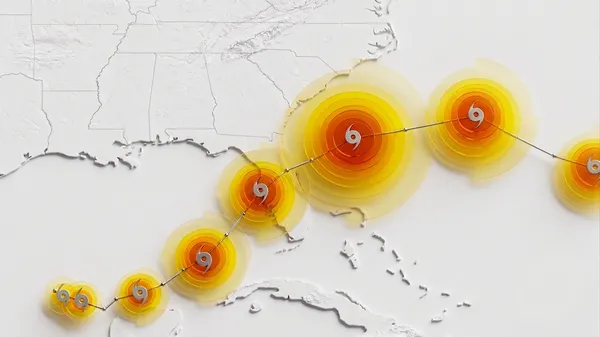 Google DeepMind’s WeatherNext 2 shows state-of-the-art accuracy in cyclone prediction.
 Discover the rich history, passionate dancers and enduring legacy of Argentinian tango through a new Google Arts & Culture collection.
 From agentic capabilities and real-time information to personalized recommendations, Ask Maps makes it easier than ever to get more done.