When we first launched Android Bench, we built a rigorous foundation for evaluating how large language models (LLMs) assist developers with real-world Android tasks. As AI models and agents rapidly evolve, we’ve been updating our methodology, such as aligning our benchmark framework with the Harbor framework. Today we’re releasing the first set of long-horizon tasks (LHT), which are tasks of great complexity that take an engineer multiple days or even a week to complete. We are also introducing agentic evaluation, starting with agents from corresponding model providers. This addition brings us to Android Bench 2.0—a major upgrade designed to evaluate AI models and agents against the scale, ambiguity, and complex multi-step problem solving that you tackle every day.
The Android Bench 2.0 leaderboard
From incremental fixes to long-horizon tasks
The first iteration of Android Bench, along with similar early AI coding benchmarks, focused on incremental changes to existing repositories, in many cases limited to bug fixes or smaller feature requests. This was a reflection of the capabilities of AI assistance at the time, as well as how you were using it.
To continue helping you find the models and coding agents best suited to your development workflow, we have raised the bar of our evaluations to match the work you delegate to AI. Android Bench 2.0 mirrors these ambitious challenges with LHTs that include upgrading dependencies, adding new features, building apps from scratch, or converting a cross-platform app to Android.
Complex tasks require a more nuanced evaluation and scoring
On multi-day engineering tasks, binary pass or fail grading doesn’t capture the full picture.
For example, an agent might refactor 40 screens to Jetpack Compose, set up database tables, and pass 90% of requirements, but fail a single edge-case assertion. Binary scoring rates this run as 0%, obscuring the model's architectural capabilities. We are moving to continuous scoring to provide a more meaningful signal, both for model development and for your understanding of how AI can help you.
We calculate this completion rate through a combination of factors like functionality, visual fidelity, and avoiding regressions. We also apply objective scoring penalties for deviations from evaluation instructions or structural constraints. Check out the updated leaderboard and click into each model’s card view to see additional elements such as the pass rate, completion rate, and average costs per model and per task.
The highest pass rate for LHTs is around 28%, much lower than the ~91% for the original tasks in the benchmark.
The model card view allows you to explore the strengths and pitfalls of each model
Long-horizon tasks uncover helpful insights for AI assistance
Beyond measuring how well AI handles long-running tasks, the LHT dataset helps us learn more about the strengths and weaknesses of tested models, and we offer you more practical guidance.
Across model tiers, AI does a better job at writing new code rather than refactoring existing code. Refactors and migrations get trickier because success depends on architectural complexity rather than code volume.
Models show strong capabilities on well-established, deterministic transformations, such as converting Java to Kotlin, swapping Retrofit for Ktor, or introducing a ViewModel layer. They apply these patterns consistently, even across 125+ files and 8,000+ lines of code.
However, models struggle when tasks require runtime validation (like missing dependency injection graphs), involve breaking framework changes, or run into knowledge gaps with unreleased libraries. Porting cross-platform apps to Android remains an open challenge—no model hits a 100% pass rate, and frontier models reach at most a 80% completion rate.
Introducing agent evaluations
To help you get a better sense of how models perform when integrated into your agentic workflows, we are adding commonly used agents into our evaluation. We're starting by running new models against LHTs with agents from the corresponding model provider. For example, we ran GPT 5.6 Sol on Codex, and Gemini 3.8 Flash on Google Antigravity. This pairing shows how harness design positively impacts developer outcomes, as we’ve seen prompt caching and compact tool windowing can result in token reductions.
We’ll be expanding this in the future by also highlighting results across various model and agent combinations, to help you discover which combinations work best for you and your team.
We invest in this measurement because it’s important for you to be able to use your agent and model of choice for Android development, and we'll have more to share with you in the coming weeks.
New models added
In addition, we are continuing to expand our leaderboard to ensure you have the most up-to-date data for your development decisions. We added Gemini 3.8 Flash, Gemini 3.7 Flash, OpenAI’s GPT-6, Anthropic’s Fable 5.1, Kimi K3, and Qwen 3.8 Max, with OpenAI’s GPT-6 Astra at the top with a 28% pass rate.
Looking ahead
Android Bench 2.0 delivers a robust environment for measuring AI for Android development. By combining long-horizon tasks, multimodal evaluation, agents, and continuous scoring, we hope to empower AI research teams to build more capable, dependable AI coding partners, and we hope to provide you with more transparency about your options for AI development.
Check out the updated leaderboard along with the updated methodology. Your feedback directly influences how we evolve Android Bench, so please continue to share your feedback with us on GitHub, as well as our social channels like X and LinkedIn.
 In this Ads Decoded episode, we share steps you can take now to drive sales and reach customers during the holiday season.
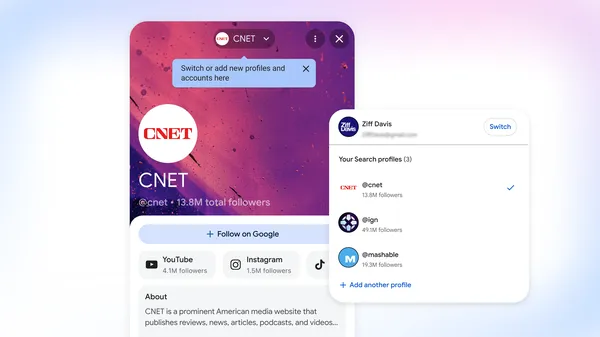 Search profile updates help publishers better highlight their content and connect with their audiences.

.png)
.png)

