The Extended Stable channel has been updated to 148.0.7778.280 for Windows and Mac which will roll out over the coming days/weeks.
Author Archives:
Connect to Google Meet hardware with room codes now in Early Preview
Getting started
- Admins: Admins: To preview this feature, your domain must be on the Rapid Release track and have devices enrolled in Early Preview. Visit the Help Center to learn more about enabling Early Preview for your Meet hardware devices.
- End users: Visit the Help Center to learn more about connecting with room codes.
Rollout pace
- Rapid Release domains: Rolling out now to Meet hardware devices enrolled in Early Preview, with expected completion by June 30, 2026
Availability
- Available to all Google Workspace customers with Google Meet hardware devices
Resources
- Google Meet Help: Use Connect room feature in Google Meet
- Workspace Updates Blog: Seamlessly join meetings on Google Meet hardware with “Connect room”
Source: Google Workspace Updates
Stable Channel Update for Desktop
The Stable channel has been updated to 149.0.7827.196/197 for Windows and Mac and 149.0.7827.196 for Linux, which will roll out over the coming days/weeks. A full list of changes in this build is available in the Log
Interested in switching release channels? Find out how here. If you find a new issue, please let us know by filing a bug. The community help forum is also a great place to reach out for help or learn about common issues.
Daniel Yip
Google Chrome
Source: Google Chrome Releases
Beta Channel Update for ChromeOS / ChromeOS Flex
The Beta channel is being updated to OS version 16700.25.0 (Browser version 150.0.7871.40) for most ChromeOS devices.
If you find new issues, please let us know one of the following ways:
Visit our ChromeOS communities
General: Chromebook Help Community
Beta Specific: ChromeOS Beta Help Community
Interested in switching channels? Find out how.
Alon Bajayo
Google ChromeOS
Source: Google Chrome Releases
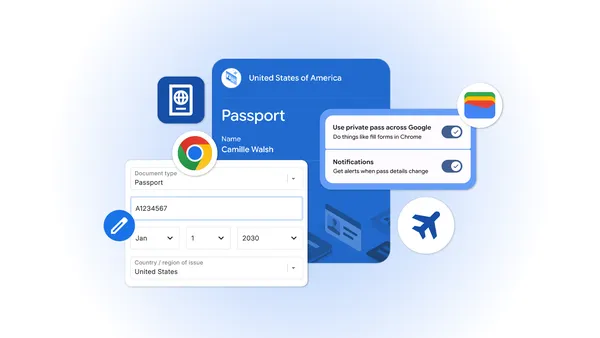
Chrome is bringing advanced autofill capabilities to your phone with Google Wallet
We’re extending new autofill capabilities to iOS and Android users. Get passport details, payment info and more, at your fingertips.
Source: The Official Google Blog
Google Apps Script is now a Google Workspace core service with enterprise-grade data protection
More about Apps Script
- Create custom menus, dialogs, and sidebars within Sheets, Docs, and Slides.
- Write custom functions for Sheets to automate complex calculations.
- Build internal add-ons to streamline organizational workflows and integrate with third-party APIs.
Getting started
- Admins:
- If you already have Apps Script enabled: No action is required. Your organization will automatically benefit from these new core service protections and technical support.
- If you previously restricted Apps Script: If you turned Apps Script off due to compliance, security, or support concerns, you can now enable the service to provide secure, custom automation for your users. Visit the Help Center to learn how to manage Apps Script access for your organization.
- End users: No action is required. Visit the Help Center to learn more about getting started with Apps Script.
Rollout pace
- Rapid Release and Scheduled Release domains: Available now
Availability
- Apps Script is now available as a core service for all Google Workspace customers
Resources
- Google Workspace Developer Documentation: Apps Script
- Google Workspace Admin Help: Turn Apps Script on or off for users
Source: Google Workspace Updates
What’s trending on Google this summer
From the hottest looks to the coolest dessert flavor, our new Summergeist report shows what’s trending for summer 2026.
Source: Search
Join Google Meet calls from Safari on iOS devices
![]() |
In this animation, an iPhone user has received a link to join a Meet call. They click on the link and immediately join via their Safari browser. |
Getting started
- Admins: There is no admin control for this feature.
- End users: If an iOS user attempts to join a Google Meet call and doesn’t have the Gmail or Meet app installed, they’ll be automatically directed to join via Safari.
Rollout pace
- Rapid Release and Scheduled Release domains: Extended rollout (potentially longer than 15 days for feature visibility) starting on June 23, 2026
Availability
- Available to all Google Workspace customers and users with personal Google accounts
Source: Google Workspace Updates
Changes to Support for Smart Campaigns in the Google Ads API
Starting on August 3, 2026 you will no longer be able to create new Smart Campaigns using the Google Ads API. You will still be able to update your existing Smart Campaigns, and they will continue to serve ads.
In lieu of new Smart Campaigns, we recommend exploring other campaign types, such as Performance Max, an automated campaign type that serves across Google's advertising channels. Other campaign types, such as Search or Demand Gen, are also available, depending on your business goals.
Technical details
- To determine whether your application is creating Smart Campaigns, look for campaign mutate requests with create operations where the campaign's
advertising_channel_typeis set toSMARTand theadvertising_channel_sub_typeis set toSMART_CAMPAIGN. - When attempting to create a new Smart Campaign, the following will occur:
- In v24 of the Google Ads API:
- A
SmartCampaignError.CREATION_FAILEDerror will be returned and the request will fail. - In v23 and earlier of the Google Ads API
- A
OperationAccessDeniedError.CREATE_OPERATION_NOT_PERMITTEDerror will be returned and the request will fail.
- A
- A
- In v24 of the Google Ads API:
For technical support issues, please reach out to Google Ads API Support. If you have any questions or want to discuss this post, please reach out to us on our “Google Advertising and Measurement Community” Discord server.
Source: Google Ads Developer Blog
Enhanced security monitoring with expanded Admin password reset alerts
Getting started
- Admins: This feature will be ON by default and automatically replaces the previous "Super Admin password reset" rule. No action is required to enable the new alert. If you had modified the recipient list for the previous rule, those settings will automatically carry over to the new rule.
- End users: There is no end user setting or impact for this feature.
Rollout pace
- Rapid Release and Scheduled Release domains: Gradual rollout (up to 15 days for feature visibility) started on June 22, 2026
Availability
- Available to all Google Workspace customers
Resources
- Google Workspace Admin Help: View alert details