Bridging the Domain Gap: AI Race Coach built with Antigravity and Gemini
On May 23, 2026, fresh off the stage at Google I/O, our Google Developer Experts (GDEs) converged on...
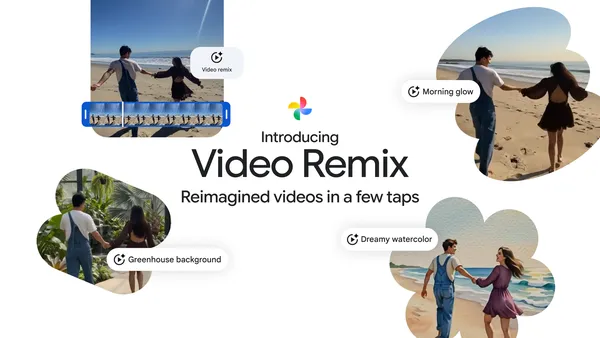 With Video Remix in Google Photos, you can transform ordinary videos into share-worthy moments in just a few taps.
 Small businesses like coffee shops can use Gemini to save time on graphic design, email marketing and sales forecasting.
 Google is announcing a long-term agreement with Thryve.Earth for 260,000 tons of carbon removal.
 Street View returns to Albania, Montenegro, North Macedonia and Serbia.
The ChromeOS Dev channel is being updated to OS version 16733.12.0 (Browser version 151.0.7922.14) for most ChromeOS devices.
Visit our ChromeOS communities
General: Chromebook Help Community
Beta Specific: ChromeOS Beta Help Community
Interested in switching channels? Find out how.
Alon Bajayo
Google ChromeOS
We're introducing a new calendar sharing permission level: “Make changes (see private events as free/busy)”. This allows you to grant someone edit access to your calendar while keeping the details of your private events entirely hidden. This is especially useful for leaders who assign delegates to help them manage their calendars.
Delegates assigned this restricted permission level will only be able to create, delete, and edit non-private events. Private events will appear to delegates as “busy” blocks on the calendar grid, and delegates will not be able to edit or reschedule them. In addition, private events won’t show up in any search results for delegates.
We’re also introducing changes to the way visibility settings are applied to recurring events.

 Three ways Google collaborates with governments, international organizations and communities on global crisis resilience.
The Stable channel has been updated to 150.0.7871.100/.101 for Windows and Mac and 150.0.7871.100 for Linux, which will roll out over the coming days/weeks. A full list of changes in this build is available in the Log
Interested in switching release channels? Find out how here. If you find a new issue, please let us know by filing a bug. The community help forum is also a great place to reach out for help or learn about common issues.
Daniel Yip
Google Chrome
Earlier this year, we announced Fill with Gemini in Google Sheets, a new AI-powered feature designed to make data preparation and manual entry even easier. Leveraging the capabilities of the AI function in Google Sheets, Fill with Gemini eliminates the need for complex formulas, helping you easily generate text, summarize information, categorize data, or analyze sentiment at scale with generated content appearing directly in the cells you choose.
Previously available in English, Spanish, Portuguese, Japanese, Korean, French, Italian, and German, both Fill with Gemini and the AI function are now expanding to users in Mandarin, Dutch, Malay, Hebrew, Polish, Turkish, Czech, Indonesian, Swedish, Danish, and Norwegian.

*Starting July 15, 2026, users with AI Expanded Access licenses will have higher limits on usage of Fill with Gemini and the AI function in Sheets.