Driving the Agent Quality Flywheel from Your Coding Agent
Source: Google Developers Blog
Unlocking Britain’s next era of productivity: Building a nation of AI trailblazers
Google UK shares its latest Economic Impact Report and how to enable more people to unlock the benefits of AI-powered technologies.
Source: The Official Google Blog
Eclipsa Video: HDR That Looks Right on Every Screen
We’ve all been there: You’re scrolling through your favorite social media feed in a dim room, and suddenly an HDR video pops up. It’s so intensely bright that you have to squint, or maybe you find yourself turning down your screen brightness just to read the caption. Other times, a video that looks vibrant on your phone looks flat, dark, or washed out when you watch it on your living room TV.
While High Dynamic Range (HDR) technology was designed to make videos look richer and more lifelike, the lack of unified industry guidelines means that the exact same clip can render in unexpected and jarring ways depending on the display you’re using.
To solve this, we’re introducing Eclipsa Video—a new standard built to make your favorite videos look consistent, balanced, and comfortable on every screen. Eclipsa Video builds on the open SMPTE ST 2094-50 specification, which Google developed in collaboration with Apple and NBCUniversal.
More consistency, comfort, and creative control
Eclipsa Video moves past individual display guesswork. Instead of leaving it up to your device to interpret a video’s brightness on its own, our format carries precise guidelines that tell compatible displays exactly how to render the image.Designed to scale with your hardware, Eclipsa Video provides three core benefits:
- A consistent baseline: Eclipsa Video introduces a shared rulebook for screens. It establishes a consistent benchmark for normal brightness—known as the HDR reference white. This ensures standard text, app interfaces, and standard-range colors remain vibrant and readable without causing uncomfortable screen glare.
- Adaptive headroom: Screens have different physical brightness limits, or "headroom." Eclipsa Video guides how displays handle highlights dynamically. Bright details remain brilliant on a premium television, while being scaled intelligently on a mobile screen to prevent sudden blinding transitions.
- Preserved creative intent: Rather than applying a single static setting to an entire video, Eclipsa Video carries adaptive, frame-by-frame instructions. Think of it as a set of digital notes from the creator traveling with the video, ensuring the exact colors, contrast, and mood they graded are preserved on your display.

Built natively into Android 17
Starting with Android 17, support for Eclipsa Video is built directly into the platform. This means a more comfortable, true-to-life HDR experience is coming natively to the phones, tablets, and TVs you rely on every day. The video you capture carries its creative intent with it, and the video you watch is shown exactly the way it was meant to be seen.
Guidelines for developers & creators
We’re inviting the developer and creator ecosystem to help build a more reliable HDR environment:
- Get started with implementation: Learn how to configure playback and capture in your apps with our official guide.
- ExoPlayer & Media3 integration: Standard playback handling built directly into Jetpack Media3, allowing ExoPlayer to support Eclipsa Video metadata automatically with no additional player configuration.
- Explore open source tools: View and inspect SMPTE ST 2094-50 metadata and dynamic gain curves in real time using HDR Explorer.
What’s next
Eclipsa Video is rolling out now, and you’ll see more apps and devices supporting it over time. Because it’s an open standard, any app developer or hardware manufacturer can integrate it to elevate the viewing experience.
Try out the new tools in Android 17, explore the open-source metadata, and let us know what you think on our developer channels. We can’t wait to see what you create.
Notes & Availability
1. Device Compatibility: Eclipsa Video playback and capture are supported natively on devices running Android 17 (API level 37) and above with HDR displays passing Eclipsa Compliance tests.
2. Developer Resources: The SMPTE ST 2094-50 Specification is openly accessible for technical evaluation.

Source: Android Developers Blog
Data regions support for the Gemini app now available
Getting started
- Admins: Visit the Help Center to learn more about data regions, choosing a geographic location for your data, setting up advanced settings for data regions, and what data is covered by data regions.
- End users: There is no end user setting for this feature.
Rollout pace
- Rapid Release and Scheduled Release domains: Available now
Availability
- Enterprise: Enterprise Plus (provides in-region processing and storage capabilities)
- Education: Education Plus and Education Standard (provides in-region storage capabilities only)
- Other Editions: Frontline Plus (provides in-region processing and storage capabilities)
Resources
- Google Workspace Admin Help: Data regions: Choose a geographic location for your data
- Google Workspace Admin Help: What data is covered by a data region policy?
- Google Workspace Admin Help: About Assured Controls and Assured Controls Plus
Source: Google Workspace Updates
Assign mobile device management admin privileges based on organizational unit
![]() |
| Example experience for an admin with OU-level permissions |
Getting started
- Admins: Visit the Help Center to learn more about administrator roles and delegating device management administrator privileges.
- End users: There is no end user impact or action required.
Rollout pace
- Rapid Release and Scheduled Release domains: Full rollout (1–3 days for feature visibility) starting on June 29, 2026
Availability
- Available to all Google Workspace customers
Resources
- Google Workspace Admin Help: Create an admin role for an organizational unit
- Google Workspace Admin Help: Delegate device management administrator privileges
Source: Google Workspace Updates
Educators and students can now share Gemini Canvas creations directly to Google Classroom
Educators and students of all ages can now seamlessly attach Gemini Canvas artifacts, like websites, quizzes, interactive games, infographics, and more, to Google Classroom assignments and posts. Right from Gemini Canvas, users can click on the “Share to to Classroom” button. This update allows users to enrich their classroom communication and coursework by embedding interactive materials directly into their existing workflows.
By removing the friction of exporting or linking external files, this feature helps teachers diversify their lesson materials and enables students to share creative outputs more efficiently. The integration ensures that rich, interactive media is easily accessible to everyone in the class, supporting a more engaging and dynamic digital learning environment.
Getting started
- Admins:
- The ability to share Gemini Canvas artifacts will be ON by default and can be managed via a new Admin console setting. Additionally, sharing is governed by your organization’s existing Drive sharing policies. If Drive content is set to be shareable outside the organization, your Gemini assets will be as well. Visit the Help Center to learn more.
- To share Gemini Canvas artifacts to Google Classroom, students and educators must also be in a group or OU with Gemini set to On. Visit the Help Center to learn more about turning Gemini on or off for users.
- End users: There is no end user setting for this feature. If enabled by your admin, you can share your Gemini canvases and media to Classroom, select Share > Share to Classroom > select the class and/or assignment you want to share it with. Visit the Help Center to learn more about Gemini.
Rollout pace
- Rapid Release and Scheduled Release domains: Available now
Availability
- Education: Education Fundamentals, Standard, and Plus
Resources
- Google Workspace Updates Blog: Share chats, canvases, and generated media from the Gemini app securely via Google Drive
- Google Workspace Admin Help: Turn conversation sharing on or off
- Google Workspace Admin Help: Turn the Gemini app on or off
Source: Google Workspace Updates
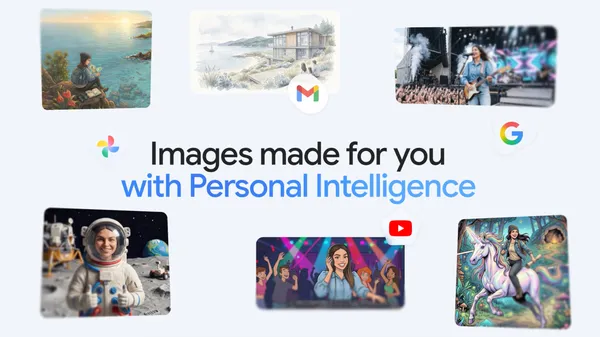
The Gemini app is bringing personalized image creation to more users.
Personal Intelligence makes the Gemini app feel tailored to you. With your permission, it pulls from Google tools like Gmail, Google Photos, YouTube and Search to provid…
Source: The Official Google Blog
Deprecating Structured Data Files v9, v9.1, and v9.2
Today we’re announcing the deprecation of Structured Data Files v9, v9.1, and v9.2. These three versions will all sunset on January 28, 2027.
Migrate to v10 or higher before the sunset date to avoid any interruption of service. Follow the steps in the SDF v10 Migration Guide to update your settings to use the new version. Use the enumerated schema differences between every deprecated version and v10 listed in the migration guide to update your integration.
After January 28, 2027, the following changes will apply to all users:
- The default version of partners and advertisers that use v9, v9.1, or v9.2 will be updated to v10.
sdfdownloadtasks.createrequests usingSDF_VERSION_9,SDF_VERSION_9_1, orSDF_VERSION_9_2in the request body will return a400error.
If you have any questions or want to discuss this post, please reach out to us on our “Google Advertising and Measurement Community” Discord server.
Source: Google Ads Developer Blog
Updated admin setting for improved video quality in Google Meet
In April 2026, we updated Meet to improve video quality on high-resolution displays. We’re now updating the way the Admin console setting that limits video bandwidth works to reduce data usage and improve call quality.
Previously, the ‘Limit video bandwidth’ setting only limited video bandwidth on the uplink; it now limits bandwidth on the downlink as well. In addition, we’re improving quality for two-person calls by increasing the uplink bandwidth usage in this scenario.
![]() |
| Updated setting for Meet default video quality |
Getting started
- Admins: Your existing settings will remain applied. Visit the Help Center to learn more about configuring default video quality.
- End users: There is no end user setting for this feature.
Rollout pace
- Rapid Release and Scheduled Release domains: Extended rollout (potentially longer than 15 days for feature visibility) starting on June 29, 2026
Availability
- Available to all Google Workspace customers
Resources
- Google Admin Help: Manage Meet settings (for admins)
- Google Admin Help: Configuring default video quality


.gif)