Introducing the Google Colab CLI

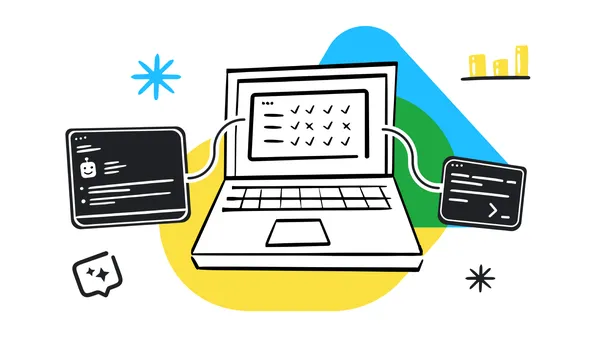
Google has announced the Google Colab Command-Line Interface (CLI), a new tool that allows developers and AI agents to connect local terminals to remote Colab runtimes for frictionless execution. The lightweight CLI enables users to easily request high-powered GPUs, run local Python scripts remotely, and seamlessly retrieve artifact logs or models like fine-tuned Gemma 3 adapters. By integrating directly into standard terminal environments, the tool is highly programmable and ready to be used by AI agents such as Antigravity or Claude Code to manage complex machine learning pipelines.
This entry was posted in Uncategorized on by .

Beta Channel Update for ChromeOS / ChromeOS Flex

The ChromeOS Beta channel is being updated to OS version 16667.35.0 (Browser version 149.0.7827.88) for most ChromeOS devices.

If you find new issues, please let us know one of the following ways:
  1. File a bug
  2. Visit our ChromeOS communities

    1. General: Chromebook Help Community

    2. Beta Specific: ChromeOS Beta Help Community

  3. Report an issue or send feedback on Chrome

  4. Interested in switching channels? Find out how.

Luis Menezes

Google ChromeOS

This entry was posted in Uncategorized on by .

Google Workspace Updates Weekly Recap – June 5, 2026

Organize My Files in Drive now generally available

In October 2025, we launched a beta for Organize My Files in Drive. This feature is now generally available and has started rolling out to eligible Google Workspace and Google AI plans. | Learn more about how Organize My Files in Drive is now generally available.

Introducing the ability to loop over a list of items in Workspace Studio

We are introducing the ability to loop over a list of items in Google Workspace Studio flows, bringing more power and flexibility to your everyday workflows. | Learn more about the ability to loop over a list of items in Workspace Studio.

Enhanced data protection for managed third-party apps

With this release, users are now able to maintain efficient workflows and securely move data between corporate Workspace accounts and other authorized, managed third-party applications without being blocked. | Learn more about enhanced data protection for managed third-party apps.

Quickly scan multiple pages in Google Drive on Android

Tired of scanning one page at a time? With the new Document Scanner in Google Drive on Android, you can now scan multiple pages at the same time. | Learn more about how to Quickly scan multiple pages in Google Drive on Android.

New data loss prevention capabilities for file attachments and proximity conditions are generally available 

Data loss prevention (DLP) rules for non-Workspace file attachments and associated proximity conditions are now generally available. These new capabilities enable organizations to target files with specific parameters, such as blocking the sharing of sensitive file formats or identifying files that contain specific strings in their titles. | Learn more about the new data loss prevention capabilities for file attachments and proximity conditions are generally available.

Data loss prevention policies for Google Calendar now available in GA

Data loss prevention (DLP) for Google Calendar is now generally available to protect sensitive information shared within event details. | Learn more about data loss prevention policies for Google Calendar now available in GA.

Gmail as a source in Ask Gemini in Drive now generally available

Gmail sources in Ask Gemini in Drive is now generally available and has started rolling out to eligible Google Workspace and Google AI plans. Ask Gemini in Drive offers a dedicated, immersive workspace designed for deep focus. Users can engage in high-context, multi-turn conversations to efficiently explore and understand content. | Learn more about Gmail as a source in Ask Gemini in Drive now generally available.
This entry was posted in Uncategorized on by .

New iOS device management settings now generally available in Google Endpoint Management

We’re introducing an expanded set of native Apple Mobile Device Management (MDM) settings to Google Endpoint Management, providing administrators with more granular control over how iOS devices are configured and secured. These new settings—spanning categories such as Apps and Services, Device Features, Data Sharing, and Backup & iCloud Sync, etc—allow admins to manage critical device behaviors directly from the Google Workspace Admin console. This update allows organizations to efficiently harden their security posture for both corporate-owned and BYOD iOS devices. With this launch, these settings will become generally available.

See below for a detailed list of the new settings by category.

Apps and Services - Writing tools, App clips, App installation from web, App installation from alternative marketplaces, Apps to be hidden, Locking apps, In app purchases


Safari - Safari history clearing, Safari private browsing

Device Features - Auto unlock, Call recording, Auto dim, Default browser modification, Personalized advertising, eSIM outgoing transfers, OTA PKI updates, iPhone mirroring, Satellite connection, RCS messaging, Unpaired external boot to recovery, Untrusted TLS prompt, Limit ad tracking, AirPlay outgoing requests pairing password, Preserve eSIM on erase

Backup and iCloud Sync - Enterprise book backup

Authentication - Fingerprint for unlock

Data Sharing - Managed pasteboard

Getting started

Rollout pace

Availability

  • Available to all Google Workspace customers with Google Endpoint Management

Resources
This entry was posted in Uncategorized on by .

Chrome Dev for Desktop Update

The Dev channel has been updated to 151.0.7872.0 for Windows, Mac and Linux.

A partial list of changes is available in the Git log. Interested in switching release channels? Find out how. If you find a new issue, please let us know by filing a bug. The community help forum is also a great place to reach out for help or learn about common issues.

Chrome Release Team
Google Chrome

This entry was posted in Uncategorized on by .